EasyManua.ls Logo

KOCOM KVM-624 - User Manual

KOCOM KVM-624
6 pages
Print Icon
To Next Page IconTo Next Page
Loading...
Thank you very much
for purchasing KOCOM
video doorphone.
please read this manual
thoroughly to ensure
correct usage, before
operating
VIDEO DOORPHONE
KVM-624 Operating Installation Manual
Clear & Bright Picture at Low Light
4Flat Monitor
7 Wired (Between Monitor & Monitor)
4 Wired (Between Monitor & Camera)
Slim Size Camera
Wide view angle
AC 100V to 240V free Voltage
Monitor
KVM-624
4-wires
polarity
4-wires
polarity
Camera
(KC-D33)
Camera
(KC-D33)
Camera
(KC-MB20)
Camera
(KC-MB20)
7-wires
polarity
※Option
※Option
or
PRODUCT
MODEL
DATE PURCHASED
WARRANTY PERIOD
AGENCY ADDRESS
KOCOM Warranties the original purchaser of this product as follows.
1) This product is produced under strict quality control and inspection procedures.
2) If this product breaks down during proper use as a result of product defect, KOCOM
will repair it within one year from date of purchase free of charge.
3) The following cases will be subject to charge, even during warranty period:
a. Breakdown during transport, or through careless treatment, by consumer.
b. Breakdown cause by unauthorized repair, or system modification.
c. Breakdown caused by natural disaster or power disorder.
Warranty
Warranty Card
KVM-624 06.09
To receive after-Sale service, have the following ready
when you contact our branches
1. Name of the product
2. Model number of the product
3. The area of problem
4. Phone number and address at
which you can be contacted.
This manual is based on the date as shown in the right and specifications
are subject to change without notice for quality improvement.
Question and Answer IconNeed help?

Do you have a question about the KOCOM KVM-624 and is the answer not in the manual?

Summary

Warranty Information

Safety Precautions

Symbol Meanings

Explains symbols used for warnings, cautions, and instructions for safe operation.

Disposal Safety

Instructions on safe product disposal to prevent fire and explosion hazards.

Installation Safety

Safety guidelines for product installation to prevent electric shock and fire.

Usage Safety

Safety guidelines for operating the product correctly to prevent injury.

Repair and Maintenance Safety

Safety advice for product maintenance and repairs to avoid hazards.

Product Usage Guidelines

Environmental Usage Warnings

Avoid humid places, dust, chemicals, and direct sunlight to prevent damage.

Handling and Operation Safety

Safe handling practices and precautions during product use to prevent electric shock.

Abnormality Handling Procedures

Procedures for responding to equipment malfunctions or abnormal conditions safely.

Operational Precautions

Environmental Placement

Keep away from humidity, heat, and strong magnetic fields for optimal performance.

Physical Handling

Avoid dropping the device and protect it from impact or volatile substances.

Cleaning and Disassembly

Instructions for cleaning and a warning against attempting to disassemble the unit.

Installation Precautions

Mounting Location

Install away from direct light, rain, and ensure wall stability for secure mounting.

Temperature and Condensation

Manage temperature differences to prevent condensation and potential breakdown.

Component Identification

Monitor and Camera Parts

Identifies key components and controls of the monitor and door camera units.

Operating Instructions

Interacting with Visitors

Step-by-step guide on how to communicate with and identify visitors.

Monitoring Door View

How to check the door view without lifting the handset.

Opening Doors Automatically

Instructions for automatically opening the door after communication.

Wiring and Installation Details

Interphone Wiring Diagram

Illustrates wiring connections between monitors and cameras.

Wiring Cautions

Important warnings regarding wiring practices to avoid noise and interference.

Monitor Installation Methods

Describes basic installation methods for the monitor on a wall.

Door Camera Installation

Details for surface-mounting the KC-D33 and flush-mounting the KC-MB20 cameras.

Door Camera Height Standards

Guidelines for optimal door camera height for effective viewing.

Summary

Warranty Information

Safety Precautions

Symbol Meanings

Explains symbols used for warnings, cautions, and instructions for safe operation.

Disposal Safety

Instructions on safe product disposal to prevent fire and explosion hazards.

Installation Safety

Safety guidelines for product installation to prevent electric shock and fire.

Usage Safety

Safety guidelines for operating the product correctly to prevent injury.

Repair and Maintenance Safety

Safety advice for product maintenance and repairs to avoid hazards.

Product Usage Guidelines

Environmental Usage Warnings

Avoid humid places, dust, chemicals, and direct sunlight to prevent damage.

Handling and Operation Safety

Safe handling practices and precautions during product use to prevent electric shock.

Abnormality Handling Procedures

Procedures for responding to equipment malfunctions or abnormal conditions safely.

Operational Precautions

Environmental Placement

Keep away from humidity, heat, and strong magnetic fields for optimal performance.

Physical Handling

Avoid dropping the device and protect it from impact or volatile substances.

Cleaning and Disassembly

Instructions for cleaning and a warning against attempting to disassemble the unit.

Installation Precautions

Mounting Location

Install away from direct light, rain, and ensure wall stability for secure mounting.

Temperature and Condensation

Manage temperature differences to prevent condensation and potential breakdown.

Component Identification

Monitor and Camera Parts

Identifies key components and controls of the monitor and door camera units.

Operating Instructions

Interacting with Visitors

Step-by-step guide on how to communicate with and identify visitors.

Monitoring Door View

How to check the door view without lifting the handset.

Opening Doors Automatically

Instructions for automatically opening the door after communication.

Wiring and Installation Details

Interphone Wiring Diagram

Illustrates wiring connections between monitors and cameras.

Wiring Cautions

Important warnings regarding wiring practices to avoid noise and interference.

Monitor Installation Methods

Describes basic installation methods for the monitor on a wall.

Door Camera Installation

Details for surface-mounting the KC-D33 and flush-mounting the KC-MB20 cameras.

Door Camera Height Standards

Guidelines for optimal door camera height for effective viewing.

Overview

This document describes the KOCOM KVM-624 Video Doorphone, a system designed for home security and communication. It provides detailed information on its functions, technical specifications, usage, and maintenance.

Function Description

The KOCOM KVM-624 Video Doorphone serves as a communication and security device for residential use. It allows users to identify visitors, communicate with them, and even open the door remotely if an automatic door opener is installed. The system comprises a monitor (KVM-624) and one or more door cameras (KC-D33 or KC-MB20).

Visitor Identification and Communication: When a visitor presses the call button on the door camera, the monitor's screen automatically turns on, displaying the visitor's image, and a call signal rings. The user can then pick up the handset to communicate with the visitor. The screen remains on for 3-4 minutes during communication or until the handset is replaced. If communication continues for more than 3-4 minutes, the monitor screen will turn off automatically.

Checking Out Door Side: Users can proactively check the outdoor area by pressing a camera button on the monitor. This action turns on the screen automatically, displaying the outdoor view for approximately 3-5 seconds before turning off.

Identifying Visitors Without Handset: The system allows for visitor identification without needing to pick up the handset. When the call button on the door camera is pressed, the monitor screen turns on automatically, displaying the visitor's image for about 30 seconds, enabling easy identification.

Automatic Door Opening: For enhanced convenience, the doorphone can be integrated with an automatic DC door lock. After communicating with a visitor, pressing the "Door Key" button on the monitor will automatically open the door. This feature requires the prior installation and connection of a compatible automatic DC door lock.

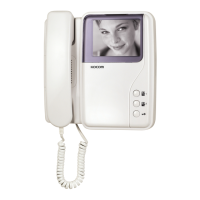
Monitor Controls: The KVM-624 monitor features a 4-inch flat monitor for clear viewing. It includes "Camera1" and "Camera2" buttons to view visitors from respective cameras without lifting the handset. A "Door Key" button facilitates automatic door opening. A "Brightness Control Knob" allows adjustment of the monitor screen's brightness, and a "Call Signal Volume Control Knob" manages the volume of the incoming call signal. The handset is used for two-way communication.

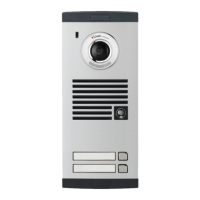
Door Camera Features: The door cameras (KC-D33 and KC-MB20) are equipped with a pinhole lens camera for capturing images, a C-Mic for audio input, and a speaker for audio output. A "Call Button" is present for visitors to initiate a call to the house. A "Power Lamp" indicates the ON/OFF status of the camera.

Important Technical Specifications

Monitor (KVM-624):

  • Power Source: Built-in AC 100V-240V~, offering free voltage operation.
  • Power Consumption: Max. 20W (Operating), 2W (Standby).
  • Ambient Temperature: 0℃ ~ 50℃.
  • Braun Tube: 4-inch Flat Tube (B/W) for display.
  • Communication System: Duplex handset conversation.
  • Call Signal Sound: Chime sound (Ding-dong).
  • Output Impedance: Picture: 75ohm, Voice: 600ohm.
  • Wiring: 7 Wired in polarity (Power1,2, GND, Voice1,2, Video1,2).
  • Max Wiring Distance:
    • Ø0.65 Single Cable: 50m.
    • 5C-2V Coaxial Cable: 100m.
  • Dimensions: 204(W) × 210(H) × 50(D)mm.
  • Clear and Bright Picture: Achieved at low light conditions.
  • Wide View Angle: Ensures a broader field of vision.

Camera (KC-D33 - Outdoor/Door):

  • Power Source: DC12V ± 1V (Power from Monitor).
  • Power Consumption: Max. 2.5W.
  • Assurance Temperature: -10℃ ~ 50℃.
  • Lens: F:2.0, f=3.0mm.
  • Min. Illumination: 0.1Lux (IR LED ON).
  • Dimensions: 87(W) × 121(H) × 33(D)mm.
  • Angle of Picture: Diagonal 90°.

Camera (KC-MB20 - Mini Metal Pinhole Camera):

  • Power Source: DC12V ± 1V (Power from Monitor).
  • Power Consumption: Max. 3.2W.
  • Assurance Temperature: -10℃ ~ 50℃.
  • Lens: Fixed.
  • Min. Illumination: 0.1Lux (IR LED ON).
  • Dimensions: 40(W) × 120(H) × 22(D)mm.
  • Angle of Picture: Diagonal 90°.

Door Opener: DC 8V~12V.

Usage Features

Installation Precautions:

  • Location: Both monitor and camera must be installed away from direct light and counter light. The camera should be installed in a rain-free location.
  • Monitor Height: Standard height for the monitor is 1,450mm ~ 1,500mm from the ground, centered around the braun tube.
  • Camera Height: Standard height for the door camera is 1,400mm ~ 1,450mm from the bottom of the camera to the floor. Care must be taken with camera height to ensure the lens angle covers the desired view.
  • Environmental Factors: Avoid installing in humid places, near heat sources (dresser, humidifier, heater), areas exposed to dust, metals, harmful gases (like hydrogen sulfide), water, chemicals, or strong magnetic fields (TV, speaker).
  • Wiring: Use designated wiring materials. Communication cables should be installed separately from power cables to prevent interference. The wiring for monitor-to-monitor communication is 7-wired, with specific cable types and maximum distances (e.g., TIV 0.65 for 50m, Coaxial cable for 100m). Door opener cable should be TIV 0.5 or above for a maximum of 10m.
  • Temperature: If installing during winter at temperatures below -5°C, allow 2 hours or more after installation before connecting to prevent condensation.
  • Pipe Sealing: Seal PVC pipes with adiabatic substances to prevent air circulation, which minimizes temperature differences and moisture/condensation on the door camera window.

Operation Guidelines:

  • Cleaning: Never use wet hands, volatile benzene, or paint thinner for cleaning. Regularly clean the camera window with soft cloths to maintain clear picture quality.
  • Handling: Avoid dropping the monitor or door camera and protect them from strong impacts.
  • Disassembly: Do not attempt to disassemble the device, as it contains electronic precision components and generates high voltage internally.

Maintenance Features

General Maintenance:

  • Cleaning: Regularly clean dust from inside the product. Failure to do so can cause fire. For internal inspection and cleaning, contact a local sales agent.
  • Power Disconnection: Always ensure the power plug is detached from the outlet or circuit breaker is turned off before putting hands inside the equipment.
  • Chemicals: Do not expose the product to benzene, thinner, hot water, or spray detergent directly onto it.
  • Moving Equipment: Always detach the plug from the outlet when moving the equipment.
  • Cable Connections: For equipment with cables connected to terminals, contact a local sales agent or qualified electrician.
  • Fuse Replacement: Use insulated tools or contact an A/S center when replacing fuses.

Troubleshooting (Cautions for Abnormality):

  • Broken Power Cable: If the power cable is broken (exposed core or short-circuit), replace it immediately with a new one to prevent fire and electric shock.
  • Abnormalities: If communication is unavailable, images are not displayed, calling is not possible, or abnormal sounds are heard, immediately detach the plug, turn off the circuit breaker, or remove batteries (if applicable). Then, request repairs from a sales agent or A/S center.
  • Foreign Substances: If foreign substances enter the equipment, immediately detach the plug, turn off the circuit breaker, or remove batteries (if applicable). Then, request repairs from a sales agent or A/S center.
  • Smoke or Smell: If smoke or an unknown smell emanates from the equipment, immediately detach the plug, turn off the circuit breaker, or remove batteries (if applicable). Ensure no more smoke or smell is present before requesting repair. Do not attempt personal repairs.
  • Physical Damage: If the equipment is dropped or its cabinet is broken, immediately detach the plug, turn off the circuit breaker, or remove batteries (if applicable). Then, request repairs from a sales agent or A/S center.
  • Storage: Avoid direct exposure to sunlight and store the equipment in a dust-free, low-temperature environment to prevent fire and electric shock.

Warranty: KOCOM provides a one-year free repair warranty from the date of purchase for product defects under proper use. However, the warranty does not cover breakdowns due to:

  • Damage during transport or careless treatment by the consumer.
  • Unauthorized repair or system modification.
  • Natural disasters or power disorders.

For after-sale service, users should have the product name, model number, problem description, and contact information ready.

KOCOM KVM-624 Specifications

General IconGeneral
BrandKOCOM
ModelKVM-624
CategoryIntercom System
LanguageEnglish

Related product manuals