EasyManua.ls Logo

KOCOM KVM-524RG - User Manual

KOCOM KVM-524RG
8 pages
Print Icon
To Next Page IconTo Next Page
Loading...
Thank you very much
for purchasing KOCOM
video doorphone.
please read this manual
thoroughly to ensure
correct usage, before
operating
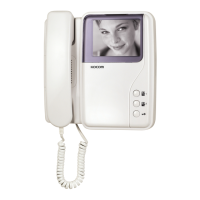
Monitor
KVM-524RG
4-wires In
polarity
or
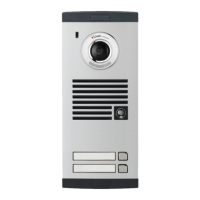
Camera
KC-D20
PRODUCT
MODEL
DATE PURCHASED
WARRANTY PERIOD
AGENCY ADDRESS
KOCOM Warranties the original purchaser of this product
as follows.
1) This product is produced under strict quality control and inspection procedures.
2) If this product breaks down during proper use as a result of product defect, KOCOM
will repair it within one year from date of purchase free of charge.
3) The following cases will be subject to charge, even during warranty period:
a. Breakdown during transport, or through careless treatment, by consumer.
b. Breakdown cause by unauthorized repair, or system modification.
c. Breakdown caused by natural disaster or power disorder.
Warranty
Warranty Card
KVM-524RG 04.08
To receive after-sales service, have the following
ready when you contact our branches
1. Name of the product
2. Model number of the product
3. The area of problem
4. Phone number and address at which you can be contacted.
VIDEO DOORPHONE
KVM-524RG Operating Installation Manual
Clear & Bright Picture at Low Light
CCIR/EIA: Images Recordable
4Flat Monitor / 4 Wired In Polarity
Easy Installation
Wide view angle
AC 110V or 220V (50Hz / 60Hz) Transformer type
Door release function
Additional 1 Monitor + 1 Camera + 2 Doorphone available
I
This manual is based on the date as shown in the right and specifications
are subject to change without notice for quality improvement.
"CAUTION: IT HAS POSSIBILITY TO HAPPEN
INOPERABLE, AS THIS PRODUCT
EXPOSED TO ELECTRON WAVE"
PLAY
AUTO
TIMES
REC
REC
Option
Camera
KC-B61
Question and Answer IconNeed help?

Do you have a question about the KOCOM KVM-524RG and is the answer not in the manual?

Summary

Warranty Information

Warranty Card Fields

Sections for entering product, model, purchase date, warranty period, and agency address.

KOCOM Warranty Policy

Details KOCOM's warranty terms, repair conditions, and exclusions for product defects.

General Safety Cautions

Warnings and Disposal Cautions

Safety warnings regarding product disposal, fire hazards, and explosion risks.

Installation Cautions

Precautions for safe and correct installation, including wiring and mounting.

Usage and Maintenance Cautions

Guidelines for safe operation, avoiding damage, and maintenance safety advice.

Continued Safety Cautions

Additional Usage Cautions

Further safety advice for product usage, handling wet hands, materials, and ventilation.

Abnormality Handling Cautions

Actions to take when detecting malfunctions, smoke, damage, or unusual conditions.

System Safety Instructions

General System Safety

General safety advice for electronic equipment, installation, and handling alien materials.

Product-Specific Safety

Safety precautions related to video phones, wiring, assembly, and cleaning for specific products.

Operation and Component Details

Operation Precautions

Advice on environmental conditions, handling, and avoiding disassembly for safe operation.

Installation Precautions

Guidelines for mounting monitor and camera, considering light, rain, cement, temperature, and heating.

Component Overview

Lists and diagrams of monitor, camera, and accessory components included with the system.

Product Specifications

Technical details for monitor and camera, including power, dimensions, and performance metrics.

Part Identification and Installation

KVM-524 RG Monitor Parts

Identifies and describes the functions of various buttons, lamps, and controls on the KVM-524RG monitor.

Door Camera Parts

Identifies and describes the components of the KC-D20 and KC-B61 door cameras.

Monitor Installation Guide

Instructions for basic monitor mounting, including wall hanger and standard height.

Door Camera Installation Guide

Guidance for installing the KC-D20 door camera, including surface mounting and height considerations.

Operating Instructions

Visitor Interaction and Door Opening

Steps for identifying, talking to, and granting access to visitors, and automatically opening the door.

Recording and Time Management

How to perform manual/auto recording, play back images, and set the system time and date.

Internal Communication Features

Guidance on using the intercom function between multiple monitors or doorphones.

Wiring Diagrams

Video Doorphone Wiring Diagram 1

Diagram illustrating the wiring connections for the video doorphone system with camera options.

Video Doorphone Wiring Diagram 2

Diagram showing wiring for the video doorphone system, including UTP cable recommendations.

Summary

Warranty Information

Warranty Card Fields

Sections for entering product, model, purchase date, warranty period, and agency address.

KOCOM Warranty Policy

Details KOCOM's warranty terms, repair conditions, and exclusions for product defects.

General Safety Cautions

Warnings and Disposal Cautions

Safety warnings regarding product disposal, fire hazards, and explosion risks.

Installation Cautions

Precautions for safe and correct installation, including wiring and mounting.

Usage and Maintenance Cautions

Guidelines for safe operation, avoiding damage, and maintenance safety advice.

Continued Safety Cautions

Additional Usage Cautions

Further safety advice for product usage, handling wet hands, materials, and ventilation.

Abnormality Handling Cautions

Actions to take when detecting malfunctions, smoke, damage, or unusual conditions.

System Safety Instructions

General System Safety

General safety advice for electronic equipment, installation, and handling alien materials.

Product-Specific Safety

Safety precautions related to video phones, wiring, assembly, and cleaning for specific products.

Operation and Component Details

Operation Precautions

Advice on environmental conditions, handling, and avoiding disassembly for safe operation.

Installation Precautions

Guidelines for mounting monitor and camera, considering light, rain, cement, temperature, and heating.

Component Overview

Lists and diagrams of monitor, camera, and accessory components included with the system.

Product Specifications

Technical details for monitor and camera, including power, dimensions, and performance metrics.

Part Identification and Installation

KVM-524 RG Monitor Parts

Identifies and describes the functions of various buttons, lamps, and controls on the KVM-524RG monitor.

Door Camera Parts

Identifies and describes the components of the KC-D20 and KC-B61 door cameras.

Monitor Installation Guide

Instructions for basic monitor mounting, including wall hanger and standard height.

Door Camera Installation Guide

Guidance for installing the KC-D20 door camera, including surface mounting and height considerations.

Operating Instructions

Visitor Interaction and Door Opening

Steps for identifying, talking to, and granting access to visitors, and automatically opening the door.

Recording and Time Management

How to perform manual/auto recording, play back images, and set the system time and date.

Internal Communication Features

Guidance on using the intercom function between multiple monitors or doorphones.

Wiring Diagrams

Video Doorphone Wiring Diagram 1

Diagram illustrating the wiring connections for the video doorphone system with camera options.

Video Doorphone Wiring Diagram 2

Diagram showing wiring for the video doorphone system, including UTP cable recommendations.

KOCOM KVM-524RG Specifications

General IconGeneral
BrandKOCOM
ModelKVM-524RG
CategoryIntercom System
LanguageEnglish

Related product manuals