6 www.kodak.com/go/support
Taking pictures/videos
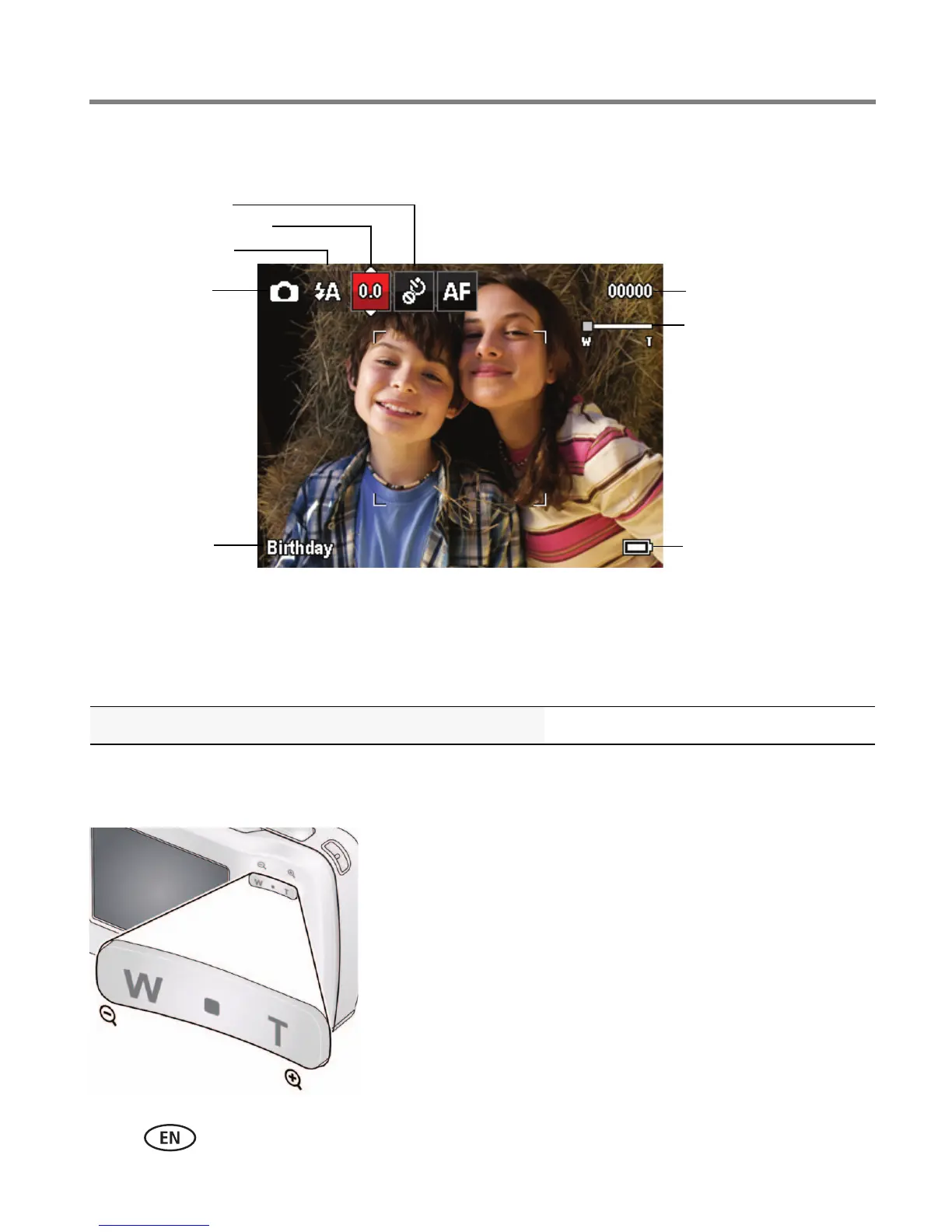
Understanding the picture-taking icons
Know when your batteries need attention
The battery level icon appears when the battery requires your attention. (If you’re
viewing shortcuts, the battery level is always displayed. See page 10.)
Using the digital zoom
1 Use the LCD to frame your subject.
2 To zoom in, press Telephoto (T).
To zoom out, press Wide Angle (W).
The zoom slider shows the zoom level on the LCD.
3 Take the picture.
NOTE: You may notice decreased image quality when using digital
zoom.
Purchase extra batteries for your special event www.kodak.com/go/c122accessories
Battery level
Capture mode
Pictures/time remaining
Zoom slider
Keyword tag
Self timer
Flash mode
Exposure compensation








 To Next Page