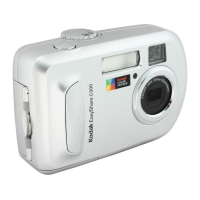
How to fix Kodak Digital Camera that does not turn on?
K
Kathy MorrisAug 20, 2025
If your Kodak Digital Camera does not turn on, first remove the battery and check if it is the correct type, then reinsert it. If that doesn't work, try inserting a new or charged battery. Alternatively, connect the camera to a Kodak 3-volt AC adapter (sold separately) and try again.
M
Monica HayesAug 22, 2025
Why Ready light does not turn on and the Kodak Digital Camera does not work?
D
Debra WatkinsAug 22, 2025
If the ready light on your Kodak Digital Camera doesn't turn on and the camera isn't working, first ensure the camera is turned on. Then, recharge the battery or install a new one. If the mode dial was on when reloading the battery, turn the mode dial off, then back on.
J
johnsontylerAug 25, 2025
Why my computer does not communicate with the Kodak EasyShare CD43?
C
Christopher Murphy MDAug 25, 2025
To ensure your computer communicates with the Kodak Digital Camera, insert a charged battery and turn on the camera. Make sure the USB cable is securely connected to both the camera and the computer. If using an EasyShare dock, check all cable connections and ensure the camera is properly seated on the dock. Finally, verify that the EasyShare software is installed.
J
Juan QuinnAug 26, 2025
Why is my Kodak Digital Camera picture not clear?
A
Alicia StanleyAug 26, 2025
To ensure proper exposure and focus, press the shutter button halfway until the ready light turns green. Then, fully depress the shutter button to capture the picture. Also, ensure the lens is clean and that you're not in Close-up mode if you are more than 27.6 inches (70 cm) away from your subject. For best results, especially with high zoom or in low light, stabilize the camera on a flat surface or use a tripod.
J
James DayAug 27, 2025
Why is my Kodak EasyShare CD43 Digital Camera picture too dark?
J
Jacob FischerAug 28, 2025
To fix a picture that's too dark, try repositioning the Kodak camera for better lighting, use Fill flash, or adjust your position to avoid having the light behind your subject. Ensure you're within the flash's effective range. You can also press the shutter button halfway to set exposure and focus before fully pressing it. Adjusting the exposure compensation may also help.
K
Karen WalkerAug 29, 2025
Why is my Kodak EasyShare CD43 picture too light?
T
toddjohnAug 29, 2025
To correct an overly bright picture, reposition the Kodak camera to reduce available light, turn off the flash, and ensure you are within the flash's effective range. Press the shutter button halfway to set exposure and focus before fully pressing it. Using Auto, Landscape, or Close-up modes can also help adjust the exposure compensation.
A
Amanda OlsonAug 31, 2025
What to do if Kodak EasyShare CD43 Digital Camera storage location is full?
J
Johnny SmithAug 31, 2025
If your Kodak Digital Camera's storage is full, transfer pictures to your computer. Alternatively, delete pictures from the memory card or insert a new one. You can also change the image storage location to the internal memory.
A
Amanda ThompsonSep 2, 2025
What to do if Kodak EasyShare CD43 lens does not extend?
J
Jacqueline BarnesSep 2, 2025
If your Kodak Digital Camera lens isn't extending or retracting, ensure the battery is charged. If that doesn't work, try turning the camera off and then on again, keeping in mind that the lens won't extend in Favorites mode.
T
thomascalvinSep 4, 2025
Why I cannot take a picture with my Kodak EasyShare CD43?
G
Gabrielle MoralesSep 4, 2025
If you can't take a picture with your Kodak Digital Camera, turn the camera off and then on again, making sure it is not in Favorites mode. Fully depress the shutter button. Also, ensure you have a new or charged battery and wait until the Ready light glows green before taking another picture. If the memory is full, transfer pictures to your computer, delete pictures from the camera, change the image storage location, or insert a new card.
B
Brandon CarrSep 6, 2025
What to do if Kodak EasyShare CD43 Digital Camera displays a blue or black screen in Review?
L
Laura AlvarezSep 6, 2025
If a blue or black screen appears instead of a picture in Review mode on your Kodak Digital Camera, try transferring the picture to your computer. You can also transfer all pictures to the computer. Then, try taking another picture. If the problem persists, try using the internal memory or another memory card.