Transferring and printing pictures
www.kodak.com/go/support
15
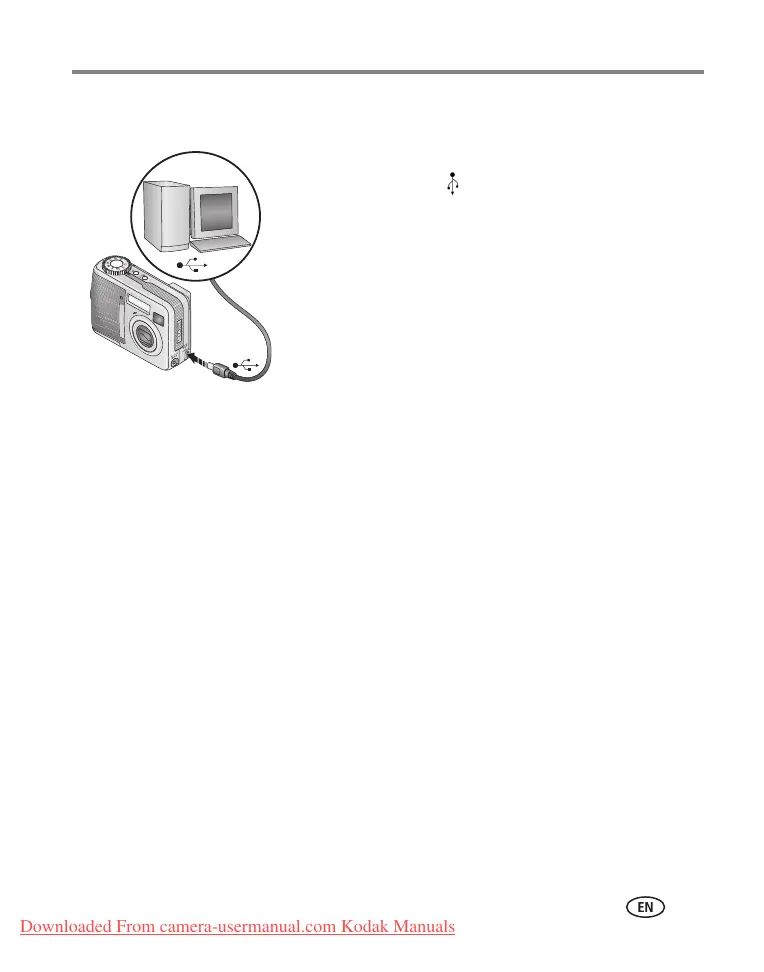
Transferring pictures with the USB cable
1 Turn off the camera.
2 Plug the labeled end of the USB cable into the
labeled USB port on your computer. See your
computer user’s guide for details.
3 Plug the other end of the USB cable into the labeled
USB port on the camera.
4 Turn on the camera.
Kodak EasyShare software opens on your computer.
The software prompts you through the transfer
process.
NOTE: Visit
www.kodak.com/go/howto
for an online tutorial on connecting.
Also available for transferring
You can also use these Kodak products to transfer your pictures and videos.
■ Kodak EasyShare camera dock, Kodak EasyShare printer dock (see page 19)
■ Kodak 8-in-1 card reader
Purchase these and other accessories at a dealer of Kodak products or
www.kodak.com/go/cd43accessories.
Downloaded From camera-usermanual.com Kodak Manuals






 To Next Page