EasyManua.ls Logo

Kodak KB28 - User Manual

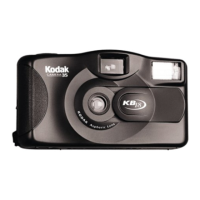
Kodak KB28
66 pages
Print Icon
To Next Page IconTo Next Page
Loading...
Kodak
KB28
Camera
ENGLISH/ESPAÑOL/FRANÇAIS

Questions and Answers

  • C
    Christine StoutJul 30, 2025
    Why my Kodak KB28 will not operate?
    • D
      Darlene HernandezJul 30, 2025
      If your Kodak Digital Camera isn't turning on, there are several potential reasons. First, make sure the lens cover is fully opened. Next, check the batteries; they might be dead or not correctly inserted. Replace them, ensuring they match the diagram on the battery door. Also, the flash might not be ready; wait for the flash-ready light to illuminate. Finally, the film might not be loaded properly or needs to be rewound/removed.
  • J
    Jeffrey BuckleyAug 9, 2025
    What to do if flash-ready light fails to glow on Kodak Digital Camera?
    • M
      Michael HuffmanAug 10, 2025
      If the flash-ready light on your Kodak Digital Camera isn't glowing after 30 seconds, try these steps: Ensure the lens cover is fully open. Weak or dead batteries can cause this issue, so replace them with two fresh AAA-size alkaline batteries, inserting them as shown on the battery door. Also, make sure film is loaded in the camera.
  • K
    kristinaspencerAug 19, 2025
    How to fix shutter button if it cannot be released on Kodak KB28?
    • S
      Scott BennettAug 19, 2025
      If you can't press the shutter button on your Kodak Digital Camera, the lens cover might be closed. Open the lens cover and try again.

Summary

Camera Identification

Shutter Button

Identifies the primary control for capturing an image.

Lens

Identifies the optical component for image capture.

Flash

Identifies the built-in lighting unit for photography.

Battery Door

Indicates the access point for the camera's power source.

Loading the Batteries

Loading the Film

Prepare Film Loading

Open the film door and prepare for film insertion.

Taking Pictures

Taking Flash Pictures

Unloading the Film

Troubleshooting

Camera Not Operating

Addresses issues like lens cover closed or dead batteries.

Kodak KB28 Specifications

General IconGeneral
BrandKodak
ModelKB28
CategoryDigital Camera
LanguageEnglish

Related product manuals