EasyManua.ls Logo

Kodiak K-5KTRB-8 - User Manual

Default Icon
2 pages
Print Icon
To Next Page IconTo Next Page
Loading...
27519 - K-5KTRB-8 Kodiak 5K Flashlight Operating Instructions & Precautions 05242301
Charging: This product is rechargeable. Please charge fully before first use to ensure optimal
performance. Pull up the rubber port cover. Connect the full sized USB plug of the included
charging cable to a USB power source such as a power cube, computer or car adapter and the
USB-C plug into the charging port. A flashing red power button indicates charging is in progress.
Charging is complete when the power button is solid green. DO NOT USE THE FLASHLIGHT
WHILE IT IS CHARGING!
LOCK OUT PROTECTION: This flashlight automatically locks after 2 minutes of non-use!
Double click the power button to unlock the flashlight. The light blinks twice to confirm it is
unlocked. Click again to select your desired brightness mode. Double clicking the power
button also manually locks the flashlight, preventing accidental activation. The light blinks
twice to confirm it is locked. For safety reasons, store the flashlight in locked mode & remove
batteries.
Flashlight Operation (Unlocked):
Repeatedly pressing the power button cycles through high, medium, and low brightness modes
plus off. Long pressing the power button in any mode activates the turbo brightness mode. If
turbo is activated from one of the standard brightness modes, the flashlight automatically
reverts to the previously selected mode after 30 seconds. Turbo may also be accessed from the
off mode if the light is unlocked. It automatically reverts to off after 30 seconds.
To adjust the beam size, hold the body of the flashlight stationary while twisting the head
clockwise or counterclockwise.
Charging a Smartphone: Pull up the rubber port cover. Using your own phone charging cable,
connect the full sized USB plug into the flashlight’s USB power bank port. Connect the other
end to your device. NOTE: Charging a smartphone reduces the overall runtime of the flashlight.
Replace the port cover when finished.
Battery Replacement: Please contact the manufacturer for information on rechargeable
battery replacement.
Caution: Due to high light output, certain areas of this flashlight may become hot while in use.
Avoid touching the area where the “HOT” symbol is visible.
Caution: Lithium batteries can explode or cause burns if shorted, overheated, disassembled,
recharged or exposed to fire or high temperature (above 212°). If the flashlight is turned on
while in a container or in clothing, the flashlight can overheat, damage the flashlight and/or
cause surrounding material to ignite.
Question and Answer IconNeed help?

Do you have a question about the Kodiak K-5KTRB-8 and is the answer not in the manual?

Summary

Flashlight Charging

Charging the Flashlight

Charge fully before first use. Connect USB-C to charging port. Flashing red indicates charging, solid green means complete.

Charging a Smartphone

Use flashlight's USB power bank port with your cable. Note: reduces flashlight runtime.

Flashlight Operation

Lock Out Protection

Automatically locks after 2 mins of non-use. Double-click to unlock/lock. Light blinks twice to confirm status.

Brightness Modes

Cycle through high, medium, low, and off by pressing. Long press for turbo mode.

Beam Adjustment

Adjust beam size by twisting the head clockwise or counterclockwise.

Maintenance and Safety

Battery Replacement

Contact the manufacturer for rechargeable battery replacement information.

Heat and Battery Cautions

Flashlight parts can get hot. Handle with care. Lithium batteries have explosion/burn risks if mishandled.

General Precautions

Eye Safety

Do not stare into light, shine into eyes, or use with extra lenses to prevent injury.

Product Use

This product is not a toy. Use as intended and inspect for damage before use.

Storage Instructions

Remove battery for extended storage. Screw cap back on tightly.

Summary

Flashlight Charging

Charging the Flashlight

Charge fully before first use. Connect USB-C to charging port. Flashing red indicates charging, solid green means complete.

Charging a Smartphone

Use flashlight's USB power bank port with your cable. Note: reduces flashlight runtime.

Flashlight Operation

Lock Out Protection

Automatically locks after 2 mins of non-use. Double-click to unlock/lock. Light blinks twice to confirm status.

Brightness Modes

Cycle through high, medium, low, and off by pressing. Long press for turbo mode.

Beam Adjustment

Adjust beam size by twisting the head clockwise or counterclockwise.

Maintenance and Safety

Battery Replacement

Contact the manufacturer for rechargeable battery replacement information.

Heat and Battery Cautions

Flashlight parts can get hot. Handle with care. Lithium batteries have explosion/burn risks if mishandled.

General Precautions

Eye Safety

Do not stare into light, shine into eyes, or use with extra lenses to prevent injury.

Product Use

This product is not a toy. Use as intended and inspect for damage before use.

Storage Instructions

Remove battery for extended storage. Screw cap back on tightly.

Overview

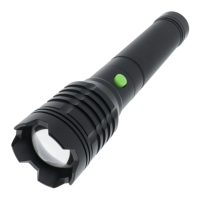
The Kodiak 5K Flashlight (model 27519 - K-5KTRB-8) is a rechargeable, multi-mode flashlight designed for various illumination needs and includes a power bank function for charging smartphones.

Function Description:

The primary function of the Kodiak 5K Flashlight is to provide illumination through multiple brightness modes: high, medium, low, and a turbo brightness mode. It features a zoomable beam, allowing users to adjust the beam size by twisting the flashlight head. Beyond illumination, the flashlight doubles as a power bank, capable of charging smartphones via its USB power bank port.

Important Technical Specifications:

  • Model: 27519 - K-5KTRB-8
  • Power Source: Rechargeable battery.
  • Charging Interface: USB-C input for charging the flashlight.
  • Power Bank Output: Full-sized USB port for charging external devices.
  • Charging Indicator: Flashing red power button indicates charging; solid green indicates charging complete.
  • Lock Out Protection: Automatic lock after 2 minutes of non-use; manual lock/unlock via double-clicking the power button.
  • Brightness Modes: High, Medium, Low, Turbo.
  • Beam Adjustment: Twist-head mechanism for adjusting beam size.

Usage Features:

  • Charging the Flashlight: To charge, pull up the rubber port cover, connect the included charging cable's full-sized USB plug to a power source (e.g., power cube, computer, car adapter), and the USB-C plug into the flashlight's charging port. The power button will flash red during charging and turn solid green when fully charged. Important: Do not use the flashlight while it is charging.
  • Unlocking the Flashlight: If the flashlight is locked (which happens automatically after 2 minutes of non-use or manually), double-click the power button. The light will blink twice to confirm it is unlocked.
  • Operating the Flashlight (Unlocked):
    • Brightness Modes: Repeatedly pressing the power button cycles through high, medium, low, and off.
    • Turbo Mode: Long-pressing the power button in any mode (including off, once unlocked) activates the turbo brightness mode. If activated from a standard brightness mode, the flashlight reverts to the previously selected mode after 30 seconds. If activated from off, it reverts to off after 30 seconds.
    • Adjusting Beam Size: Hold the flashlight body stationary and twist the head clockwise or counterclockwise to adjust the beam.
  • Locking the Flashlight: Double-clicking the power button manually locks the flashlight. The light will blink twice to confirm it is locked. For safety, it is recommended to store the flashlight in locked mode and remove batteries.
  • Charging a Smartphone: Pull up the rubber port cover. Connect your phone's charging cable to the flashlight's full-sized USB power bank port and the other end to your smartphone. Note: Charging a smartphone will reduce the flashlight's runtime. Remember to replace the port cover when finished.
  • Safety Precautions:
    • Heat Warning: Due to high light output, certain areas of the flashlight may become hot during use. Avoid touching areas marked with the "HOT" symbol.
    • Eye Safety: Do not stare directly into the light, shine it into eyes, or focus the beam with an additional lens, as this can cause serious injury, including temporary or permanent loss of sight.
    • Children: Keep away from infants and toddlers, as this product contains small parts and is not a toy.
    • Overheating Risk: If the flashlight is turned on while in a container or clothing, it can overheat, potentially damaging the flashlight or igniting surrounding material.

Maintenance Features:

  • Initial Charge: Charge the flashlight fully before first use to ensure optimal performance.
  • Battery Replacement: For information on rechargeable battery replacement, users should contact the manufacturer.
  • Storage: For extended periods of non-use, it is recommended to remove the rechargeable battery. To do this, unscrew the battery compartment cap at the bottom, remove the battery, and screw the cap back on. When ready to use again, unscrew the cap, insert the battery with the positive (raised) end first, and screw the cap back on tightly.
  • Inspection: Inspect the flashlight before every use. Do not use if any parts are damaged, loose, or missing.
  • Lithium Battery Caution: Lithium batteries can explode or cause burns if shorted, overheated, disassembled, recharged improperly, or exposed to fire or high temperatures (above 212°F).

Kodiak K-5KTRB-8 Specifications

General IconGeneral
BrandKodiak
ModelK-5KTRB-8
CategoryFlashlight
LanguageEnglish

Related product manuals