
 Need help?
Do you have a question about the Kohler Decision-Maker 3500 and is the answer not in the manual?
Specific to engine/alternator, preprogrammed in original controller. Backup disk available.
Installation-specific timer values, setpoints, generator data. Recorded on disk or form.
Observe precautions for accidental starting, hazardous voltage, moving parts, grounding, and short circuits.
Retrieve parameters from backup disk, paper form, or controller menu.
Press OFF/RESET, disconnect battery charger and battery cables.
Remove junction box panels, controller screws, and disconnect harness connectors.
Reconnect electrical connections, align controller, install screws, and replace panels.
Reconnect generator set engine starting battery and battery charger.
Load personality profile and user parameters using PC and SiteTech™ software.
Start, test, and stop the generator set. Reconnect to load and set AUTO mode.
The Decision-Maker® 3500 Controller is a sophisticated control unit designed for use with 33-150 kW Kohler generator sets, particularly in marine applications. Its primary function is to manage and monitor the operation of the generator set, ensuring reliable performance and providing comprehensive control to the user. This controller acts as the central brain of the generator system, integrating various inputs and outputs to regulate engine and alternator functions, respond to system demands, and provide critical status information.
The core function of the Decision-Maker® 3500 Controller is to provide automated and manual control over the generator set. This includes starting and stopping the engine, regulating voltage and frequency, and managing various protective functions. The controller continuously monitors critical parameters such as engine speed, oil pressure, coolant temperature, battery voltage, and generator output (voltage, current, frequency). If any parameter deviates from its normal operating range or exceeds predefined limits, the controller can initiate alarms, warnings, or even shut down the generator set to prevent damage.
Beyond basic control, the controller also handles more advanced functions. It can manage paralleling operations, allowing multiple generator sets to work together to meet larger load demands or provide redundancy. It also incorporates features for load management, ensuring that the generator set operates efficiently and within its capacity. The controller's internal software, known as the "application program," dictates its operational logic and how it interacts with the generator set components. This program is preprogrammed at the factory and is essential for the controller's functionality.
Another crucial aspect of its function is the "personality profile." This profile is specific to the engine and alternator configuration of a particular generator set. It contains data that tailors the controller's operation to the unique characteristics of the connected hardware, ensuring optimal performance and compatibility. Without the correct personality profile, the controller cannot effectively manage the generator set.
The controller also stores "user parameters," which are customizable settings unique to each installation. These include timer values for various operations (e.g., cool-down timers), setpoints for voltage and frequency regulation, and selections for input/output configurations. These parameters allow the installer or operator to fine-tune the generator set's behavior to meet specific site requirements and operational preferences.
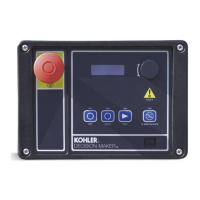
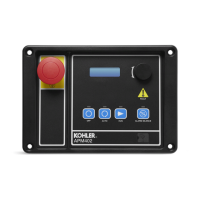
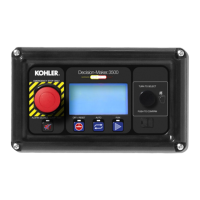
The Decision-Maker® 3500 Controller is designed for user-friendly interaction, offering both manual control and automated operation. The front panel of the controller features a user interface with a display and navigation buttons, allowing operators to access menus, view system status, and make adjustments. The "TURN TO SELECT" and "PUSH TO CONFIRM" mechanism simplifies menu navigation. An "ALARM SILENCE/LAMP TEST" button is provided for quick acknowledgment of alarms and testing of indicator lamps.
For emergency situations, an "EMERGENCY STOP ONLY" button is prominently located, providing an immediate shutdown of the generator set. The controller supports various operational modes, including OFF/RESET, RUN, and AUTO. The OFF/RESET button is used to shut down the generator set and clear any active faults. The RUN button initiates manual starting of the generator set, while the AUTO button enables automatic startup in response to a remote transfer switch or start/stop signal.
The controller's ability to store and manage user parameters is a key usage feature, allowing for customization to suit diverse applications. These parameters can be accessed and modified through the controller's menu displays or, more efficiently, via SiteTech™ software on a connected PC. This flexibility ensures that the generator set can be optimized for specific load requirements, environmental conditions, and operational policies.
Connectivity options enhance the controller's usability. A mini USB connection port is available for connecting a PC, enabling the use of SiteTech™ software for configuration, diagnostics, and data management. This allows for easy loading of personality profiles, application programs, and user parameters, as well as creating backups. The controller also features various harness connectors (P1, P2, P3, P4) for interfacing with the engine, generator, sensors, relays, and network communication lines, facilitating comprehensive integration into the generator system.
The Decision-Maker® 3500 Controller incorporates several features that simplify maintenance and troubleshooting. The ability to replace the controller as a service kit (GM92086) highlights its modular design, allowing for efficient repair or upgrade without replacing the entire generator set. When a replacement controller is installed, the process involves transferring critical data—the application program, personality profile, and user parameters—to the new unit.
The availability of backup disks for the personality profile and application program is a crucial maintenance feature. These disks, typically supplied with the generator set, provide a means to restore the controller's essential software in case of a controller failure or replacement. This minimizes downtime and ensures that the generator set can be quickly brought back into service with the correct configuration.
For user parameters, multiple backup methods are supported, including backup disks/files, paper forms, or manual recording from the controller's menu displays. This redundancy ensures that critical site-specific settings are not lost during controller replacement or system reconfiguration. The SiteTech™ software plays a vital role in maintenance, allowing technicians to load, save, and modify these parameters, as well as create new user parameter data backups.
The USB connection and compatibility with SiteTech™ software facilitate diagnostic procedures. Technicians can connect a PC to the controller to access detailed operational data, fault logs, and system status, aiding in the identification and resolution of issues. This software-based approach streamlines troubleshooting and reduces the need for extensive manual checks.
Calibration is another important maintenance aspect supported by the controller. After installation or significant configuration changes, the generator set can be calibrated using instructions found in the Decision-Maker® 3500 Operation Manual. This ensures that the controller's measurements and control outputs are accurate, maintaining optimal performance and reliability of the generator set. The modular design, comprehensive data backup options, and software-aided diagnostics collectively contribute to the maintainability of the Decision-Maker® 3500 Controller.
 General
| Voltage | 120/240V |
|---|---|
| Fuel Type | Gasoline |
| Battery | 12V |
| Phase | Single |
| Amperage | 29.2A (120V), 14.6A (240V) |
| Starting System | Electric |


 To Next Page