Feature Setup or Changes
Clock
Press the [Wake Up] button.
Press the ″Menu″ icon and press the up or down arrow until [Clock set] is displayed.
Press the right arrow. Select [12H] or [24H] for the display style using the up or down arrows.
Press the right arrow and adjust the hour using the up and down arrows. The hours will also
change the [am] or [pm] setting.
Press the right arrow and adjust the minutes using the up or down arrows.
Press the ″Menu″ icon to save the setting.
Auto-flush
Press the [Wake Up] button.
Press the ″Menu″ icon and press the up or down arrow until [Auto-flush] is displayed.
Press the right arrow, and change the setting to [Auto-flush:on] or [Auto-flush:off] using the up or
down arrows.
Press the ″Menu″ icon to save the setting.
Power Save
NOTE: Power save mode deactivates the heated seat. When the toilet is in power save mode the indicator
light in the sensing window appears red.
Press the [Wake Up] button.
Press the ″Menu″ icon and press the up or down arrow until you find [Power save].
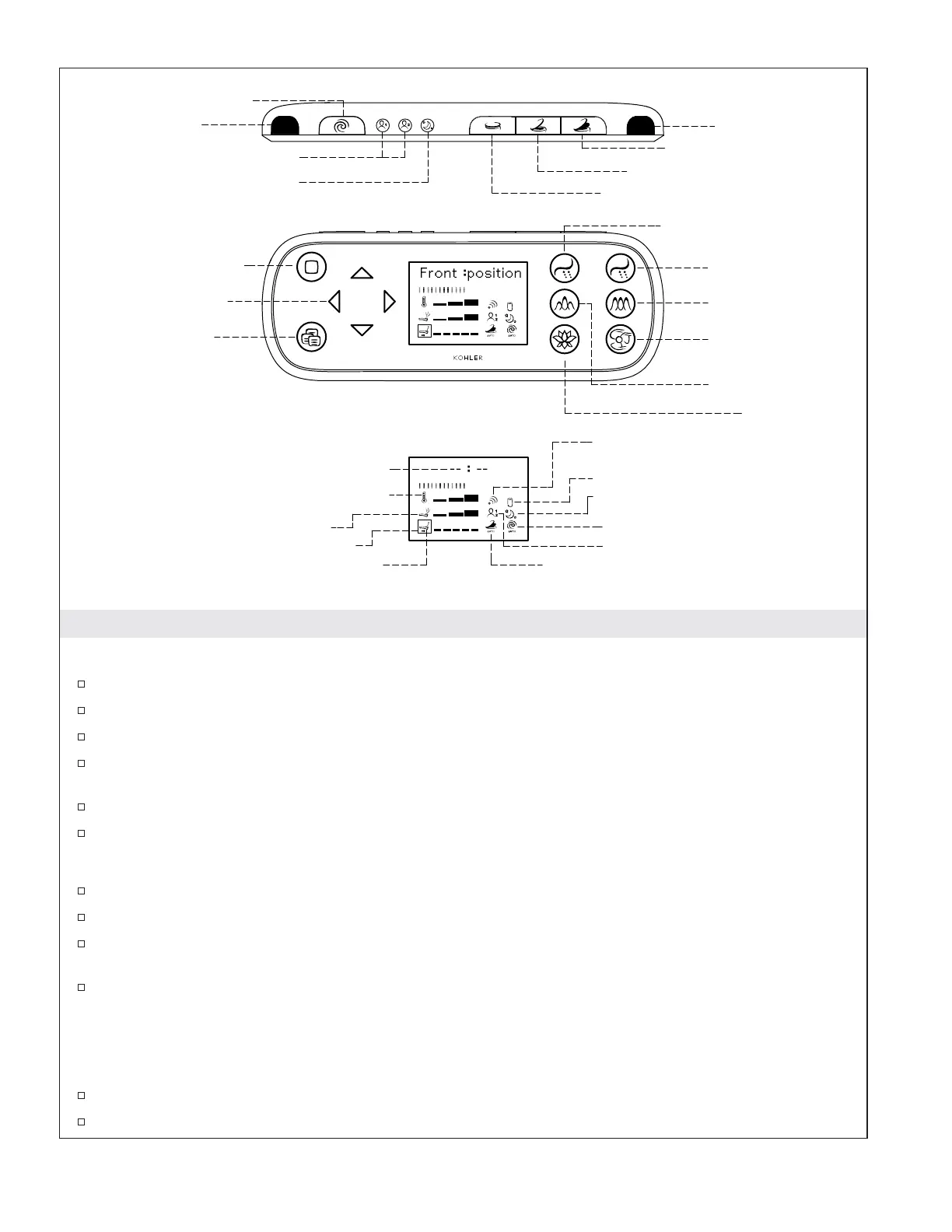
Pressure
Temperature
Wand Position
Time Display
Auto Open/Close
Power Save
Auto Flush
Preset
Battery Low Display
Infrared Sending Indication
Pulsate
Deodorizer
Dryer
Oscillate
Rear Wash
Front Wash
Menu
Selection Adjustment
Arrows
Stop
Preset 1 & 2
Seat Cover Close
Wake Up
Seat and Seat Cover Open
Seat Cover Open / Seat Close
Manual Flush
Menu
Stop
Front Rear
OscillatePulsate
DryerDeodorizer
Selection Box
Signal Window
Signal Window
1221754-5-C 6 Kohler Co.


 To Next Page
 Loading...