1
1
KOHLER KD-7 Copy
2
3
3
4
4
Songs (MIDI files and audio files) can be copied from different sources to Libraries and Albums.
HOW TO COPY A SONG ?
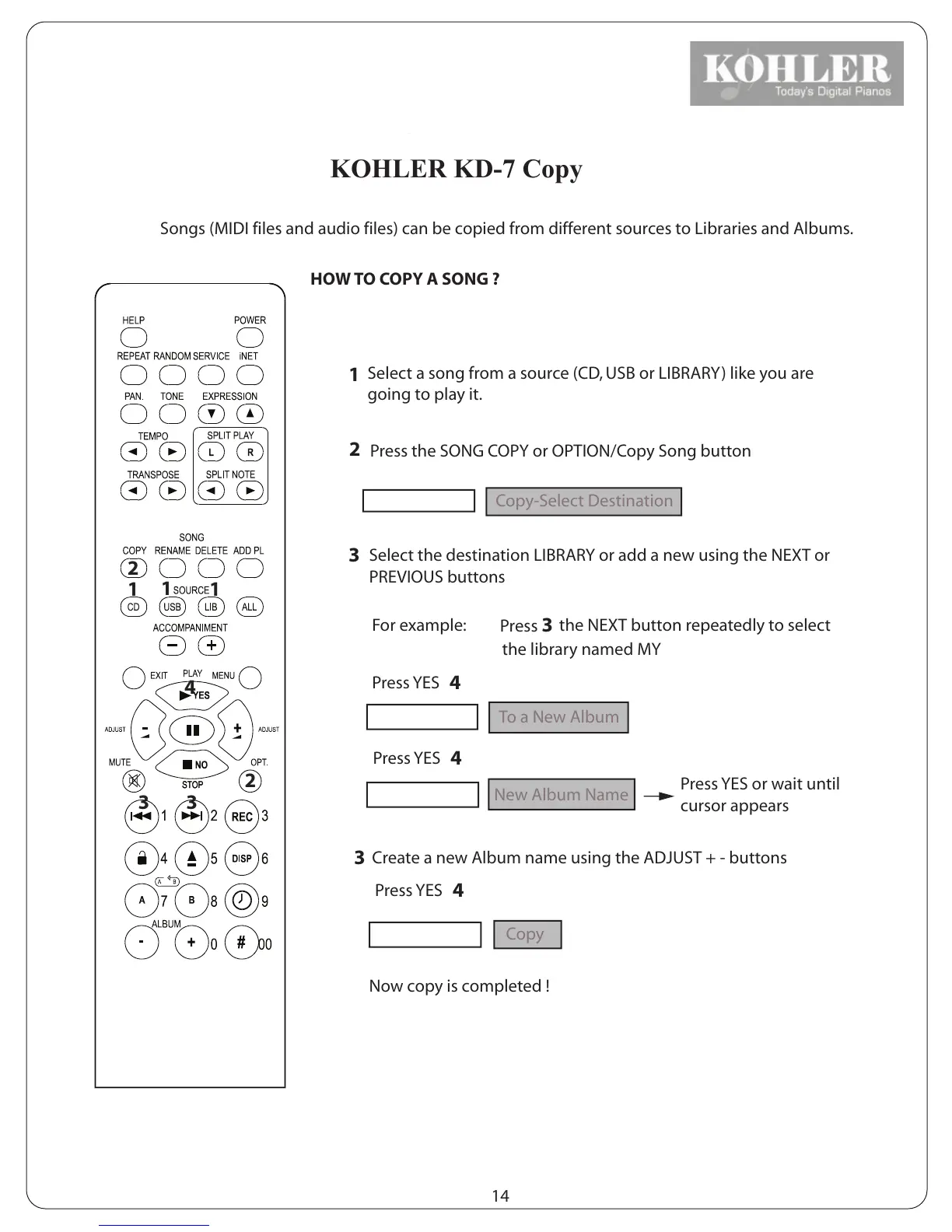
1
1
1
Select a song from a source (CD, USB or LIBRARY) like you are
going to play it.
2
2
Press the SONG COPY or OPTION/Copy Song button
3
Select the destination LIBRARY or add a new using the NEXT or
PREVIOUS buttons
Display reads:
Copy-Select Destination
For example:
Press 3
the NEXT button repeatedly to select
the library named MY
Press YES
4
Display reads:
To a New Album
Press YES
4
Display reads:
New Album Name
3
Create a new Album name using the ADJUST + - buttons
Press YES or wait until
cursor appears
Press YES
4
Display reads:
Copy
Now copy is completed !
14
KOHLER



 To Next Page