THE SOURCE BUTTONS
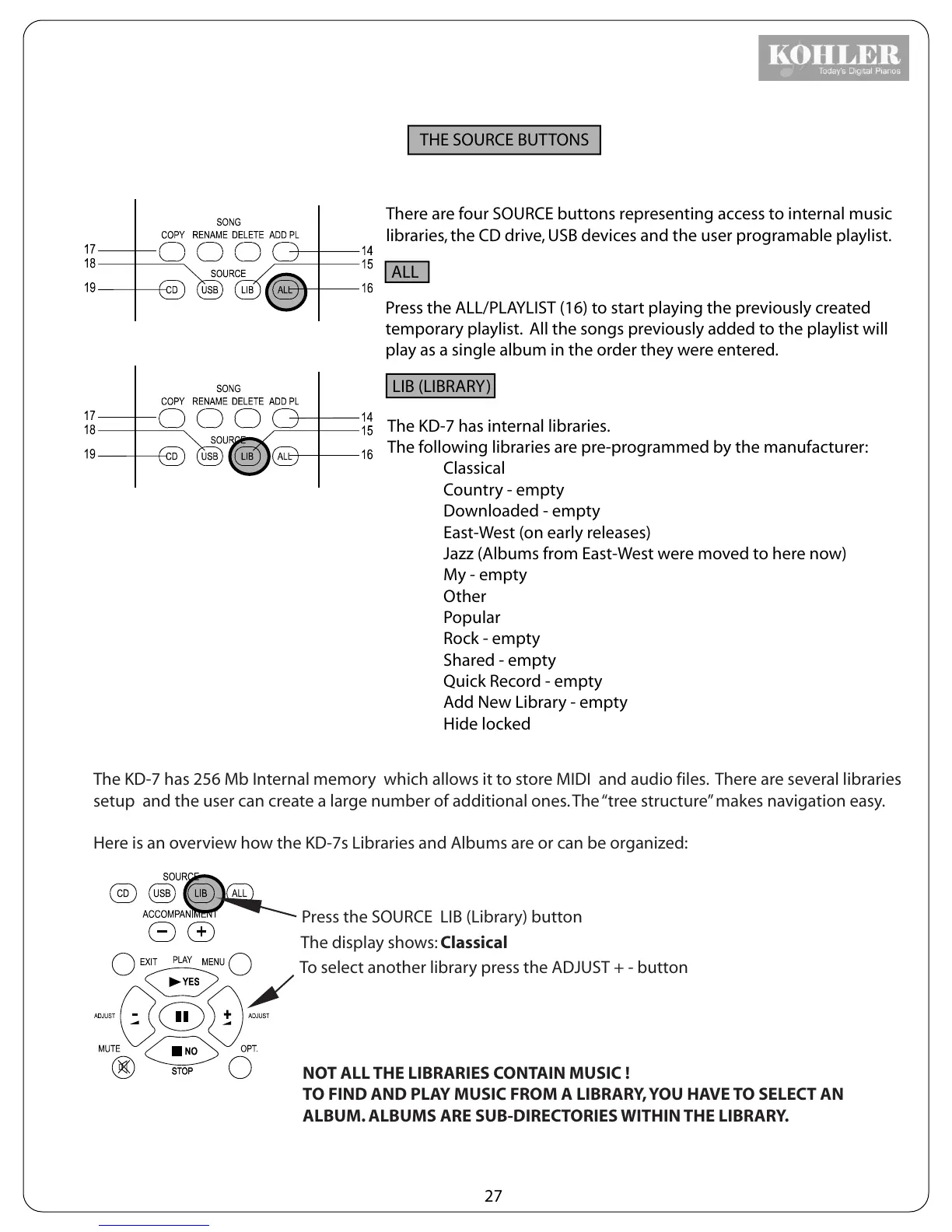
There are four SOURCE buttons representing access to internal music
libraries, the CD drive, USB devices and the user programable playlist.
ALL
Press the ALL/PLAYLIST (16) to start playing the previously created
temporary playlist. All the songs previously added to the playlist will
play as a single album in the order they were entered.
LIB (LIBRARY)
The KD-7 has internal libraries.
The following libraries are pre-programmed by the manufacturer:
Classical
Country - empty
Downloaded - empty
East-West (on early releases)
Jazz (Albums from East-West were moved to here now)
My - empty
Other
Popular
Rock - empty
Shared - empty
Quick Record - empty
Add New Library - empty
Hide locked
1
4
The KD-7 has 256 Mb Internal memory which allows it to store MIDI and audio files. There are several libraries
setup and the user can create a large number of additional ones. The “tree structure” makes navigation easy.
Here is an overview how the KD-7s Libraries and Albums are or can be organized:
Press the SOURCE LIB (Library) button
The display shows: Classical
To select another library press the ADJUST + - button
NOT ALL THE LIBRARIES CONTAIN MUSIC !
TO FIND AND PLAY MUSIC FROM A LIBRARY, YOU HAVE TO SELECT AN
ALBUM. ALBUMS ARE SUB-DIRECTORIES WITHIN THE LIBRARY.
27



 To Next Page