HOW TO ADJUST THE VOLUME AND BALANCE
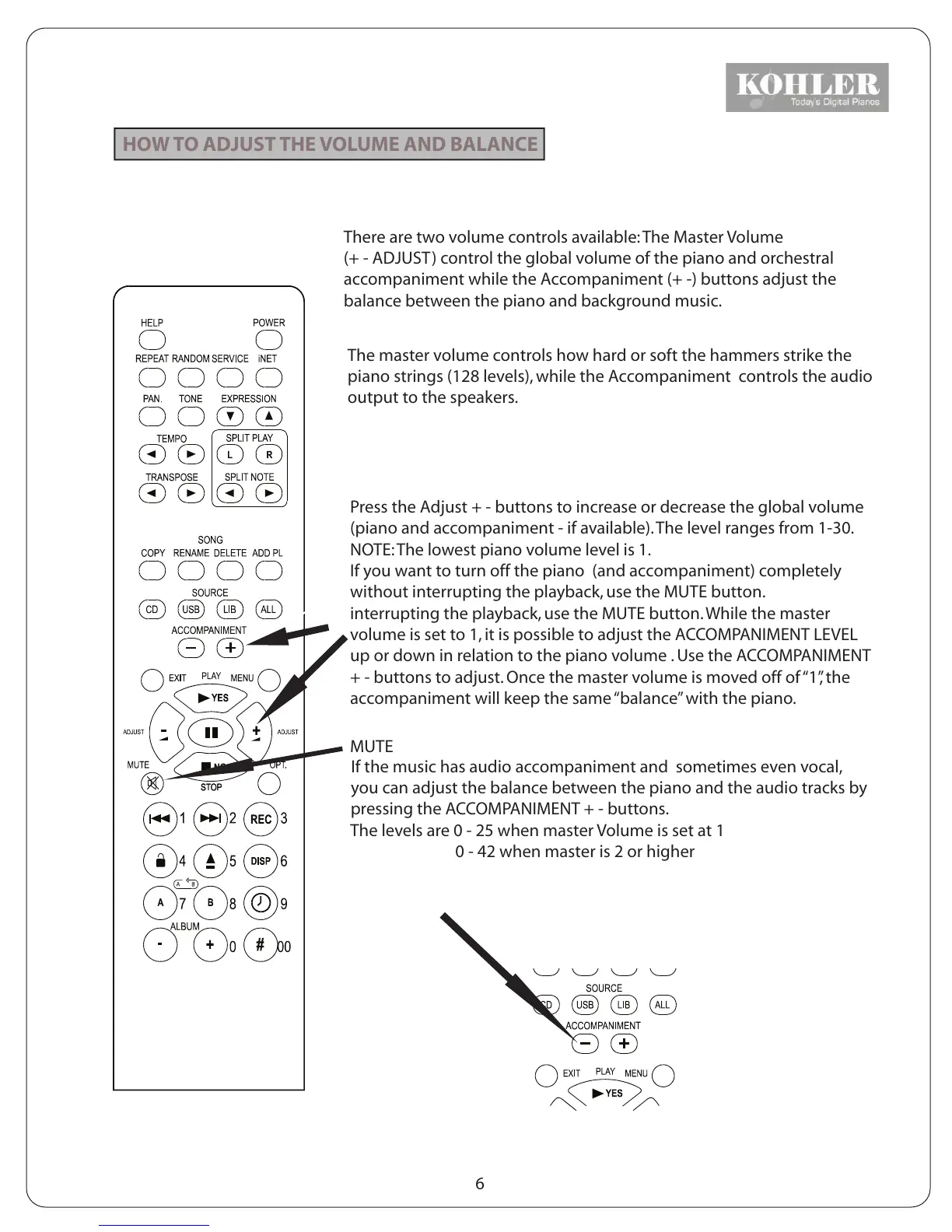
There are two volume controls available: The Master Volume
(+ - ADJUST) control the global volume of the piano and orchestral
accompaniment while the Accompaniment (+ -) buttons adjust the
balance between the piano and background music.
The master volume controls how hard or soft the hammers strike the
piano strings (128 levels), while the Accompaniment controls the audio
output to the speakers.
Press the Adjust + - buttons to increase or decrease the global volume
(piano and accompaniment - if available). The level ranges from 1-30.
NOTE: The lowest piano volume level is 1.
If you want to turn off the piano (and accompaniment) completely
without interrupting the playback, use the MUTE button.
interrupting the playback, use the MUTE button. While the master
volume is set to 1, it is possible to adjust the ACCOMPANIMENT LEVEL
up or down in relation to the piano volume . Use the ACCOMPANIMENT
+ - buttons to adjust. Once the master volume is moved off of “1”, the
accompaniment will keep the same “balance” with the piano.
MUTE
If the music has audio accompaniment and sometimes even vocal,
you can adjust the balance between the piano and the audio tracks by
pressing the ACCOMPANIMENT + - buttons.
The levels are 0 - 25 when master Volume is set at 1
0 - 42 when master is 2 or higher
6
KOHLER



 To Next Page