SR: Susutain Release - controls the return of the solenoid and the damper rail. Lower value allows the
dampers to return faster, higher value helps reducing mechanical noise. Default setting is 32.
The ADJUST + and - buttons change the value and the Forward and Rewind buttons activate the
sonenoid to monitor and adjust the damper rail return to the optimal setting.
SD: Sustain Release Delay - adjusts the time delay before force is applied to the pedal solenoid.
This setting has significant effect on lowering the sustain pedal noise. Default and typical
setting is 32.
It is very important that the SC, SR and SD are working in conjunction and set to the correct values.
ST: Store Parameters - after the Key Solenoid Hold, Release, Sustain Force, Sustain Release and
Susutain Release Delay values are set, the new information has to be stored in the internal memory.
When the display shows: St: Store Parameters, press the YES button. The display shows: “Ok: Stored”
Once the new values are stored, they will remain in the internal memory until new values are selected
and stored again. After the Store function is completed press the NO button to return to the CD mode.
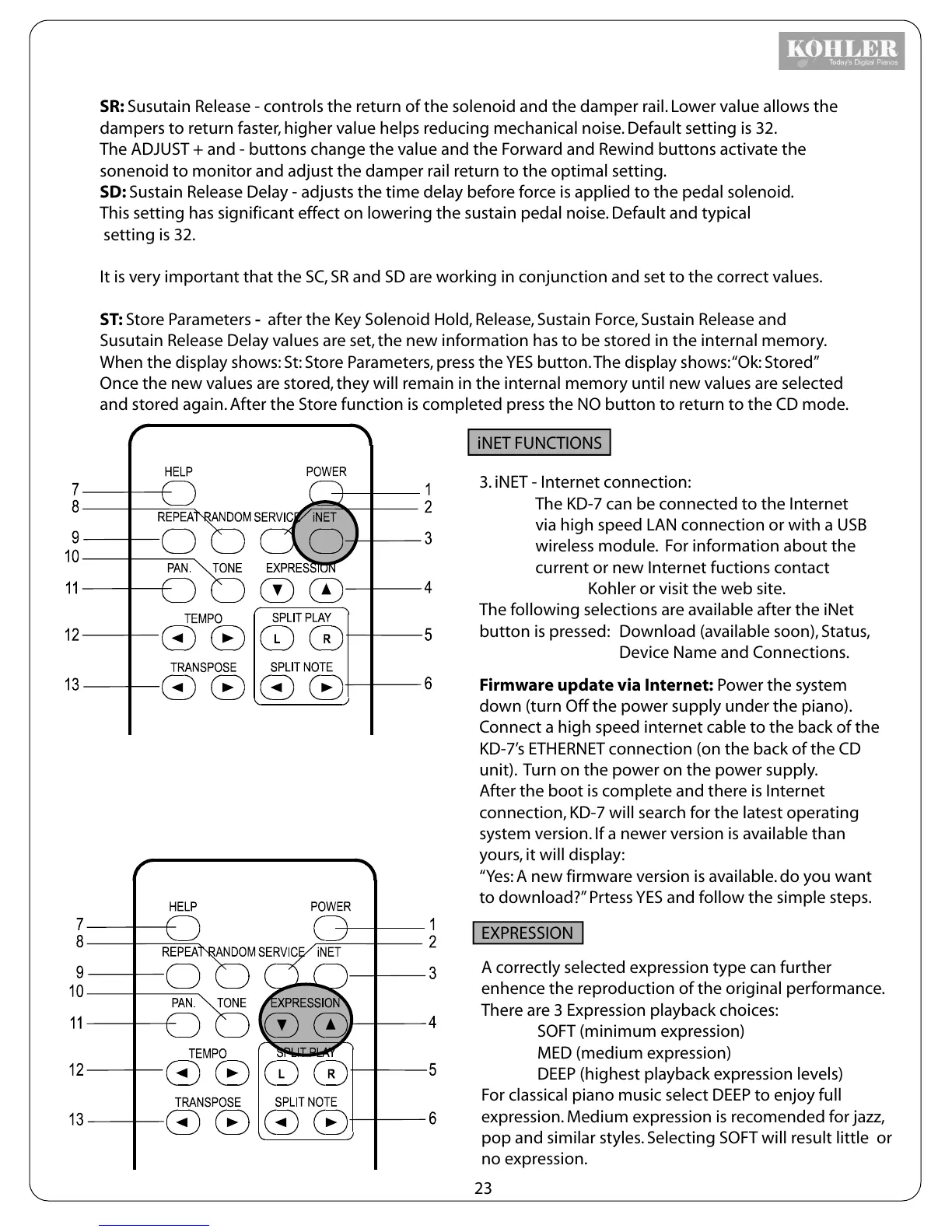
3. iNET - Internet connection:
The KD-7 can be connected to the Internet
via high speed LAN connection or with a USB
wireless module. For information about the
current or new Internet fuctions contact
Kohler or visit the web site.
The following selections are available after the iNet
button is pressed:
Download (available soon), Status,
Device Name and Connections.
Firmware update via Internet: Power the system
down (turn Off the power supply under the piano).
Connect a high speed internet cable to the back of the
KD-7’s ETHERNET connection (on the back of the CD
unit). Turn on the power on the power supply.
After the boot is complete and there is Internet
connection, KD-7 will search for the latest operating
system version. If a newer version is available than
yours, it will display:
“Yes: A new firmware version is available. do you want
to download?” Prtess YES and follow the simple steps.
iNET FUNCTIONS
EXPRESSION
A correctly selected expression type can further
enhence the reproduction of the original performance.
There are 3 Expression playback choices:
SOFT (minimum expression)
MED (medium expression)
DEEP (highest playback expression levels)
For classical piano music select DEEP to enjoy full
expression. Medium expression is recomended for jazz,
pop and similar styles. Selecting SOFT will result little or
no expression.
23



 To Next Page