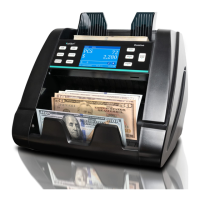
What to do if Kolibri Bank Note Validator KCD-1000 does not recognize a genuine bill?
- FFrancis LiJul 29, 2025
If your Kolibri Bank Note Validator KCD-1000 fails to recognize a genuine bill, the solution is to clean all sensors.
What to do if Kolibri Bank Note Validator KCD-1000 does not recognize a genuine bill?
If your Kolibri Bank Note Validator KCD-1000 fails to recognize a genuine bill, the solution is to clean all sensors.
What to do if Kolibri Security Sensors screen displays “CEO”?
If the screen displays “CEO”, make sure that there are no foreign objects covering the sensors inside the unit. Remove any foreign objects, close the lid tightly, and then turn the unit on.
How to fix Kolibri Security Sensors if screen displays “OPEN”?
If the screen displays “OPEN”, make sure that the lid is properly closed.
Introduction to the Kolibri KCD-1000 4-way money detector and its capabilities.
Essential safety precautions for operating the money detector, including electrical and handling risks.
Lists all items included in the KCD-1000 money detector package.
Technical details of the KCD-1000, including weight, dimensions, sensors, and power requirements.
Diagrams illustrating the top and back views of the KCD-1000 with labeled parts.
Explains the function of the display and indicators for PASS/FAIL messages on the KCD-1000.
Step-by-step guide on how to connect and turn on the KCD-1000 money detector.
Guidelines on the condition of bills suitable for detection to avoid operational issues.
Instructions on how to insert bills into the 4-way detector and expected results.
Describes how the KCD-1000 indicates bill recognition status via screen messages.
Procedures for cleaning and maintaining the KCD-1000 to ensure optimal performance and longevity.
Solutions for common problems encountered with the KCD-1000, including screen errors and bill jamming.
Information on the KCD-1000 warranty, coverage, and conditions for service.
Details for contacting Kolibri technical support for assistance with the KCD-1000.
| Acceptance Rate | 98% |
|---|---|
| Storage Temperature | -20°C to 60°C |
| Note Insertion | Four-way |
| Interface | RS-232, USB |
| Operating Temperature | 0°C to 40°C |