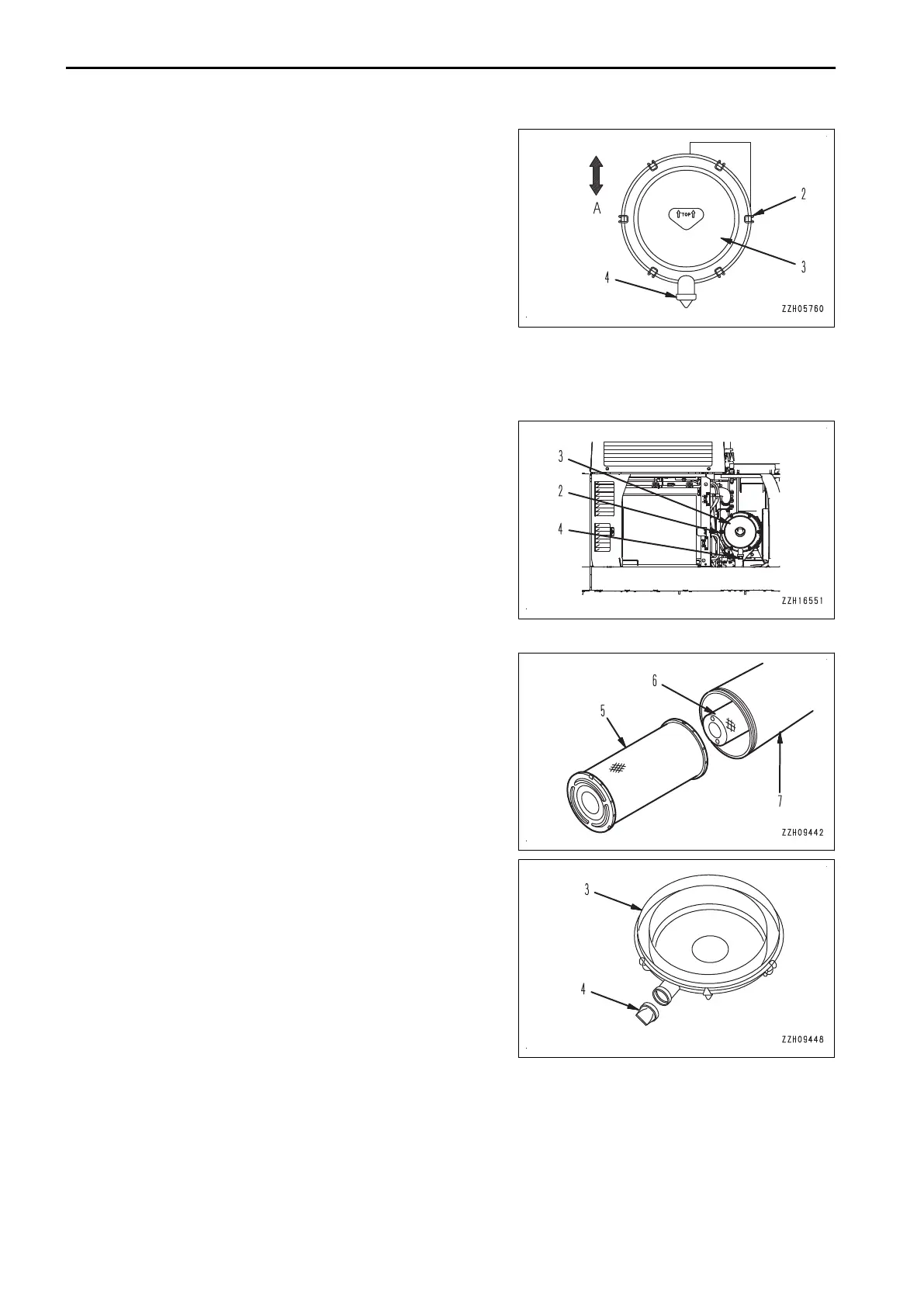
5)
Always install cover (3) so that vacuator (4) faces the
ground (A).
6)
When cover (3) is installed, check that the clearance
between the air cleaner body and cover (3) is not too
large.
If the clearance is too large, remove cover (3), and
then install it again.
15.
Check that air cleaner clogging caution lamp (1) on the
monitor panel.
If it light up just after cleaning of the elements has been
finished, replace the inner and outer elements.
METHOD FOR CHANGING AIR CLEANER ELEMENT
Replace the outer element in the following procedure.
1.
Open the door at the rear left side of the machine, remove
hooks (2) (6 places) and remove cover (3).
2.
Hold outer element (5), rock it lightly up and down and to the right and left, and twist to pull it out.
Do not remove inner element (6) at this time.
3.
When outer element (5) is removed, check that the inner
element does not come out of position and is not at an an-
gle.
If it is at an angle, push it straight to the bottom with your
hand.
4.
Clean dusts in inside and on cover (3) of air cleaner body
(7) by using a clean cloth or brush.
5.
If any dust is attached to vacuator valve (4) installed to
cover (3), remove it.
MAINTENANCE PROCEDURE MAINTENANCE
4-18



 To Next Page