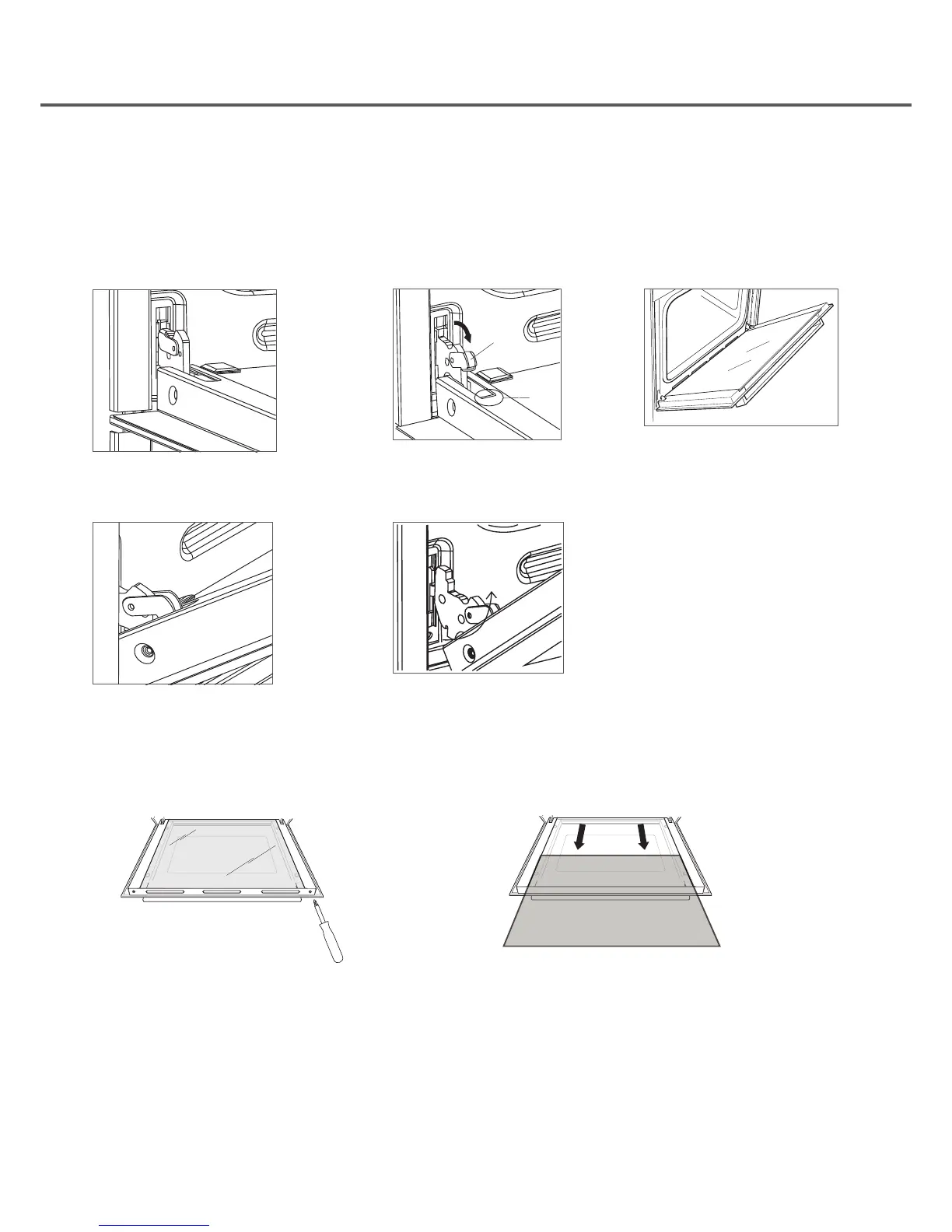
1. Open the door to the full extent. 2. Open the lever A completely on
the left hand hinges
3. Open the door to angle as
shown.
A
B
4. Close the door until the left & right hand
levers A are hooked to part B of the door
5. Withdraw the hinge hoods for
there position following arrow C.
To replace the door, reverse the
above procedure
C
HOW TO REMOVE THE OVEN DOORS
For a more thorough clean, you can remove the oven door.
To remove the oven door use the following instructions:
REMOVING THE INNER PANE OF GLASS
1. Remove the top plate by unscrewing the 2 screws (A). 2. Gently pull out the inner panel of glass
G
A A
Clean the glass with an appropriate cleaner. Dry thoroughly, and place on a soft surface. Now you can also clean the
inside of the outer glass.
To replace the glass reverse the procedure above.


 To Next Page