6
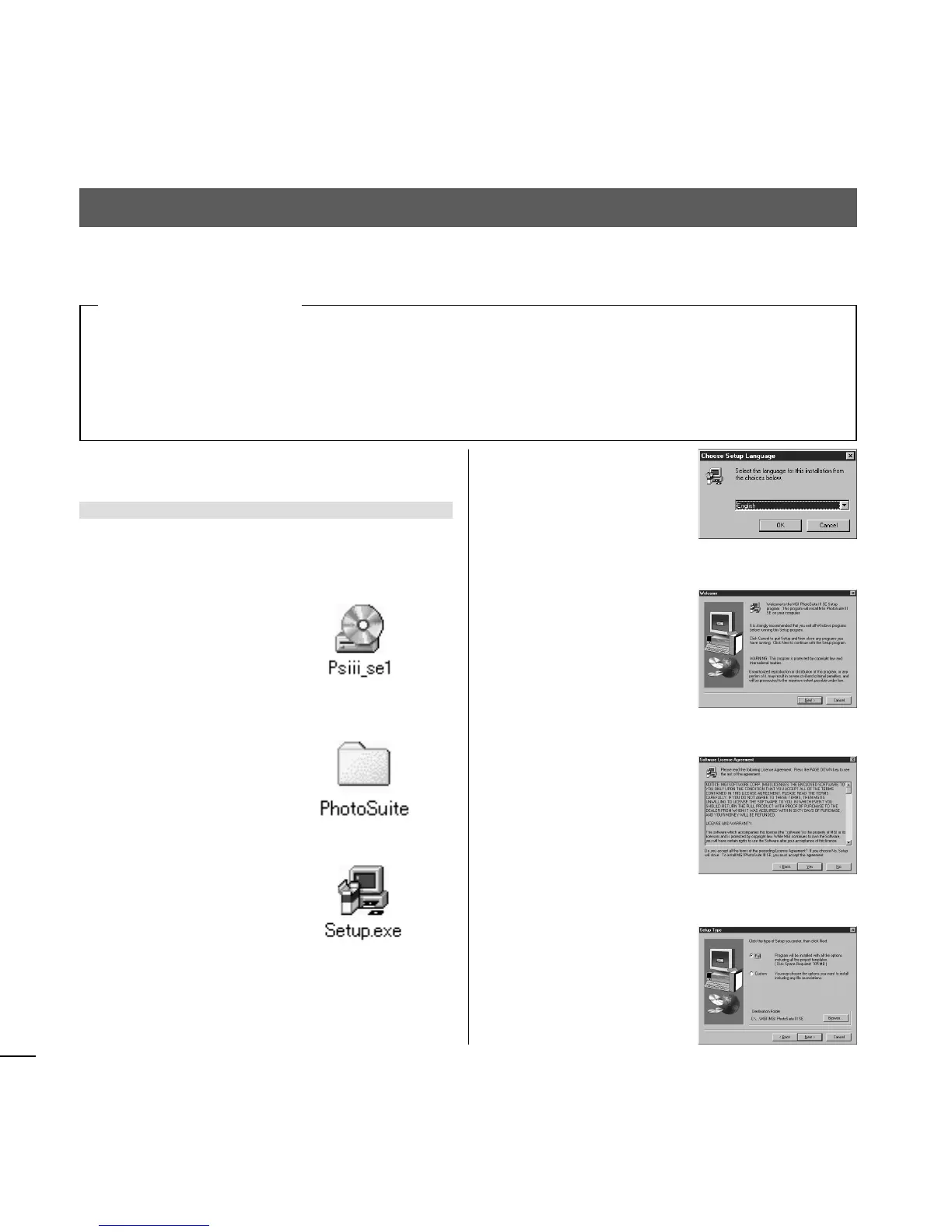
5 Choose [English] and
click [OK].
6 Click [Next].
7 Click [Yes].
8 Choose [Full] and click
[Next].
● Windows
Install MGI PhotoSuite
1 Turn on the computer and insert the CD-
ROM disc.
2 Double-click [My Com-
puter] and then the
CD-ROM icon in the
window that opens
subsequently.
3 Double-click the
[PhotoSuite] folder.
4 Double-click the
[Setup.exe] icon.
Windows
OS Windows 98/98SE/ME
Memory 32 MB or more
Hard disk space 200 MB or more
Interface USB
Display 32,000 colors or more, 640 × 480 pixels
or more
Others CD-ROM drive
Macintosh
MacOS 8.6/9.0 (QuickTime 3.0 or later)
32 MB or more
200 MB or more
USB
32,000 colors or more, 640 x 480 pixels or more
CD-ROM drive
6. Installing Software
Note: Check that the operating environment of your computer meets the following require-
ments.
[Operating environment]














 To Next Page