9. Live View
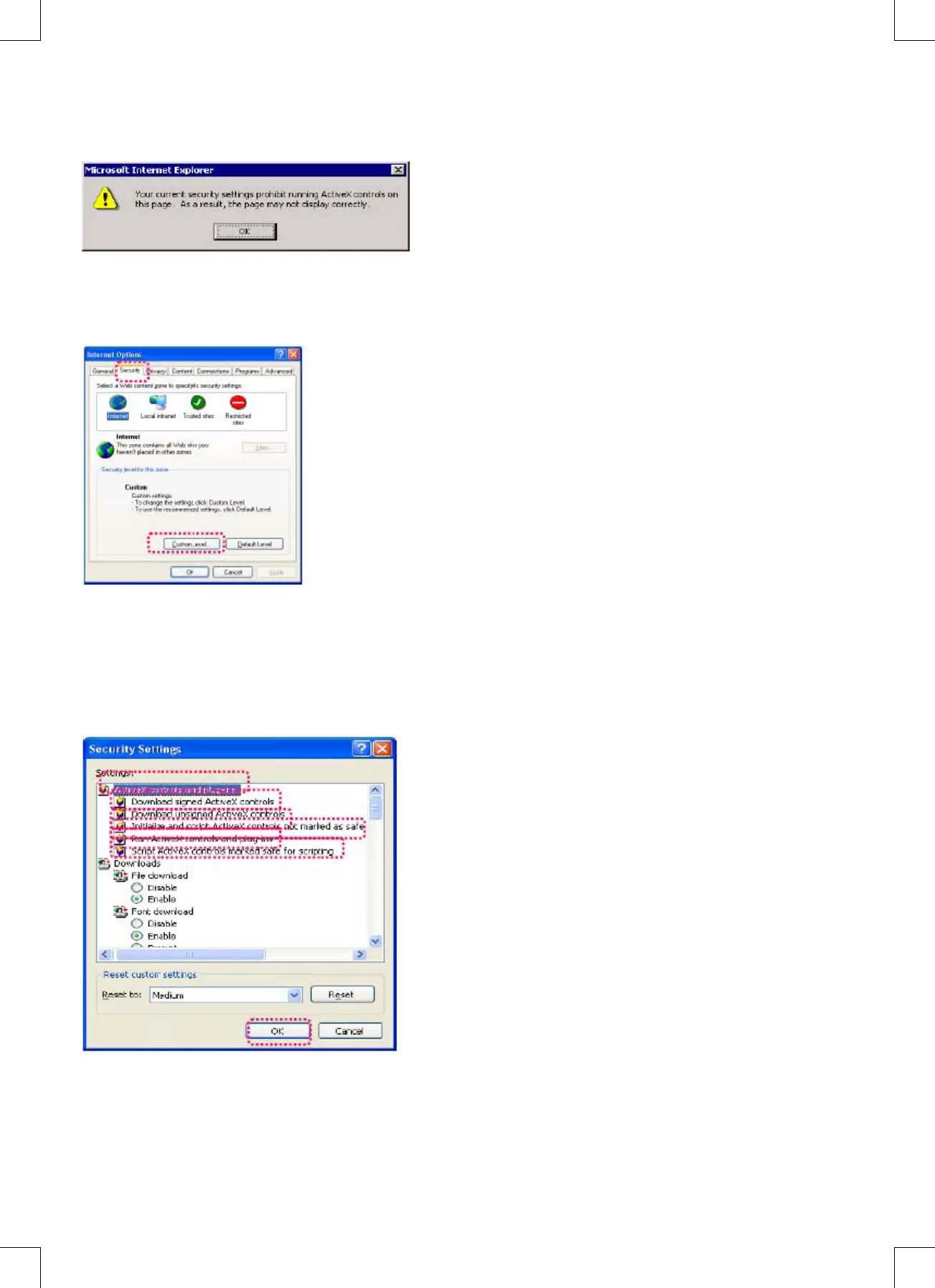
When using the CMP-NWIPCAM21 for the rst time, users must change the Internet Explorer security settings (please
refer to settings step 1.9.1). Otherwise, the system will display the following warning, and be unable to display the
surveillance feed.
After having successfully set up the CMP-NWIPCAM21 settings during the rst use, users do not need to change the
settings again for later use.
9.1 The IE security settings can be changed by following the steps below:
Step 1: IE Toolbar -> Tools -> Internet Options -> Security -> Custom Level….
Step 2: After clicking on Custom Level…, a security settings window appears. Change ActiveX Control Options and Plug-
in settings to the following:
1. Download signed ActiveX controls: Enable
2. Download unsigned ActiveX controls: Enable
3. Initialize and script ActiveX controls not marked as safe: Enable
4. Run ActiveX controls and plug-ins: Enable
5. Script ActiveX controls marked safe for scripting: Enable
Step 3: After pressing “ok”, a warning window appears. Click on “Yes”, and you return to the last window. Press “ok”, and
the setup is complete.


 To Next Page