DVB-T2 FTA20
Digital set-top box
Package contents
• Digital set-top box
• Remote control (incl. 2 AAA batteries)
Description
The digital set-top box is a device that allows you to access
digital TV and radio channels on your TV.
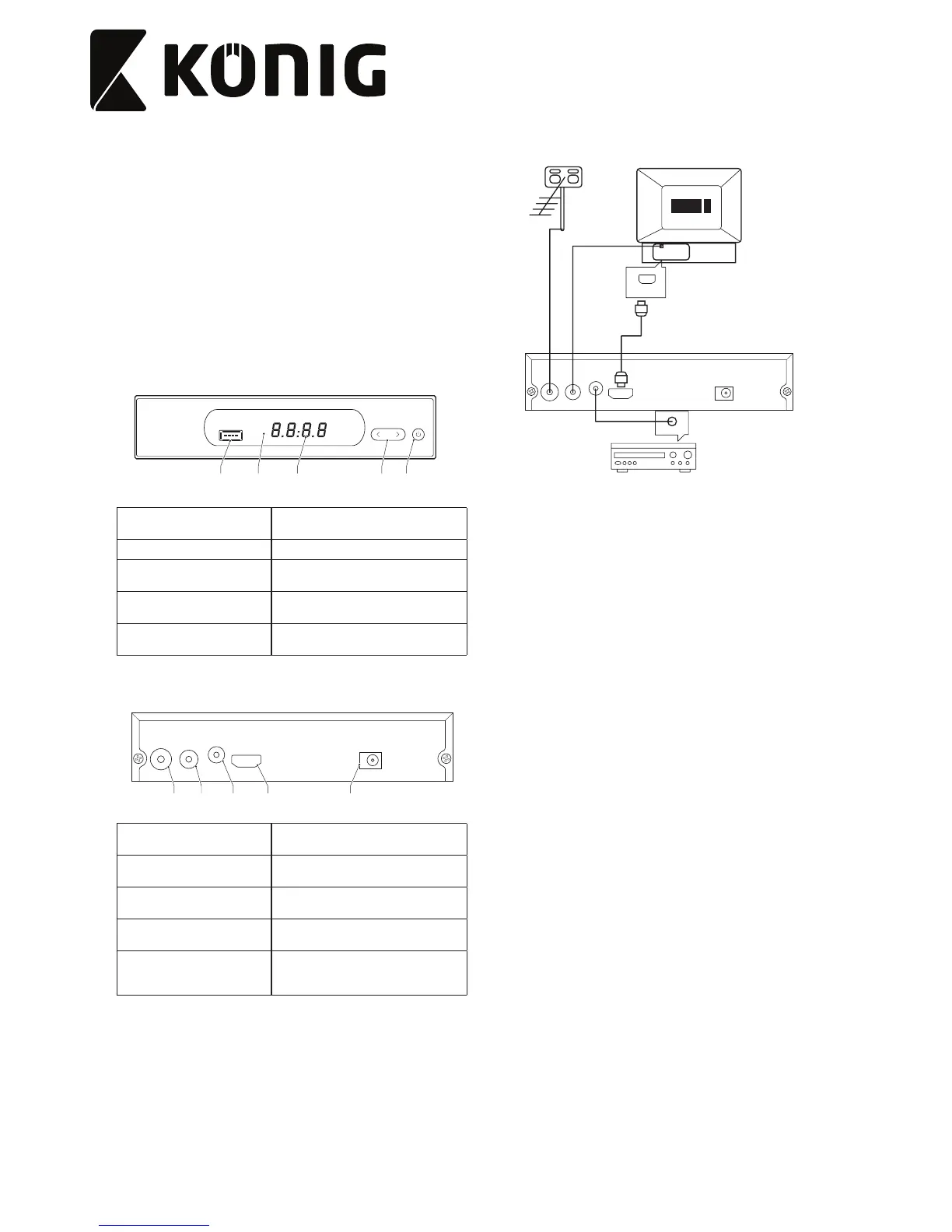
Front panel
4 13 25
1. On/o button
• Press the button to switch on or o
the device.
2. Display
3. Remote control sensor
• Point the remote control to the
remote control sensor.
4. Arrow buttons
• Press the buttons to go to the next or
previous channel.
5. USB input
• Connect a USB device to the USB
input using a USB cable.
Rear panel
6 7 8 9 10
HD OUT
DC-5V-IN
ANT OUT
COAXIAL
ANT IN
6. RF input
• Connect the external antenna to the
RF input using a coaxial cable.
7. RF output
• Connect the TV to the RF output using
a coaxial cable.
8. Coaxial output
• Connect an audio device to the
coaxial output using a coaxial cable.
9. HDMI output
• Connect the TV to the HDMI output
using an HDMI cable.
10. DC input (5V)
• Connect the power adapter to the DC
input of the device and to the wall
socket.
Connection scheme
HDMI
COAXIAL


 To Next Page