1
--
+
+
23
45 6
78 9
0
PgVOL
REC
FAV
TV/RADIOGOTO
OK
i
MUTE
AD
21
24
14
5
25
2623
27
19 22
2120
18 15
917
11
16
4
13
6
8
3
10
12
7
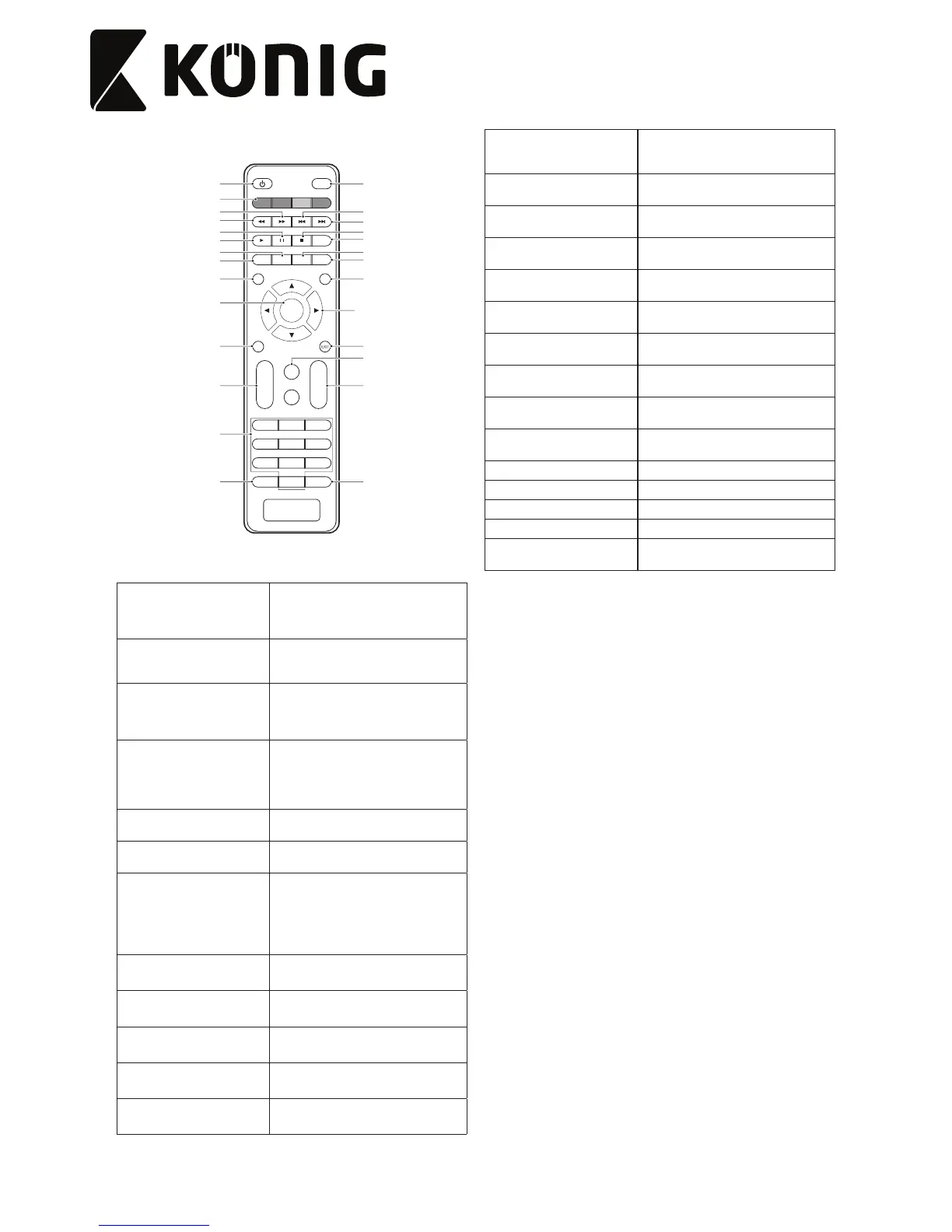
1. On/standby button
• Press the button to switch on the
device.
• Press the button again to set the
device to standby mode.
2. Mute button
• Press the button to mute the sound.
• Press the button again to unmute the
sound.
3. Digit buttons
• Press one of the buttons to go to the
required channel.
• Press one of the buttons to go to the
required menu item.
4. Arrow buttons
• Press the buttons to navigate in the
menu.
• Press the buttons to move from main
menu to submenu or from submenu
to main menu.
5. Volume +/- buttons
• Press the buttons to increase or
decrease the volume.
6. Channel +/- buttons
• Press the buttons to go to the next or
previous channel.
7. OK button
• Press the button to conrm the
selection.
• Press the button to conrm the
entered value.
• Press the button to open a drop-down
list.
8. TV/Radio button
• Press the button to switch between TV
mode and radio mode.
9. Recall button
• Press the button to switch between
the last two channels.
10. Goto button
• Press the button to select the play
time of media.
11. Favourite button
• Press the button to display the
favourite menu.
12. Menu button • Press the button to access the menu.
13. Exit button
• Press the button to exit the menu.
• Press the button to cancel the
selection.
14. EPG button
• Press the button to display the
electronic program guide (EPG).
15. Audio button
• Press the button to select the audio
language or the audio mode.
16. Info button
• Press the button to display
information for the current channel.
17. Teletext button
• Press the button to enter teletext
mode.
18. Subtitle button
• Press the button to enter subtitle
mode.
19. Play button
• Press the button to play the
programme.
20. Pause button
• Press the button to pause the screen
picture.
21. Stop button
• Press the button to stop the
programme.
22. AD button
• Press the button to adjust the audio
description (AD) volume.
23. Fast-forward button • Press the button to fast-forward.
24. Rewind button • Press the button to rewind.
25. Skip-forward button • Press the button to skip forward.
26. Skip-backward button • Press the button to skip backward.
27. Colour buttons
• Press the buttons to operate dierent
functions in teletext mode.


 To Next Page