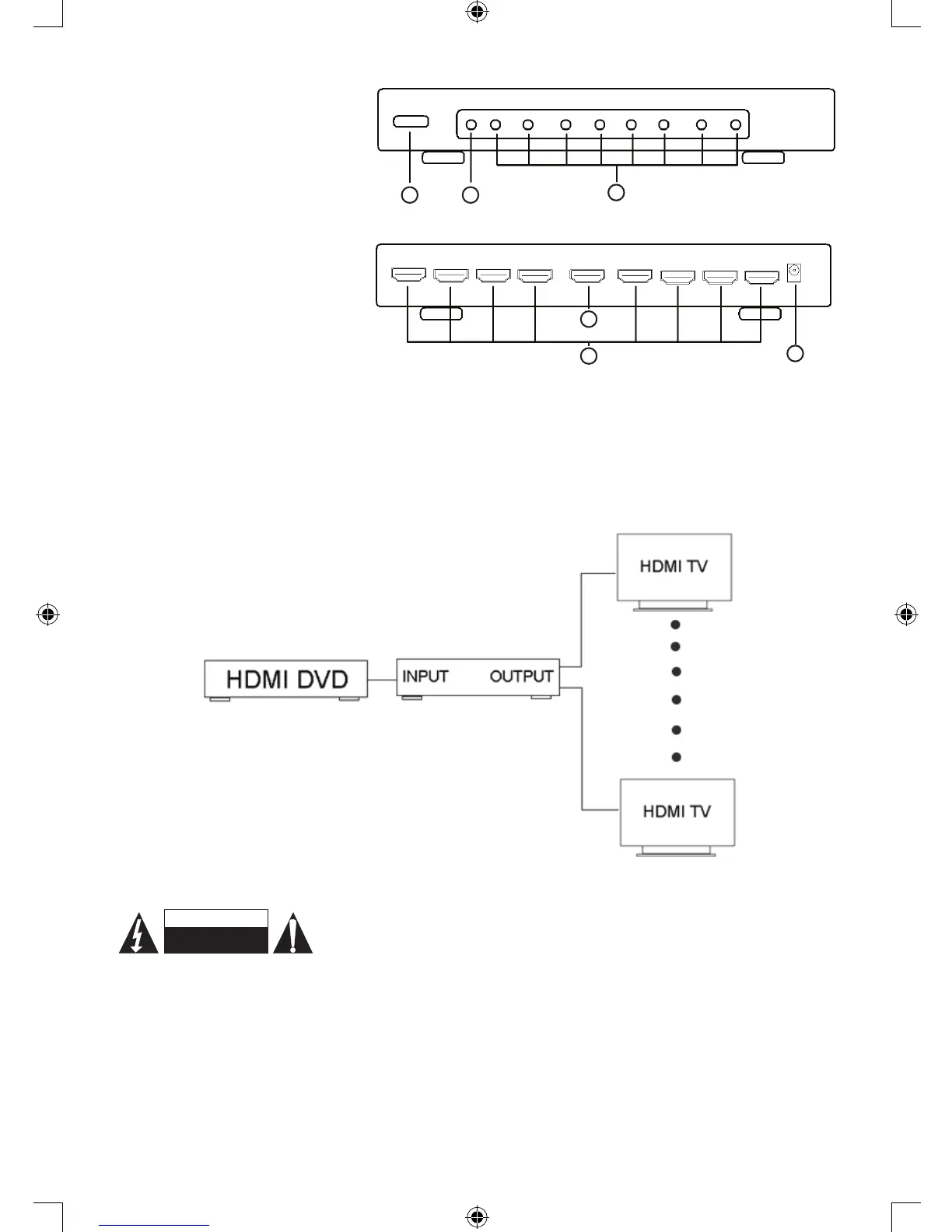
Panel descriptions:
1) Power on/off switch
2) Power LED
3) Active port LED
4) HDMI input connection
5) 8x HDMI output connections
6) 5 V DC connection
Connection and operation:
• Connect the HDMI input source
and output devices into the
HDMI Splitter. (HDMI cables are
optional)
*please refer to the connection
diagram section.
• Insert the DC side of the 5 V power supply into it and then connect the AC side of the power supply
into the wall outlet.
• Turn on the power.
Attention: Insert / Extract cable gently.
Connection diagram:
HDMI
cable
HDMI
cable
HDMI
cable
HDMI SPLITTER
Safety precautions:
To reduce risk of electric shock, this product should ONLY be opened by an
authorized technician when service is required. Disconnect the product from
mains and other equipment if a problem should occur. Do not expose the product to water or moisture.
Maintenance:
Clean only with a dry cloth. Do not use cleaning solvents or abrasives.
Warranty:
No guarantee or liability can be accepted for any changes and modications of the product or damage
caused due to incorrect use of this product.



 To Next Page