2. Set up
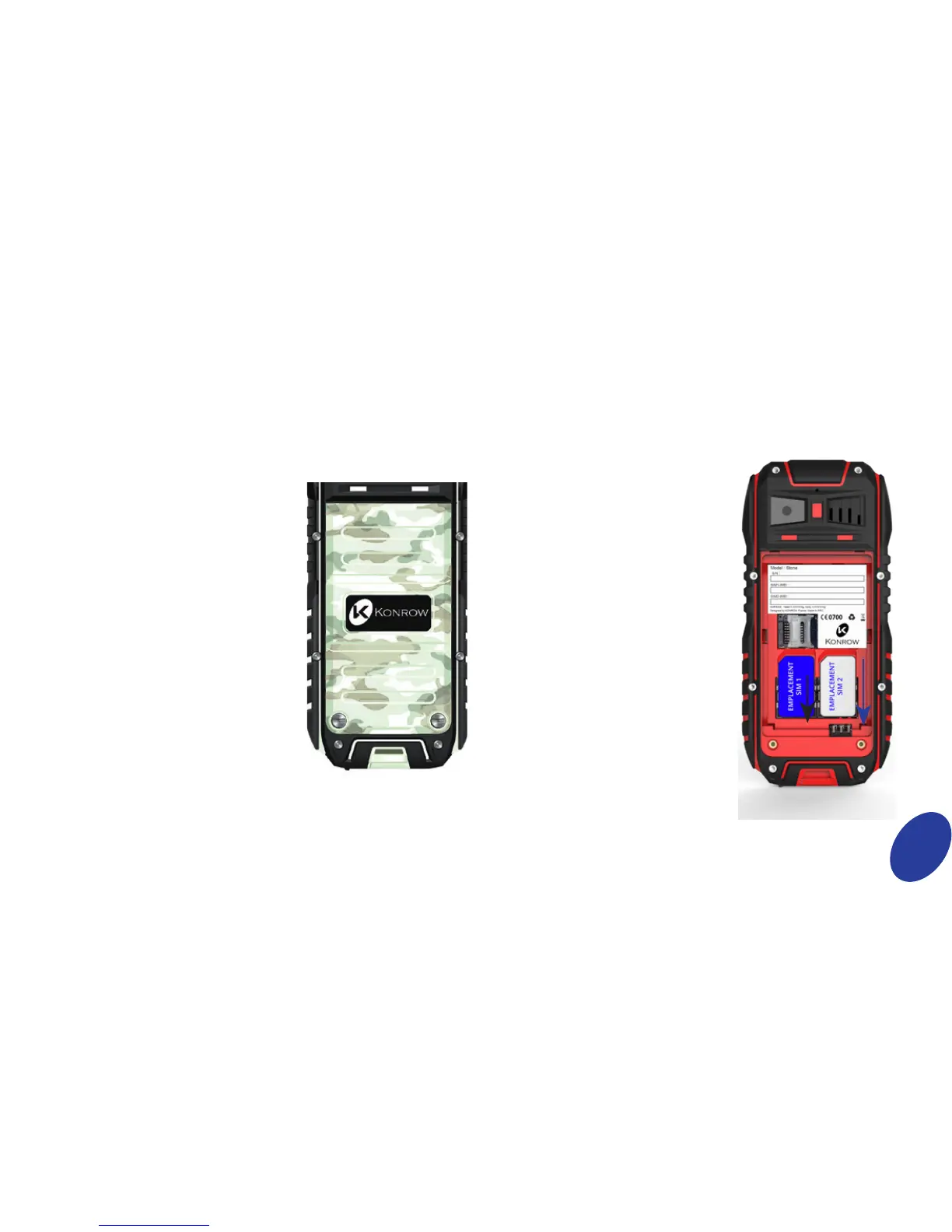
Inserting a SIM card
The Stone is a mobile phone with
dual SIM card, which enables
you to use two lines on the same
mobile. Your Stone has two
standard SIM ports. To insert the
SIM card(s):
• Switch o the phone and
remove the rear cover and
battery by unscrewing the
screws and making sure the
seal of protection against
water.
• Insert the SIM card correctly
into the relevant card slots
(see gure below).
• Then replace the battery
and cover.
Set up
Removing or installing the battery cover
The Stone mobile phone is
waterproof and therefore a
screwdriver is necessary so as to
open the battery compartment.
There are two screws into the
battery cover. Please use the
screwdriver to turn the screws
at left direction for opening the
cover.
To install the battery cover, aim at
the opposite direction.
Caution: Please make sure the
two screws are tightened up
when power on or the waterproof
capability of the phone will be
aected.
The cover of the USB slot must be
closed tightly.


 To Next Page