33
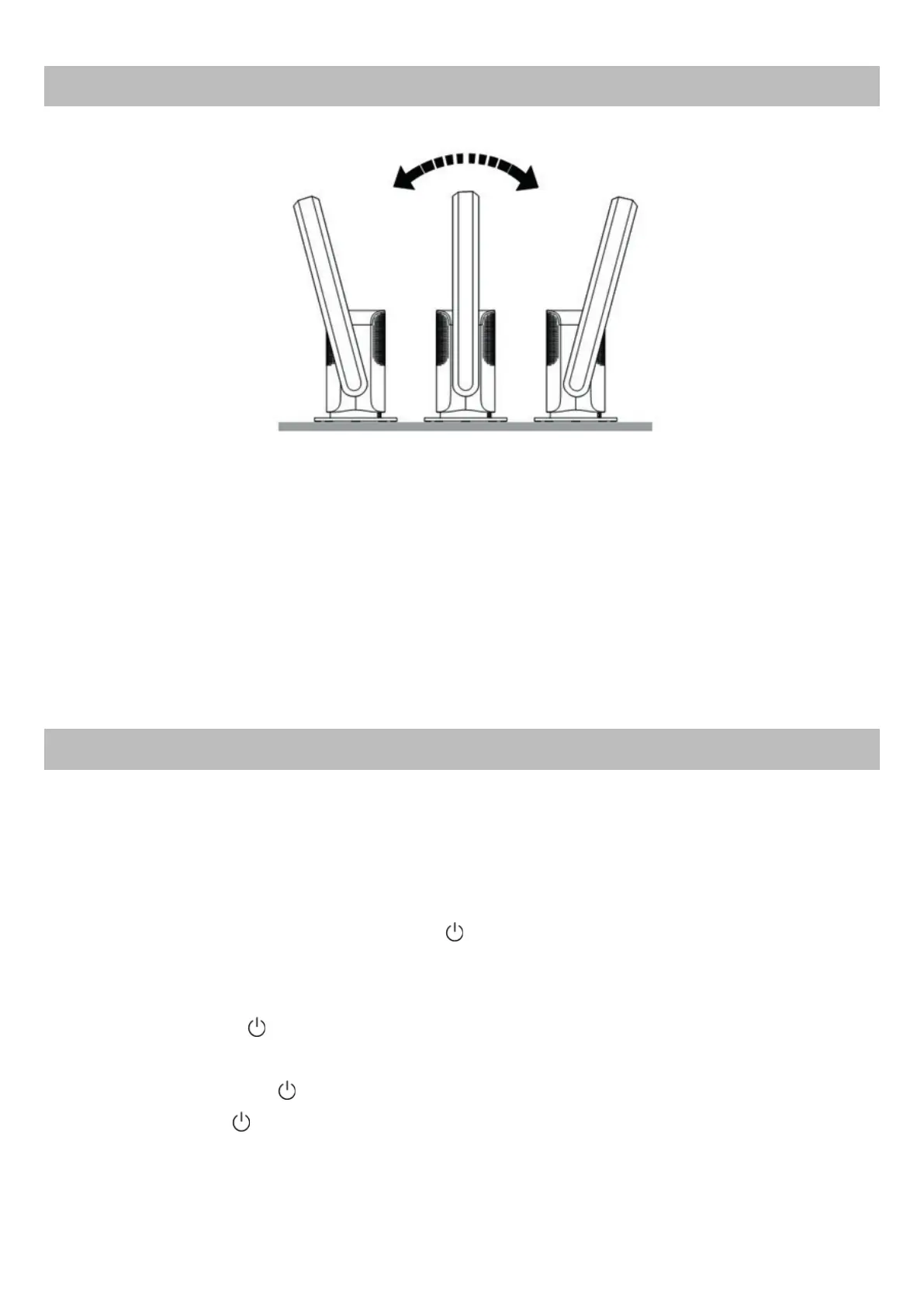
AIR FLOW TILT ADJUSTMENT
FIRST START-UP
1. Before proceeding to adjusting the inclination of the air flow, make sure that
the device is not in operation and that the plug of the power cord is discon-
nected from the power outlet.
2. Hold the main body of the appliance firmly while simultaneously tilting the
arc structure of the air duct manually. The arc structure can be tilted in one di-
rection or another for a maximum of 15°. Do not attempt to further force the tilt
in order to avoid damage to the device!
1. Connect the plug of the power cord to the power outlet;
2. Press the physical on/off button located at the base of the main body of the
appliance and near the output of the power cable;
3. A beep will emit indicating that the device has entered Stand-by mode;
4. Subsequently pressing the button
will emit a beep indicating that the ap-
pliance has started.
NOTE: The button is present on both the LED screen as a touch button, and
on the remote control as a physical button.
5. To reset the device to Standby mode press the button on the remote con-
trol, or press the
touch button on the LED screen for 2/3 seconds; in both
cases will beep.



 To Next Page