34
FEATURES
CAUTION! During operation in “Warm” mode, the surfaces of the appliance
can reach high temperatures even a few moments after switching on. Do not
touch!
Please note:
- The On/Off button (a touch button on the LED screen or a physical button
on the remote control) does not completely disconnect the power supply of
this product. To turn off the device completely press the button at the base of
the appliance, then disconnect the power cord plug from the power outlet.
- The device is equipped with a protection system that automatically cuts the
power supply in case of accidental overheating or overturning. If this system
is activated, immediately disconnect the appliance and allow it to cool down
completely before the next use.
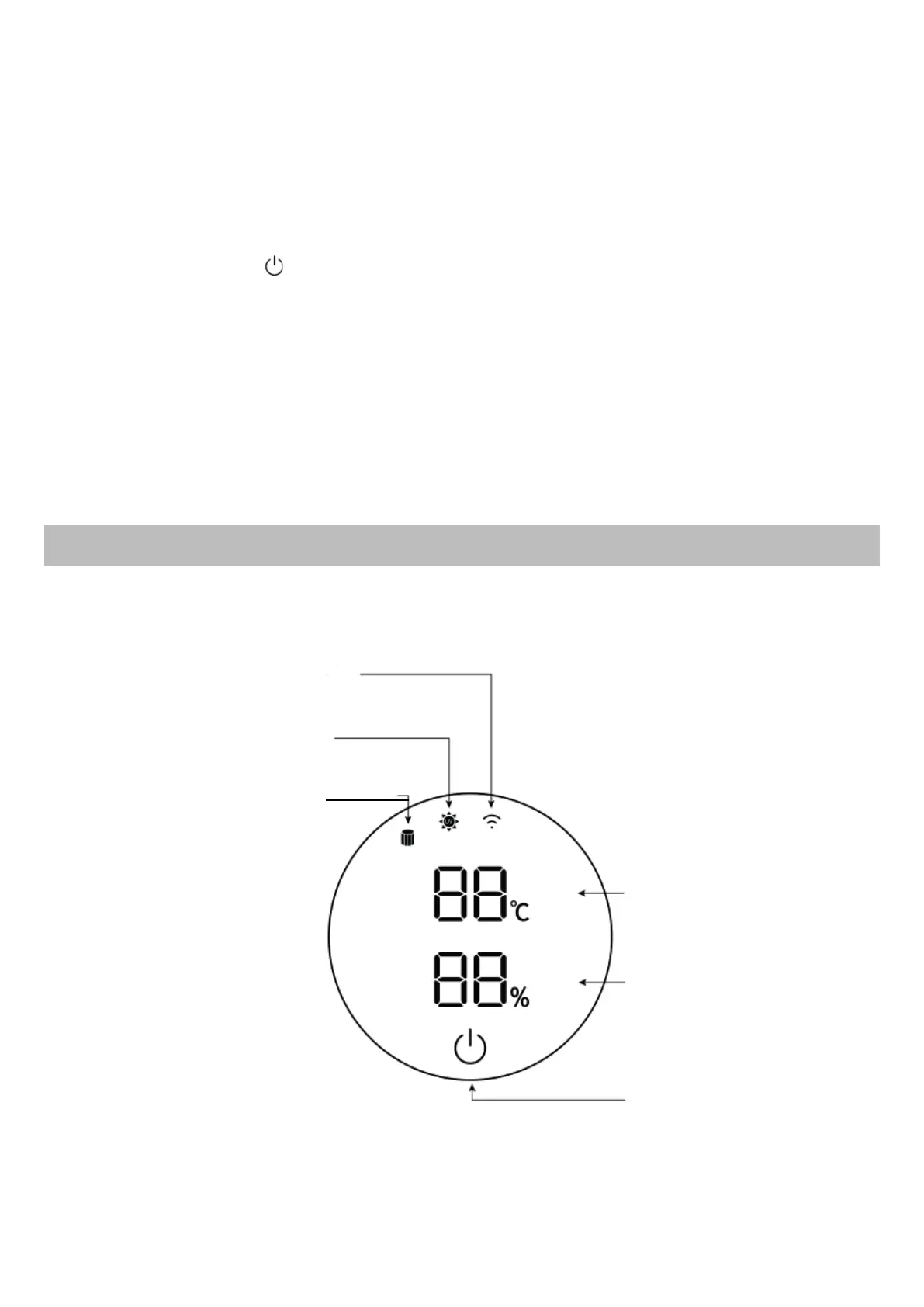
LED DISPLAY
Air flow intensity and relative
humidity percentage
Touch screen On/Off button
Temperature indicator
UV-C lamp indicator
Wi-Fi Indicator
Air filter replacement
warning indicator



 To Next Page