35
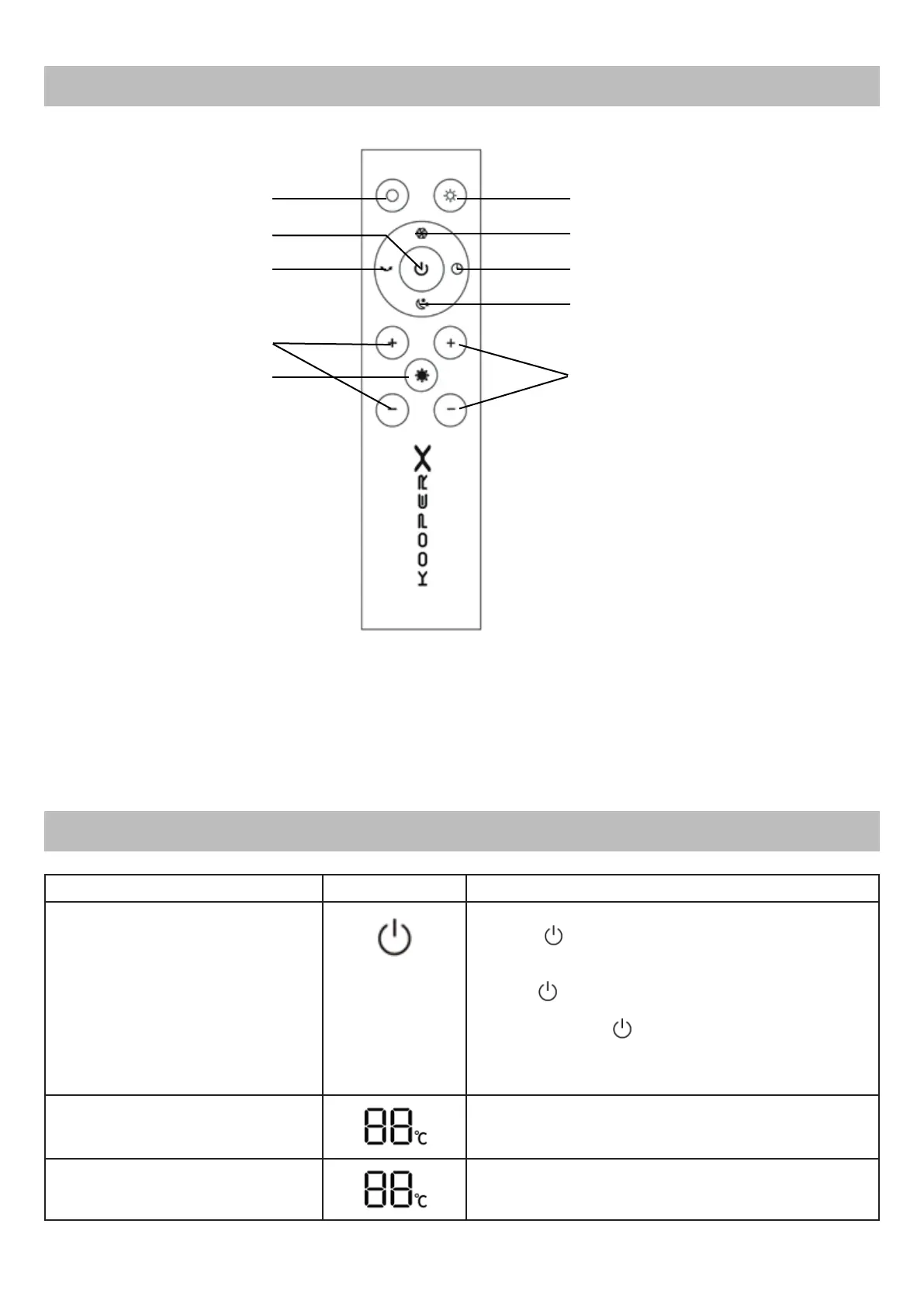
REMOTE CONTROL
DESCRIPTION OF ICONS AND OPERATION
Start button “Warm” mode
Maximum power mode button
Timer button
Start button Stand-By mode
(Sleep Mode)
Start button “Ventila-
tion” mode
On/Off button
Main body swing
start button
Air ow intensity
adjustment button
UV-C Lamp Button
Temperature adjustment button
Note: to ensure the correct operation of the remote control, direct it at the LED
screen of the unit to optimize the reception of the commands.
Function Icon/Button Description
On/Off On/Off button
• Press (touch button on the LED screen or
physical button on the remote control) to start the
unit and leave Stand-By mode;
• Press (touch button on LED screen) repeate-
dly to adjust the air intensity
• Press and hold (touch button on LED screen)
for 5 seconds to turn on Wi-Fi and connect with
Smartphone via the app.
Temperature
The LED screen displays the airow temperature
value that can be adjusted using the dedicated
settings.
Percentage of relative humidity
Once Sleep Mode is activated, the relative humi-
dity percentage value is displayed on the screen.



 To Next Page