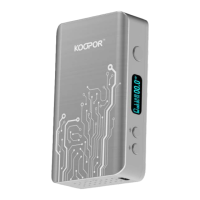
http://www.koopor.com/plus/ KOOPOR Plus 6
3. Attach Atomizer
KOOPOR Plus atomizer head is using a new generation of elastic-touch design, perfectly fits
a variety of atomizers.
Please confirm that the atomizer head should not be blocked by any stems before attachment:
1. Connect the atomizer to the device and tighten it clockwise.
2. After the device is powered on, please press the KOOPOR Button to vape.
3. IS NEW COIL? Y/N: A new coil will be detected in the TC Mode. Press UP Button if
you’re using a new atomizer and Press DOWN Button to confirm it’s the same one.
4. Operations
1. Power On:
① While the device is off power, fast click KOOPOR Button 5 times in 2s to start up.
The screen successively shows "WELCOME", brand "KOOPOR PLUS”;
② From standby status, shortly press KOOPOR Button to active the system and light the
display screen.
2. Power Off: While the device is locked, hold KOOPOR Button for 5s, then the display
screen shows “GOOD BYE!”, and the screen turns off, which means the device is power off.
3. Vaping:
① While the device is power on, hold KOOPOR Button to vape (it will be forced to stop
working when one vaping is longer than 12s, release once to vape again);
② Release KOOPOR Button and enter standby mode; if without any operation in 5
minutes, need to be restarted if use again.
4. Screen Unlocked Status:
① Press UP / DOWN Button to adjust the temperature or wattage settings;
② Press UP+ DOWN Button simultaneously to lock the UP / DOWN Button to avoid
accidental operation;
③ Press KOOPOR+ UP Button simultaneously to choose working mode between TC
Mode, VW Mode and Memory Mode;
④ Press KOOPOR + DOWN Button simultaneously to choose different effect
Normal/Soft/Hard/Max/Min.
5. Screen Locked Status:
① Press the KOOPOR+ UP Button simultaneously to turn display stealth mode ON;
② Press the KOOPOR + DOWN Button simultaneously to turn display stealth mode
OFF;
③ Press the UP Button + DOWN Button simultaneously to flip the screen.
④ Hold the KOOPOR Button for 5s, choose OFF to power off.
6. Saving: All the settings will be automatically saved while settings done. No need to reset
after power on.


 To Next Page
 Loading...