http://www.koopor.com/plus/ KOOPOR Plus 8
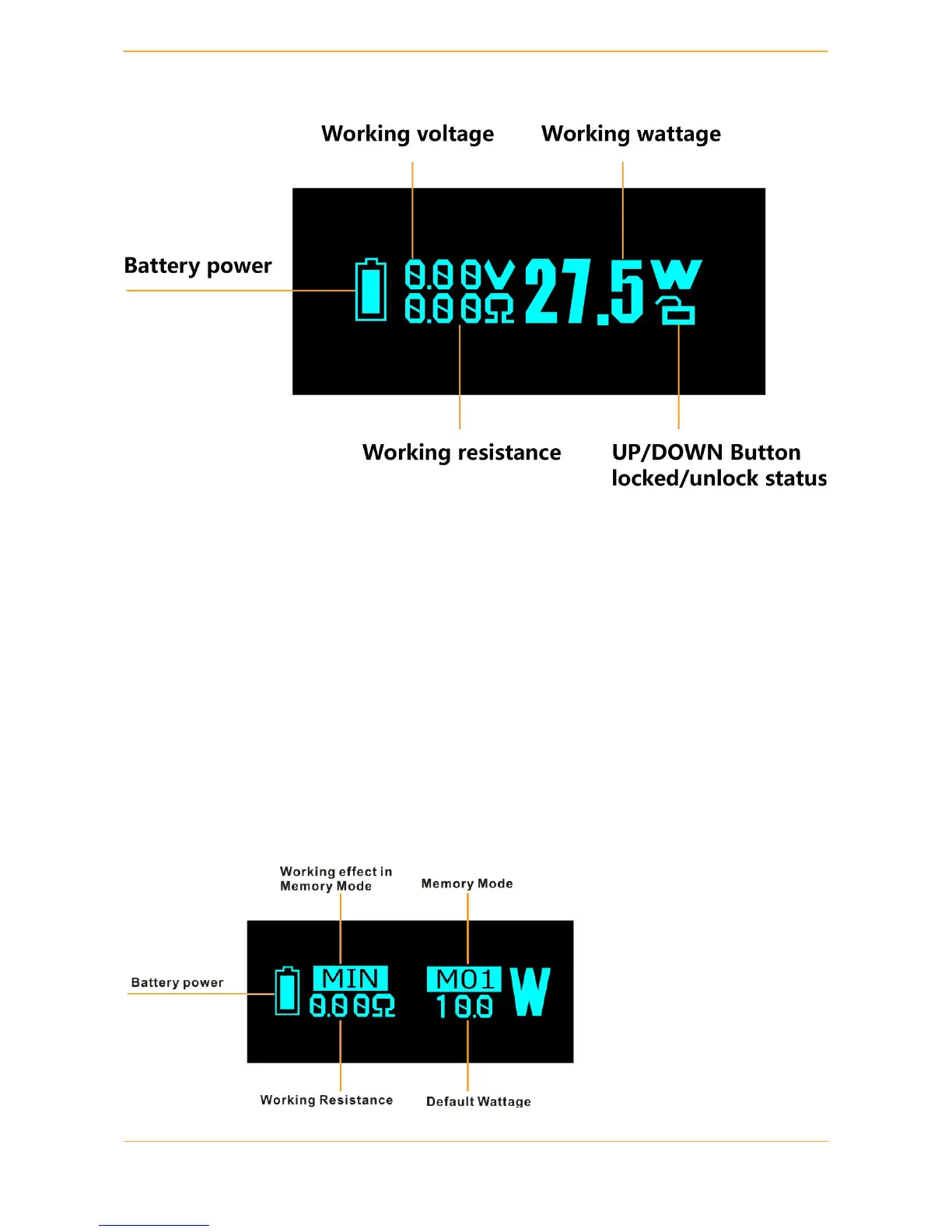
6. VW Mode
KOOPOR Plus VW Mode is available for all types of atomizers.
1. Enter VW Mode: switch between TC Mode, VW Mode and Memory Mode by pressing
KOOPOR Button + Up Button simultaneously while screen is unlocked.
2. In the Wattage Mode, use the UP / DOWN Button to adjust the wattage settings with an
increment/decrement of 0.1w to get the best preferred wattage. Then wait for 5 seconds or hold
down KOOPOR Button to switch between the Hard/Normal/Soft/ Max/Min vaping effects.
3. Lock the UP / DOWN Button by pressing the UP+ DOWN Button
simultaneously, to avoid accidentally pressing. Again, simultaneously press to unlock UP /
DOWN Button.
7. Memory Mode
KOOPOR Plus Memory Mode is designed to save your time and effort.


 To Next Page