4
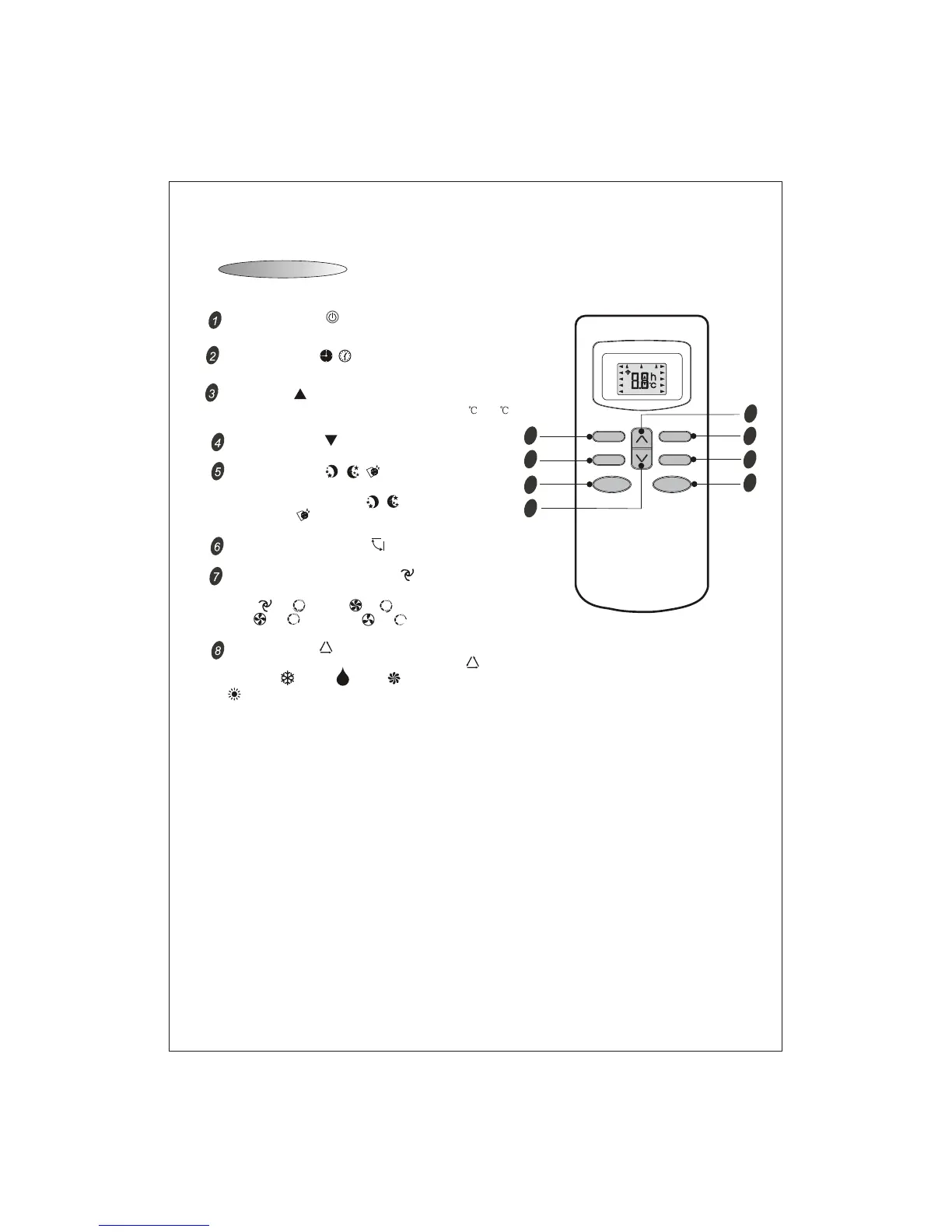
Remote Controller
Note: Each mode and relevant function will be further specified in following pages.
SLEEP
FAN
TIMER
SWING
ON/OFF
MODE
MID
SWING
AUTO
DRY
FAN
HEAT
COOL
FEEL
SLEEP
TIMER ON
HIGH
LOW
TMIER OFF
8
4
6
2
5
3
7
1
Remote Controller
The remote controller transmits signals to the system.
MODE button
FAN SPEED control button
UP button
DOWN button
ON/OFF button
SLEEP button
SWING control button
TIMER button
Used to select the type of operation mode: FEEL( ),
COOLING( ), DRY( ), FAN( ) AND HEATING
FEEL mode can select the operation
mode such as COOL,DRY,FAN,HEAT automatically depending
on the room temperature.
( Only for Heat Pump).
Used to select the indoor fan motor speed:
Auto( or ), High( or ),
Mid( or ) and Low( or ).
This function is invalid in sleep mode.
Used to increase the set room temperature (16 ~31 )
and time(0.5~24h).
Used to decrease the set room temperature and time.
Used to set or cancel sleep operation.
It includes normal-SLEEP( )and
-SLEEP( ),but is
optional.
Comfort-
able Comfortable-SLEEP
Used to start and stop operation .
Used to adjust airflow direction.
Used to select TIMER operation.



 To Next Page