1.1 M1-M5 quick recall function
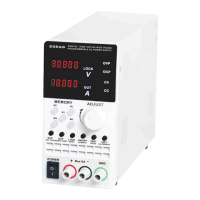
Instruction: Short press M1 M5 keys to quickly recall the contents stored
in 1 5.
1.2 M1-M5 quick storage function
Instruction: Adjust the stored voltage and current value and long press
the M key to store the current value in the memory of the selected M key.
Instruction: Short press OVP to activate the OVP value setting function,
adjust the OVP value to be set through the knob and the VSET key, and
short press the OVP to save and exit.
Instruction: When the OVP is at the OFF state, short press the OVP key
and then short press the ON/OFF key to enable this function. When the
OVP is at the ON state, short press the OVP key and then short press the
ON/OFF key to disenable this function.
3.1Set the OCP value
Instruction: Short press the OCP to activate the OCP value setting function,
adjust the OCP value to be set through the knob and the ISET key, and short
press the OCP to save and exit.
Instruction: When the OCP is at the OFF state, short press the OCP key
and then short press the ON/OFF key to enable this function. When the
OCP is at the ON state, short press the OCP key and then short press the
ON/OFF key to disenable this function.
5
operatinginstruction
KWR Series Wide Range Programmable DC Power Supply



 To Next Page