EasyManua.ls Logo

Korg 01/W pro - Page 21

Korg 01/W pro
41 pages
Print Icon
To Next Page IconTo Next Page
To Previous Page IconTo Previous Page
Loading...
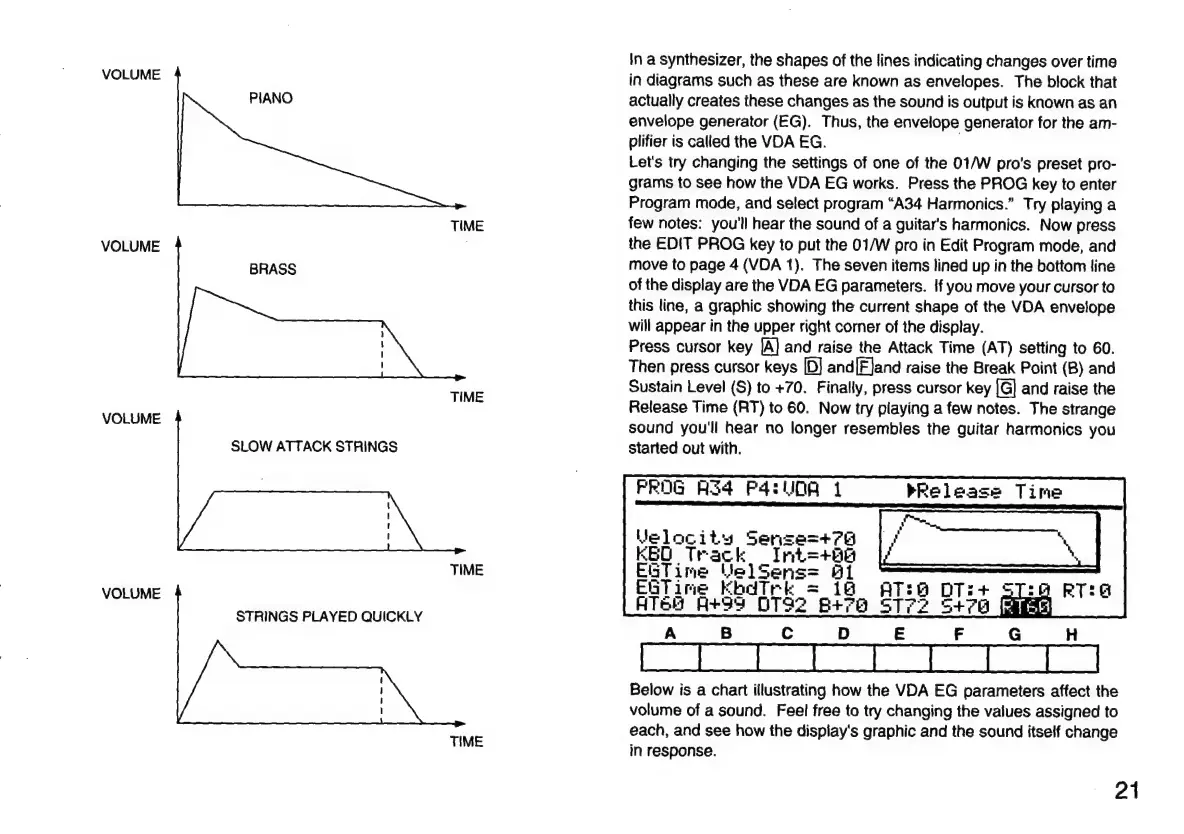
In
a
synthesizer,
the
shapes
of
the
lines
indicating
changes
over
time
VOLUME
in
diagrams
such
as
these
are
known
as
envelopes.
The
block
that
PIANO
actually
creates
these
changes
as
the
sound
is
output
is
known
as
an
envelope
generator
(EG).
Thus,
the
envelope
generator
for
the
am-
plifier
is
called
the
VDA
EG.
|
Let's
try
changing
the
settings
of
one
of
the
01/W
pro's
preset
pro-
grams
to
see
how
the
VDA
EG
works.
Press
the
PROG
key
to
enter
Program
mode,
and
select
program
“A34
Harmonics.”
Try
playing
a
TIME
few
notes:
you'll
hear
the
sound
of
a
guitar's
harmonics.
Now
press
VOLUME
|
the
EDIT
PROG
key
to
put
the
01/W
pro
in
Edit
Program
mode,
and
BRASS
move
to
page
4
(VDA
1).
The
seven
items
lined
up
in
the
bottom
line
of
the
display
are
the
VDA
EG
parameters.
If
you
move
your
cursor
to
this
line,
a
graphic
showing
the
current
shape
of
the
VDA
envelope
will
appear
in
the
upper
right
corner
of
the
display.
Press
cursor
key
|A]
and
raise
the
Attack
Time
(AT)
setting
to
60.
Then
press
cursor
keys
[D]
and[EJand
raise
the
Break
Point
(B)
and
Sustain
Level
(S)
to
+70.
Finally,
press
cursor
key
[G]
and
raise
the
i
Release
Time
(RT)
to
60.
Now
try
playing
a
few
notes.
The
strange
VOLUME
sound
you'll
hear
no
longer
resembles
the
guitar
harmonics
you
SLOW
ATTACK
STRINGS
started
out
with.
PROG
A34
P4DA
À
bRelease
Time
Velocity
Sense=+76
KED
Track
Int=+8e
ii
EdT
ime
pear:
TO
aro
DT
me
K
pk
=
è
+
VOLUME
Ted
A+da
DTS2
etre
STP?
S+ra
E
STRINGS
PLAYED
QUICKLY
A
B
C
D
E
F
G
H
Below
is
a
chart
illustrating
how
the
VDA
EG
parameters
affect
the
volume
of
a
sound.
Feel
free
to
try
changing
the
values
assigned
to
each,
and
see
how
the
dispiay's
graphic
and
the
sound
itself
change
in
response.
TIME
21

Related product manuals