EasyManua.ls Logo

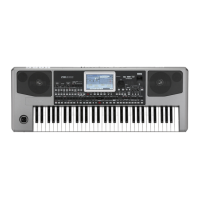
Korg PA 500 - User Manual

Korg PA 500
292 pages
Print Icon
To Next Page IconTo Next Page
Loading...
User’s Manual
ENGLISH
OS Ver. 1.1
3E
Pa500-110UM-ENG.book Page i Friday, March 28, 2008 11:12 AM

Table of Contents

Questions and Answers

  • T
    Tanya WhiteAug 16, 2025
    What to do if my Korg PA 500 has no sound?
    • T
      Tristan PattersonAug 16, 2025
      If your Korg Musical Instrument isn't producing sound, here are a few things to check: * Ensure nothing is plugged into the PHONES connector, as this disables the internal speakers. * Verify the connections to your amplifier or mixer. * Confirm that all components of your amplifying system are powered on. * Check that the MASTER VOLUME slider is not set to “0”. * Make sure that the Local and Speaker parameters are turned On. * Verify that the Attack parameter value isn't too high and the Volume parameter isn't too low.
  • J
    Jason FordAug 18, 2025
    Why won't my Korg PA 500 Musical Instrument turn on?
    • C
      Christina EvansAug 18, 2025
      If your Korg Musical Instrument isn't powering on, verify the following: 1. Ensure the power cable is securely plugged into both the outlet and the instrument's connector on the back. 2. Check the cable for any damage. 3. Confirm there are no issues with the main power supply. 4. Make sure the power switch is turned ON. If it still fails to power on, contact your dealer or the nearest KORG Service Center.
  • C
    Cheryl MartinezAug 21, 2025
    What to do if my Korg PA 500 Musical Instrument does not respond to MIDI messages?
    • J
      jkellerAug 21, 2025
      If your Korg Musical Instrument isn't responding to MIDI messages, check these items: * Confirm that all MIDI or USB cables are correctly connected. * Ensure the external device is transmitting on MIDI channels that the Pa500 is set to receive. * Verify that the MIDI IN Filters on the Pa500 aren't blocking the reception of messages.
  • M
    Margaret BrownAug 25, 2025
    Why can't I save data to a card on my Korg PA 500 Musical Instrument?
    • N
      Nicholas OchoaAug 25, 2025
      If you're unable to save data to a card using your Korg Musical Instrument, consider the following: * Check if the device is formatted. * Ensure the device is correctly inserted. * Verify that the write protect switch on the card is not in the protect position. * Confirm that the card contains data compatible with the Pa500.
  • S
    Spencer MejiaAug 27, 2025
    Why does the sound not stop on my Korg PA 500?
    • L
      larry43Aug 28, 2025
      If the sound on your Korg Musical Instrument continues even after you release the keys, ensure that the damper switch polarity parameter is set correctly.
  • T
    Tracy ValentineAug 30, 2025
    What to do if percussive instruments are not played correctly on Korg PA 500?
    • R
      Richard BenjaminAug 30, 2025
      If percussive instruments are not playing correctly on your Korg Musical Instrument, make sure that the Drum track is set to Drum Mode and the external device has no transposition applied.
  • F
    Felicia CummingsSep 2, 2025
    Why can't I format a device on my Korg PA 500?
    • W
      William LaraSep 2, 2025
      If you're having trouble formatting a device with your Korg Musical Instrument: * Check that the card is correctly inserted. * Ensure the write protect switch of the card is not in the protect position.
  • H
    Holly ThompsonSep 5, 2025
    What to do if the selected Style or Song cannot start on Korg Musical Instrument?
    • J
      jennifervargasSep 5, 2025
      If the selected Style or Song cannot start on your Korg Musical Instrument, make sure that the Clock parameter is set to Internal. If you are using the MIDI Clock of another device, you must set the MIDI Clock parameter to MIDI or USB (depending on the port the Pa500 is hooked to the other device through) and make sure that the external device transmits MIDI Clock data.
  • R
    robert50Sep 8, 2025
    Why are the lowest notes not played on my Korg PA 500 Musical Instrument?
    • A
      Amanda JoyceSep 9, 2025
      If the lowest notes are not playing on your Korg Musical Instrument, and the SPLIT LED is lit, the keyboard is divided into Lower and Upper parts. Check if the Lower track is muted and unmute it.
  • A
    Aaron GarnerSep 12, 2025
    Why does my Korg PA 500 Musical Instrument play the wrong sounds?
    • A
      anthonyianSep 12, 2025
      If your Korg Musical Instrument is playing the wrong sounds, consider these possibilities: * If the USER banks contain modified data, load the appropriate data for the Song or Style you wish to playback. * If one of the USER Drum Kits has been modified, load the appropriate Drum Kits. * If the Styles or Performances have been modified, load the appropriate data (Styles or Performances).

Korg PA 500 Specifications

General IconGeneral
Sequencer16-track sequencer
Amplification2 x 15W
MIDIIn, Out
Damper Pedal InputYes
Assignable Pedal/SwitchYes
Keyboard61 keys with velocity
Sounds880 sounds + 56 drum kits
Styles320 styles
Display320 x 240 pixel color touch screen
Speakers2 speakers in bass-reflex box
USBUSB to Host
Headphone OutputYes
ConnectionsAudio In, MIDI In/Out, USB
Polyphony80 voices

Related product manuals