EasyManua.ls Logo

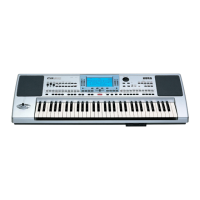
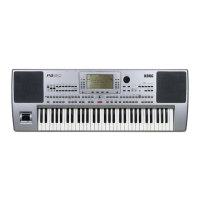
Korg PA 80 - User Manual

Korg PA 80
308 pages
Print Icon
To Next Page IconTo Next Page
Loading...
PART NUMBER: MAN0001064 © KORG Italy 2002-2005. All rights reserved
KORG ITALY S.p.A.
Via Cagiata, 85
I-60027 Osimo (An)
Italy
We
b servers
www.korg.co.jp
www
www.korg.co.uk
.korg.com
www.jam-ind.com
www.korgfr.net
www.korg.de
www.korg.it
USER'S
MANUAL
ENGLISH
Ver. 3.06
MAN0001064
E

Table of Contents

Other manuals for Korg PA 80

Questions and Answers

  • L
    Lori ChandlerAug 17, 2025
    Why is there no sound coming from my Korg PA 80?
    • B
      bjonesAug 17, 2025
      If your Korg Musical Instrument isn't producing any sound, here are a few things to check: * Ensure that your amp or mixer connections are correctly set up. * Verify that all components of your amplifying system are powered on. * Check that the MASTER VOLUME slider of the Pa80 is not set to “0”. * Confirm that the Local parameter is set to On, not Off. * Also, ensure the Speaker parameter is set to On, not Off. * If the Attack parameter value is too high, set it to a lower value to allow the sound to start faster. Additionally, check if the Volume parameter is too low and increase it if necessary. Finally, check if a jack is connected to the HEADPHONES connector, as this disables the internal speakers.
  • J
    Jerry SchroederAug 22, 2025
    What to do if my Korg Musical Instrument does not respond to MIDI messages?
    • Z
      zbishopAug 22, 2025
      If your Korg Musical Instrument is not responding to MIDI messages, ensure the following: * All MIDI cables are correctly connected. * The external device is transmitting through MIDI channels enabled to receive in the Pa80. * The MIDI IN Filters of the Pa80 do not prevent the reception of messages.
  • J
    Jonathan AdamsAug 25, 2025
    Why the selected Style or Song cannot start on my Korg Musical Instrument?
    • A
      Alicia VillaAug 26, 2025
      If the selected Style or Song on your Korg Musical Instrument cannot start, make sure that the Clock parameter is set to Int. If you are using the MIDI Clock of another device, you must set the MIDI Clock parameter to MIDI or PC TO HOST (depending on the port the Pa80 is hooked to the other device through) and make sure that the external device transmits MIDI Clock data.
  • F
    Frederick FrazierAug 28, 2025
    How to solve percussive instruments playing incorrectly on my Korg Musical Instrument?
    • M
      Maurice LawsonAug 28, 2025
      If the percussive instruments on your Korg Musical Instrument are not playing correctly, make sure that the Percussion and Drum Track is set to Drum Mode and the external device has not transposition applied.
  • M
    Melissa GallagherAug 30, 2025
    What to do if my Korg Musical Instrument is playing the wrong sounds?
    • V
      vjohnsonAug 30, 2025
      If your Korg Musical Instrument is playing the wrong sounds, load the appropriate data for the Song or the Style you wish to playback, especially if the USER banks contain modified data. Also, load the appropriate Drum Kits if one of the USER Drum Kits has been modified. Finally, if the Styles or Performances have been modified, load the appropriate data for them.
  • B
    Brooke JensenSep 2, 2025
    How to stop the sound if it does not stop on my Korg PA 80?
    • A
      Anna HensonSep 2, 2025
      If your Korg Musical Instrument sound does not stop, make sure that the damper switch polarity parameter is set correctly.
  • A
    Angela MendozaSep 4, 2025
    How to fix the lowest notes not playing on my Korg PA 80 Musical Instrument?
    • B
      Bradley ShieldsSep 5, 2025
      If the lowest notes are not playing on your Korg Musical Instrument, and the SPLIT button is lit, the keyboard is divided into Lower and Upper parts. Check if the Lower track is muted and, if so, unmute it.
  • D
    Dominique WilliamsSep 7, 2025
    Why can't I format a floppy disk on my Korg PA 80 Musical Instrument?
    • J
      jasonprestonSep 7, 2025
      If you cannot format a floppy disk on your Korg Musical Instrument, ensure that you are using a 3.5 inch 2DD or 2HD floppy disk, as these are the required types. Also, verify that the disk is inserted correctly and that the write protect tab is not in the protect position.
  • M
    msolisSep 10, 2025
    What to do if I cannot save data to a floppy disk from my Korg PA 80 Musical Instrument?
    • A
      Alyssa FisherSep 10, 2025
      If you cannot save data to a floppy disk using your Korg Musical Instrument, check if the disk is formatted. Also, ensure the disk is inserted correctly and that the write protect tab is not in the protect position.
  • M
    myerschelseaSep 10, 2025
    How to fix a Korg PA 80 that won't turn on?
    • J
      jonathanwilliamsSep 12, 2025
      If your Korg Musical Instrument is not turning on, please check the following: 1. Ensure the power cable is securely plugged into both the outlet and the connector on the back of the instrument. 2. Verify that the power cable is not damaged. 3. Confirm there are no issues with the mains. 4. Make sure the power switch is turned ON. If it still does not turn on, no answer.

Korg PA 80 Specifications

General IconGeneral
TypeArranger Workstation
Polyphony62 voices
Sound EngineHI (Hyper Integrated) synthesis system
ROM32 MB PCM ROM
Keyboard61 keys
Effects4 Stereo Master Effects
Styles304 styles
Style Tracks8 Style Tracks
Sequencer16-track
DisplayBacklit LCD
ConnectivityMIDI (In, Out, Thru)
Floppy Disk3.5 inch
OutputsL/Mono, R
InputsMic/Line input with gain control

Related product manuals