7
If the parameter value does not change
Sometimes, the parameter value might not change when you turn
the knob to left or right.
In this case, the KNOB MODE is set to “Catch.” With the “Catch”
setting, the value does not change until the knob position matches
the actual value of the parameter that you’re editing (the value
shown in the main display).
With the “Catch” setting, the knob and value change in tandem
only after the knob position has reached the actual value; this
prevents the sound from changing in an unnaturally sudden way.
With the “Jump” setting, moving the knob causes the actual value
to change immediately to the position of the knob.
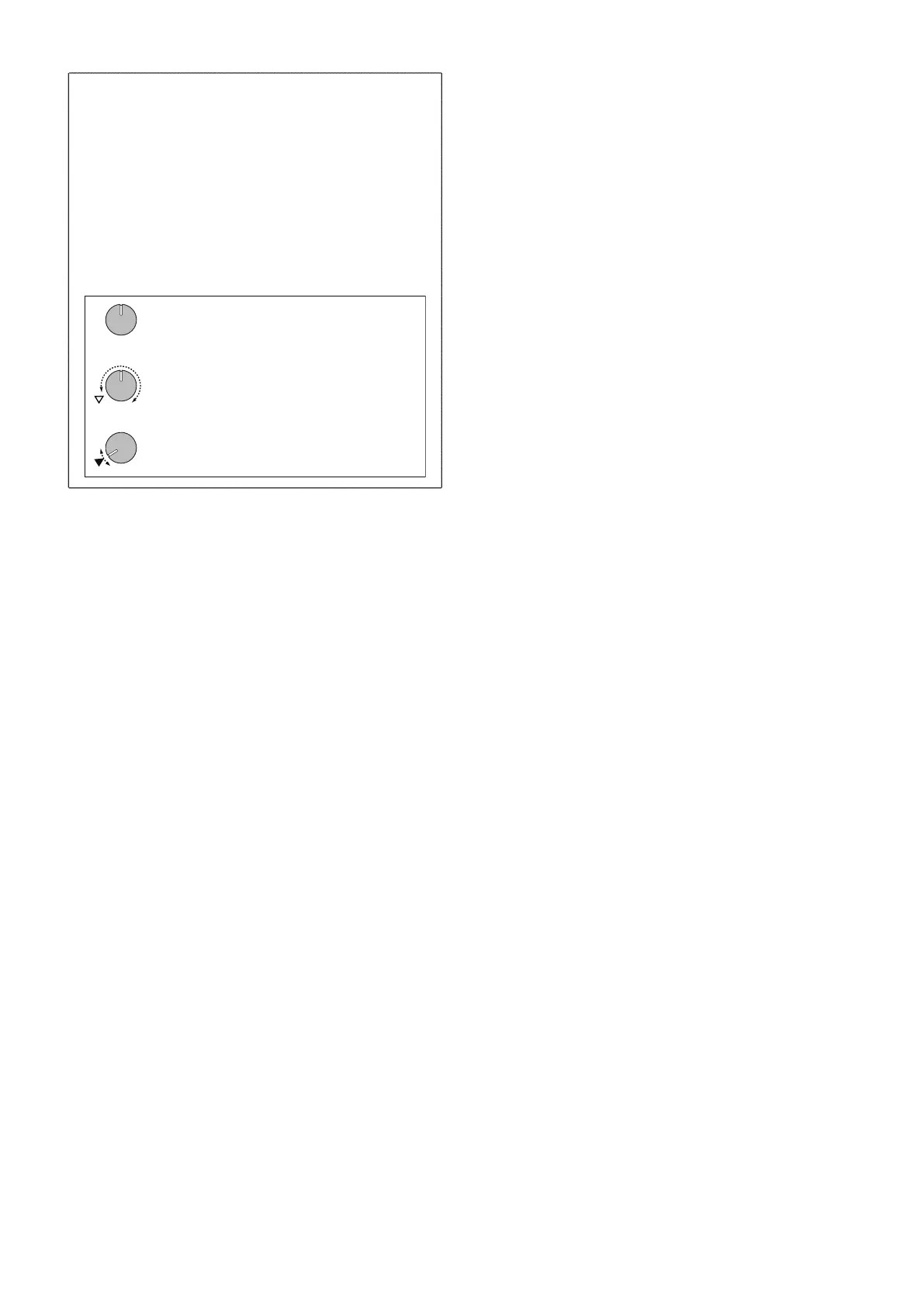
Suppose that you switch programs, and the actual value of the
parameter assigned to the knob is now at the position indicated by
the triangle in the illustration.
The parameter value will not change until you turn the knob to that
position.
Suppose that you've turned a knob to edit a certain parameter,
and the knob is in the position shown.
Once the knob has reached the position that corresponding to the
actual value, the parameter value and the knob position will be
linked, and the value will change as you turn the knob.
TOUCH SCALE RANGE ..............................[1 Oct, 2 Oct, 3 Oct, 4 Oct]
Specifies the pitch range that is assigned to the touch pad when
using the touch scale function.
TIP: To change the pitch range, press the Keyboard button and then
press a step button.
LCD CONTRAST ...................................................................... [1…25]
Adjusts the contrast of the text in the display.
AUDIO IN THRU .................................................................... [Off, On]
Specifies whether input from the Audio In jack is output from the
Audio Out L/R jacks.
BATTERY TYPE ............................................................[Ni-MH, Alkali]
Specifies the type of batteries that are being used.
Ni-MH: Choose this setting if you’re using nickel-metal hydride
batteries.
Alkali: Choose this setting if you’re using alkaline batteries.
AUTO POWER OFF ................................................. [Disable, 4 hours]
Specifies whether the power automatically turns off when no knobs
or buttons have been operated for a certain length of time. With the
factory settings, this is set to “4 hours.”
Disable: The auto power-off function is disabled. The power
does not turn off automatically.
4 hours: If four hours elapses without any of the electribe’s
buttons, knobs, or trigger pad being operated, the power turns
off automatically.
TIP: Even if a pattern is playing continuously, the power turns off
automatically if absolutely no operation has been performed
for the specified time. Choose the “Disable” setting if you don’t
want the power to turn off automatically.
POWER SAVE MODE ..................................... [Disable, Auto, Enable]
Enables or disables power save mode. When you use the electribe on
batteries, it operates in power save mode; the display backlight and
LEDs are dimmed.
Disable: Power save mode is disabled.
Auto:
Power save mode is enabled when using the electribe on
batteries, and disabled when using it with the AC adapter.
Enable: Power save mode is enabled at all times.
TIP: If the display backlight is dim, the screen might appear to
flicker depending on the surrounding lighting conditions.
6. DATA UTILITY
These functions let you write data to or read data from a memory
card, update the system, or return the instrument to the factory-set
state.
EXPORT PATTERN
This function exports the currently selected pattern to the memory
card.
The file is exported in the format of KORG\electribe\[pattern
number]_[pattern name].e2pat. If an identically-named file already
exists, it is overwritten.
TIP: If an identically-named file already exists, it is overwritten.
TIP: If the pattern is being edited, the edited form of the pattern is
exported even if you have not yet pressed the Write button to
save it.
EXPORT ALL PATTERN
This function exports all patterns and global parameters to the
memory card as a single file. The exported file is KORG\electribe\
electribe_allpattern.e2allpat on the memory card. If an identically-
named file already exists, it is overwritten.
IMPORT PATTERN
This function imports a pattern file (.e2pat file) that was exported by
the EXPORT PATTERN function.
IMPORT ALL PATTERN
From the memory card, this function imports all patterns and global
parameters contained in an .e2allpat file that was exported by the
EXPORT ALL PATTERN function.
SELECT SOURCE ......................................................... [Card, Sync In]
Selects the import source. You can select either the memory card
or data input from the Sync In jack. If importing from the
memory card, specify an .e2pat format file.
INITIALIZE PATTERN
This function initializes all data of the currently selected pattern.
Each part’s sound data and sequence data including motion se-
quence data, as well as the tempo, length, and beat are reset to the
initial state.
EXPORT AUDIO
This function exports the currently selected pattern to the memory
card as WAV files.
The files are exported to the KORG\electribe\[pattern number]_
[pattern name] Project\Audio folder of the memory card.
SELECT TYPE ............................. [Ableton Live Set, WAV File Only]
Selects the file format that is exported.
Ableton Live Set: In addition to the WAV files, an Ableton live
project file (.als file) is also exported.
If there are more than nine parts in which the trigger is turned
on for any step, a separate Lite.als file for Ableton Live Lite is
also exported.
TIP: The .als file for Ableton Live Lite is a project file containing
up to eight parts in which a trigger-on has been recorded,
starting with part 1.
WAV File Only: Only WAV files are exported. An Ableton Live
project file is not exported.
EXPORT P.SET AUDIO
Using this function, patterns that are registered as a pattern set can
be exported as WAV files.
Specify the range of set numbers for which patterns registered as a
pattern set are exported as WAV files.
The files are exported to the KORG\electribe\PatternSet Project\
Audio folder of the memory card.


 To Next Page
 Loading...