146
Factory Data
Style Elements
STYLE ELEMENTS
Note: You can remotely select the various Style Elements on the Pa50SD, by sending it Program Change messages on the Control chan-
nel (see page 127).
SINGLE TOUCH SETTINGS (STS)
Note: You can remotely select Single Touch Settings (STS) on the Pa50SD, by sending it Bank Select MSB (CC#0), Bank Select LSB
(CC#32) and Program Change messages on the Control channel (see page 127). If a Style is already selected, just send the Program
Change message.
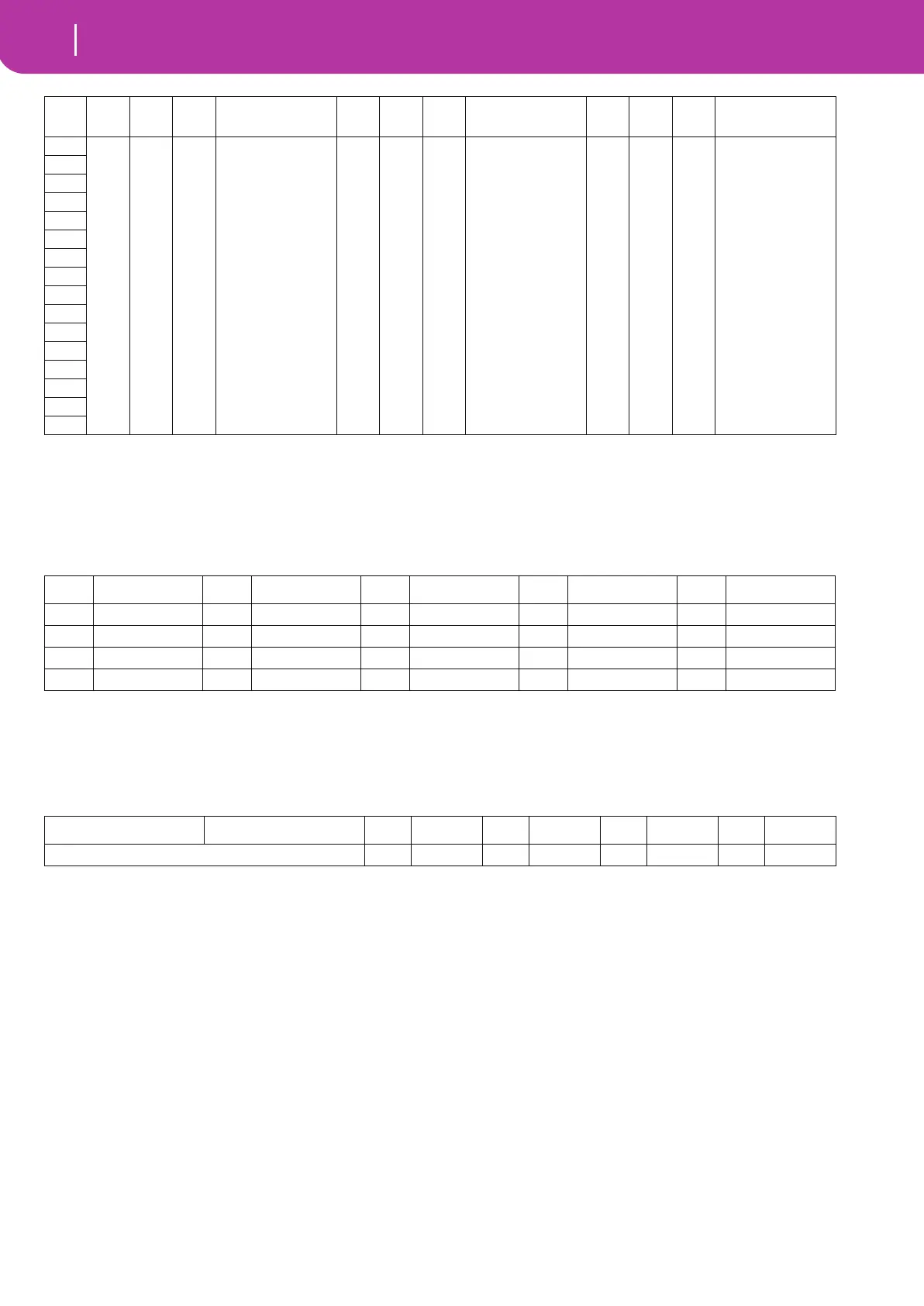
# CC#0 CC#32 PC
Bank: Direct SD
Page 1-2
CC#0 CC#32 PC
Bank: Direct SD
Page 3-4
CC#0 CC#32 PC
Bank: Direct SD
Page 5-6
1 0 29 0-15 *.SET 0 30 0-15 *.SET 0 31 0-15 *.SET
2
3
4
5
6
7
8
9
10
11
12
13
14
15
16
PC Style Element PC Style Element PC Style Element PC Style Element PC Style Element
80 Var.1 81 Var.2 82 Var.3 83 Var.4 84 Intro 1
85 Intro 2 86 Fill 1 87 Fill 2 88 Ending 1 89 Ending 2
90 Break/Count IN 91 Fade IN/OUT 92 Memory 93 Bass Inversion 94 Manual Bass
95 Tempo Lock 96 Single Touch 97 Style Change
CC#0 CC#32 PC STS PC STS PC STS PC STS
The same as the Style to which the STS pertains 64 STS 1 65 STS 2 66 STS 3 66 STS 4


 To Next Page