EasyManua.ls Logo

Korg Pitchblack XS - User Manual

Korg Pitchblack XS
8 pages
Print Icon
To Next Page IconTo Next Page
Loading...
CHROMATIC PEDAL TUNER
PB-XS
E 1
Owner's Manual

Other manuals for Korg Pitchblack XS

Question and Answer IconNeed help?

Do you have a question about the Korg Pitchblack XS and is the answer not in the manual?

Summary

Korg Pitchblack XS Connections

DC 9 V IN Jack Connection

Connect a separately sold AC adapter (9 V, 600 mA or greater) to this jack.

Input Jack Connection

Connect a cable from your instrument to the tuner's INPUT jack. Power turns on upon connection.

Bypass Jack Connection

Connect a cable from the BYPASS jack to your other effect pedals or amp.

Tuning Procedure

Reference Pitch Settings

Display Mode Settings

Regular Display Mode

Tune until the LED at the center of the meter lights up brightly.

Strobe Display Mode

Tune until the LEDs stop running for higher precision.

Half-Strobe Display Mode

Tune until LEDs stop running and only the center LED is lit.

Bright Mode Settings

Specifications

Overview

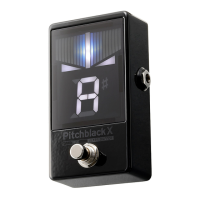
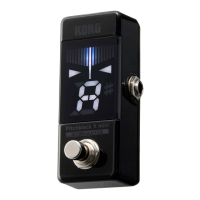
The Korg Pitchblack XS is a chromatic pedal tuner designed for musicians, offering precise and versatile tuning capabilities in a compact stompbox format. Its primary function is to accurately detect and display the pitch of an instrument, allowing for silent tuning on stage or in the studio.

Function Description

The Pitchblack XS operates as a chromatic tuner, capable of detecting notes across a wide range (E0 to C8). It features a clear LED meter and a note name display, providing visual feedback for tuning. A key feature is its TUNER ON/OFF switch, which activates the tuner and mutes the instrument's signal for silent tuning, preventing unwanted sound from being sent to an amplifier or mixer. When the tuner is off, the signal passes through to the BYPASS jack.

The tuner offers a selectable reference pitch, allowing users to calibrate the A4 note from 436 Hz to 445 Hz in 1 Hz steps. This flexibility is crucial for musicians who need to tune to different standards or ensembles. The factory default for the reference pitch is 440 Hz.

A significant aspect of the Pitchblack XS is its BUFFERED/TRUE BYPASS switch. This allows users to choose between two bypass modes:

  • True Bypass: In this mode, the input audio is outputted as-is, without any alteration to the sound. This is preferred by some musicians who want to maintain the purest signal path when the tuner is disengaged.
  • Ultra-Buffer Bypass: This mode utilizes an ultra-buffer circuit that expands the dynamic range of the sound. This is particularly beneficial when using long cables or multiple pedals in a signal chain, as it helps to prevent signal degradation and "thinning out" of the sound.

The tuner also provides four distinct display modes, each offering a different visual representation of the tuning status:

  • Regular Mode: The most straightforward mode, where the LED at the center of the meter lights up brightly when the instrument is in tune. LEDs light up from the center to the right for sharp pitches and from the center to the left for flat pitches.
  • Strobe Mode: This mode offers higher precision. Users tune until the LEDs stop running. LEDs run from left to right for high pitches and from right to left for low pitches.
  • Half-Strobe Mode: In this mode, users tune until the LEDs stop running and only the center LED is lit. Right-hand LEDs strobe for high pitches, and left-hand LEDs strobe for low pitches.
  • Mirror Mode: Users tune until the center LED lights up brightly. The extent of pitch variation is indicated by how many LEDs light up towards either side of the center.

These display modes cater to different preferences and levels of tuning accuracy required by musicians.

Usage Features

The Pitchblack XS is designed for ease of use in a pedalboard setup. It connects inline with an instrument and other effects pedals or an amplifier. Power is supplied via a DC 9V IN jack, requiring a separately sold AC adapter. The tuner powers on automatically when a cable is connected to the INPUT jack, though it requires a press of the TUNER ON/OFF switch to enter tuner mode.

To tune an instrument:

  1. Connect the instrument to the INPUT jack and other pedals/amp to the BYPASS jack.
  2. Press the TUNER ON/OFF switch to activate the tuner. The LED meter and note name display will light up, and the signal will be muted.
  3. If desired, adjust the reference pitch using the CALIB button. The current setting blinks, and subsequent presses cycle through available pitches.
  4. Select a preferred display mode using the DISPLAY/BRIGHT button. The current setting blinks, and subsequent presses cycle through the four modes.
  5. Play a single note on the instrument. The note name display will show the closest note.
  6. Adjust the instrument's tuning according to the visual feedback on the LED meter, aiming for the "in tune" indication specific to the chosen display mode.
  7. Once tuning is complete, press the TUNER ON/OFF switch again to turn off the tuner. The display will go dark, and the signal will be unmuted and sent to the BYPASS jack.

The Pitchblack XS also includes a BRIGHT mode, which allows users to adjust the brightness of the display in two levels. This is useful for optimizing visibility in various lighting conditions, from bright outdoor stages to dimly lit venues. The factory default sets the indicator to a brighter setting. To change the brightness, hold down the DISPLAY/BRIGHT button.

Maintenance Features

The Pitchblack XS is designed for reliability and convenience, with several features that minimize the need for frequent adjustments:

  • Setting Preservation: The reference pitch, display mode, and bright mode settings are automatically preserved even if the AC adapter is removed. This means users do not need to reconfigure their preferred settings every time they power on the device.
  • Factory Reset: For troubleshooting or to return to default settings, the tuner can be easily reset. By holding down the CALIB button and pressing the TUNER ON/OFF switch when turning on the tuner, all settings (reference pitch = 440 Hz, display mode = regular, bright mode = brighter) will revert to their factory defaults.
  • Robust Construction: While not explicitly detailed in the provided text, the pedal format typically implies a durable enclosure suitable for stage use.
  • Connection Safety: The manual emphasizes the importance of turning off all devices before making connections to prevent damage, a standard best practice for audio equipment. It also clarifies that the INPUT and BYPASS jacks are mono, and stereo (TRS) cables will not work, helping users avoid common connection errors.
  • Power Supply Guidance: The manual advises using only Korg-recommended AC adapters to prevent malfunction or damage, highlighting the importance of proper power supply for the device's longevity.

Korg Pitchblack XS Specifications

Power IconPower
power supplyAC adapter (9 V, 600 mA or greater)
current consumptionmaximum 40 mA
input impedance1 M-ohm
DC IN jack voltage9 V
Audio Specifications IconAudio Specifications
detection rangeE0 (20.60 Hz)–C8 (4, 186 Hz)
reference pitchA4=436–445 Hz
detection accuracy+/−0.1 cent
Weight and Dimensions IconWeight and Dimensions
dimensions70 × 80 × 47 mm
dimensions (inches)2.76″ × 3.15″ × 1.85″
weight198 g
weight (ounces)6.98 oz.

Related product manuals