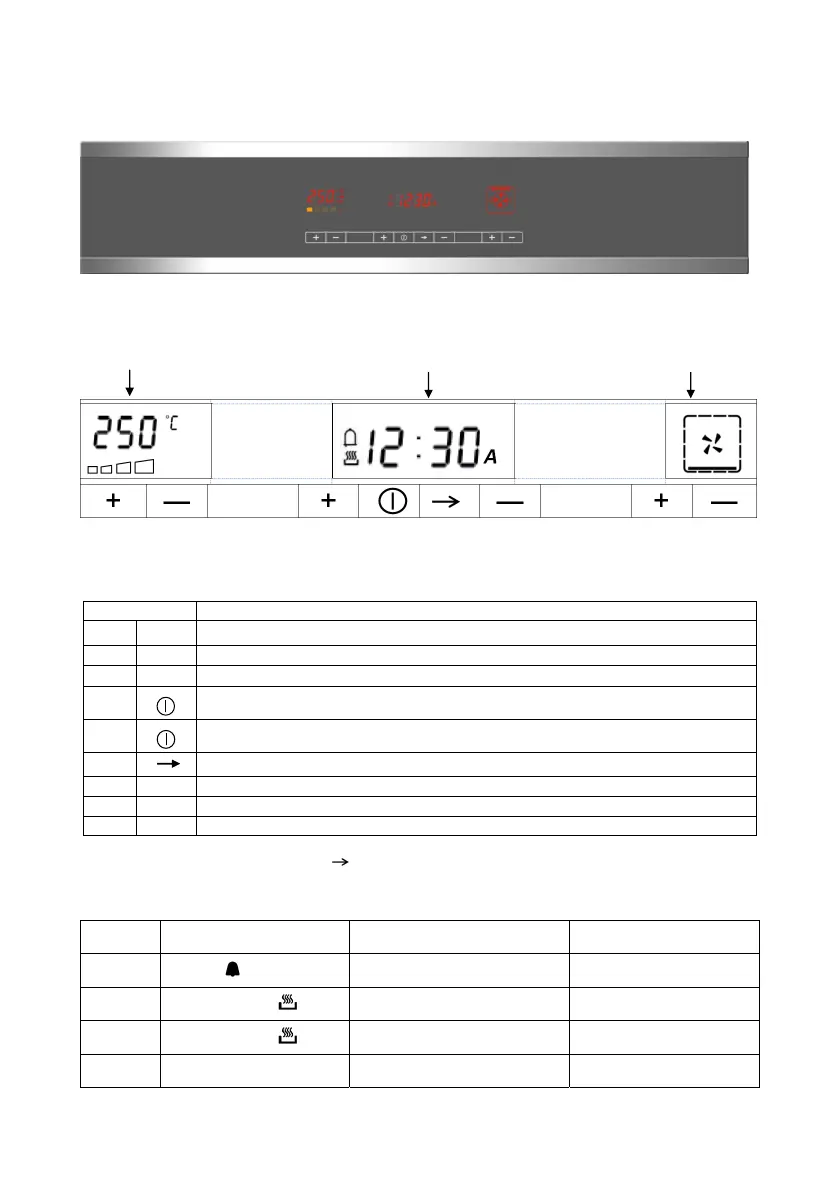
DESCRIPTION OF THE CONTROL PANEL
1 2 3 4 5 6 7 8
ELECTRONIC PROGRAMMER FULL TOUCH CONTROL
Temperature display (A) Timer display (B) Cooking progr. display (C)
1 2 3 4 5 6 7 8
Figure 3.
KEY FUNCTION
1 + Preheating mode: On / Off
2 - Temperature Edit
3 + Increasing values (temperatures, timer, programs)
4
Turning On / Off
4
Children Lock if pressed for > 4 seconds
5 Timer Edit menu (Minute minder, cooking time, end of cooking)
6 - Decreasing values (temperatures, timer, programs)
7 + Increasing programs values
8 - Decreasing programs values
SEQUENCE ASSOCIATED to the key (5)
At every key press the menu sequence is scrolled in the following way:
IMPULSE Display after press Display after 2 seconds User Action
1
Bell Icon
“ 0:00” as default value,
otherwise the current value
Timer editing
2
Cooking Pot Icon
[ dur ]
“ 0:00” as default value,
otherwise the current value
Cooking Time editing
3
Cooking Pot Icon
[ End ]
Current time as default value,
otherwise the current value
End of Cooking editing
Pressed
> 4 Sec.
[ Hour ] Current time Current time Setting


 To Next Page