5
GENERAL OPERATION
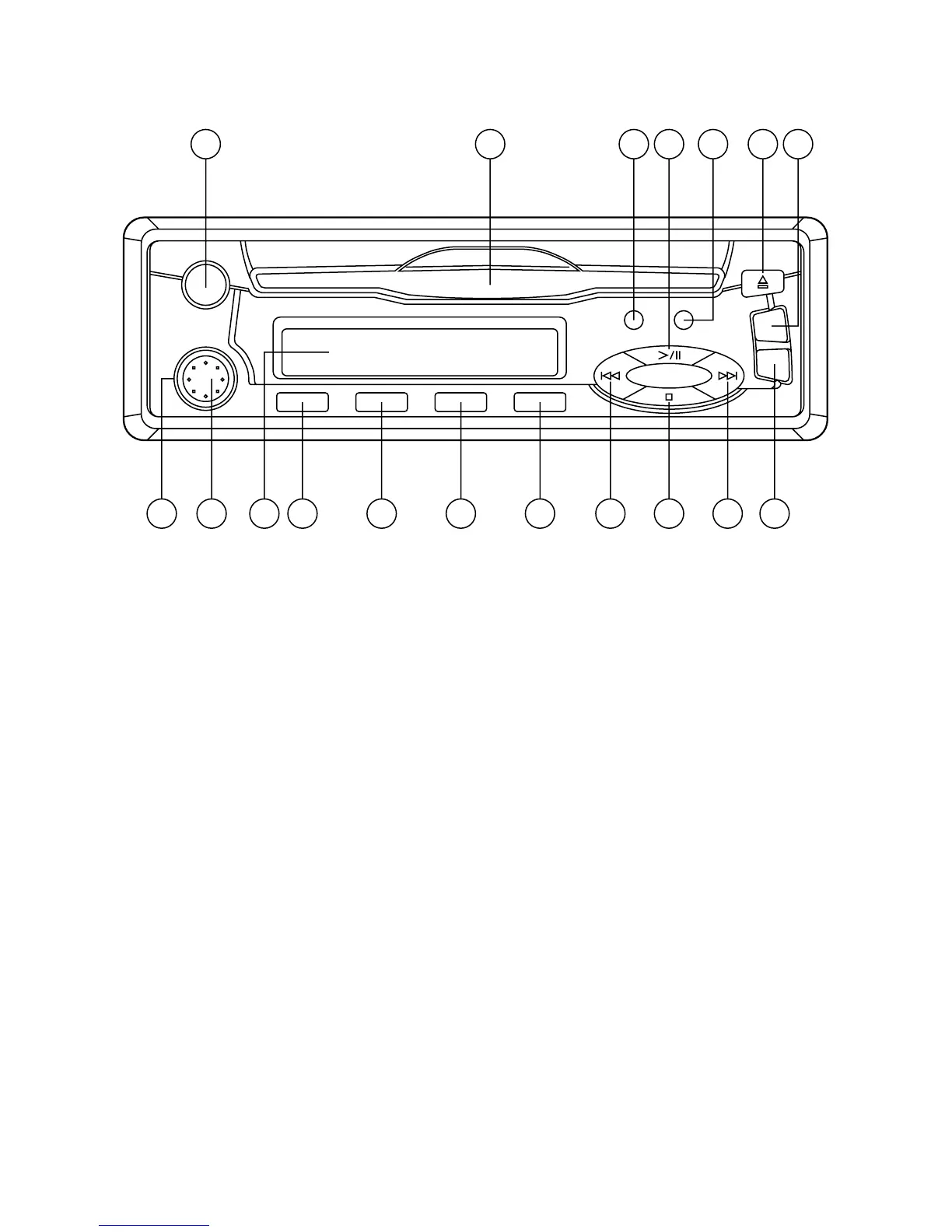
• ON/OFF
Rotate the inner knob (1) to turn on or off the unit and adjust the sound output level.
• BALANCE
Rotate the outer knob (2) to adjust sound balance between left channel and right
channel.
• SELECT MODE
Press TUNER button (4) to switch to radio mode. When the compact disc is
inserted in the disc slot, press CD button (10) to switch to CD mode.
• LIQUID CRYSTAL DISPLAY
Exhibit current frequency and activating functions on the display (18).
Note: If the unit has FADER function, the operation of knobs (1), (2) and (3) have
some changes as below:
- ON/VOL push BAL
Rotate the inner knob (1) to turn on or off the unit and adjust the sound
output level. Push inward and rotate the knob to adjust the sound balance
between left and right speakers.
- FADER
Rotate the outer knob (2) to adjust the sound balance between front and rear
speakers.
- BASS push TRE
Rotate the knob (3) to adjust the sound quality of low frequency level.
Push inward and rotate the knob to adjust the sound quality of high frequency
level.
9 123 11 13 10
4
6147
8
16
5
15
18
17
1
2



 To Next Page