05 06
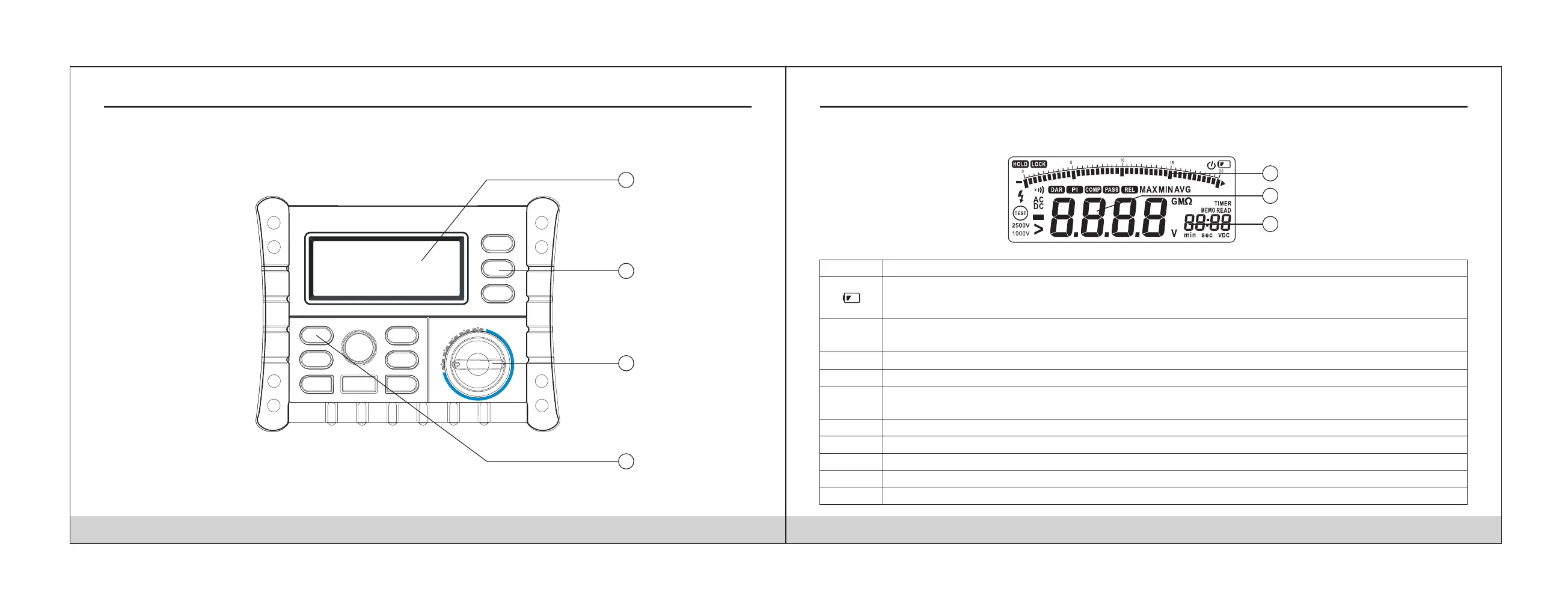
Front Panel
Indicator
Description
LOCK
Screen
Hold
function, the meter do not update display.
Introduction
1
2
3
4
Button
Button
Rotary Switch
Analog Bar
1
2
3
Primary Screen
SecondaryScreen
Display Screen
Low battery Indicates when it is time to replace the battery.
To avoid false readings, which could lead to possible electric shock or personal injury, replace the battery as
soon as the low battery indicator appears.
Indicates a test lock will be applied the next time you press Test Button on the meter, the test lock acts to hold
down the button until you press Test Button again.
HOLD
PASS
Compare function is selected
When compare function is selected, when the measuring value between upper limited value and lower limited
value, display this sign.
COMP
Compare function is selected
REL
In insulation test mode, display the DAR value
DAR
In insulation test mode, display the PI value
PI
Timer function is selected
TIMER
Store function is selected
MEMO
HOLD


 To Next Page