KRAMER: SIMPLE CREATIVE TECHNOLOGY
Using Your VGA/UXGA Distributor
6
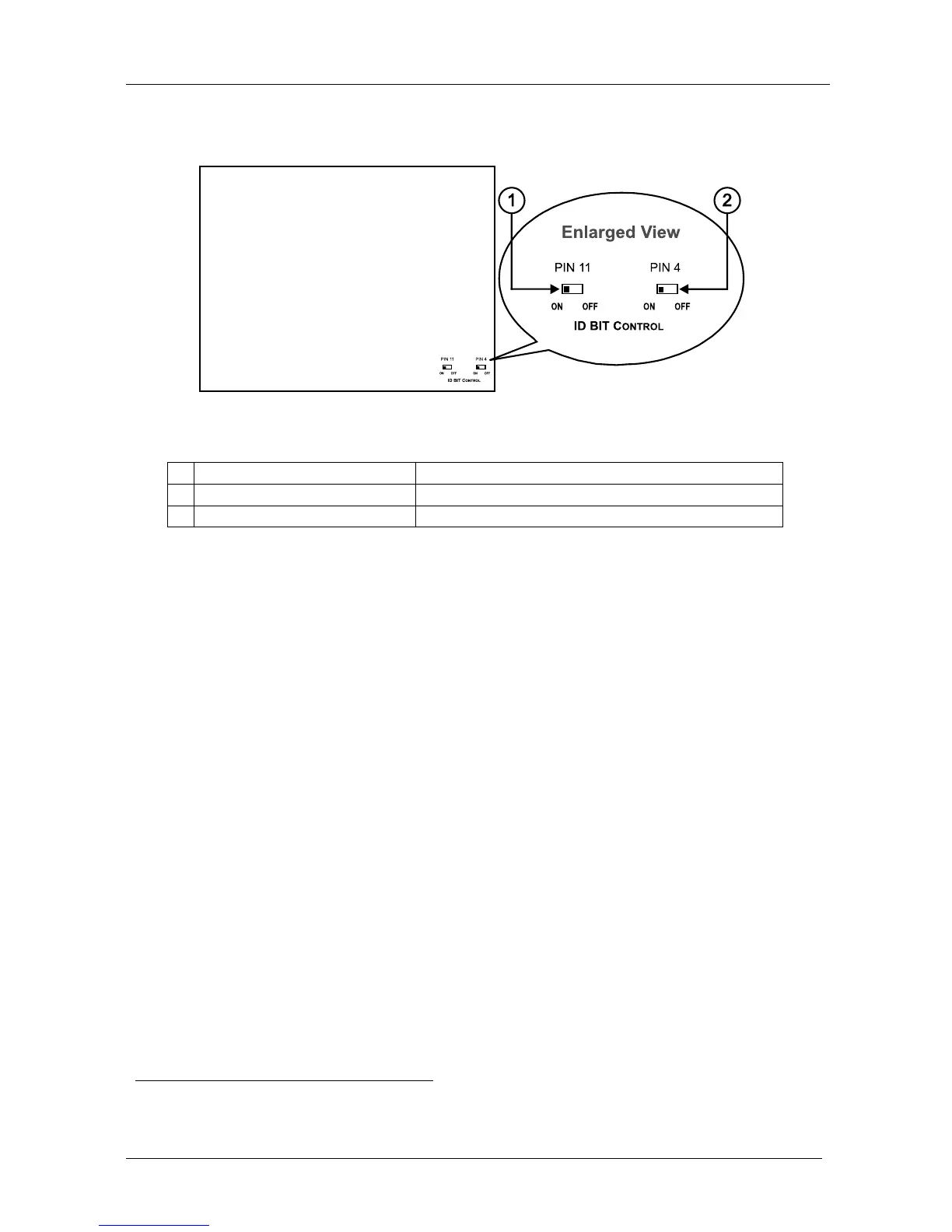
4.4 Your VP-3xl, VP-4xl, and VP-5xl VGA/UXGA Distributor Underside
Figure 4 and Table 7 define the underside ID BIT Control switches:
Figure 4: VGA/UXGA Distributor Underside
Table 7: VGA/UXGA Distributor Underside Features
# Feature Function
1 PIN 11 ID BIT CONTROL Switch
Slide to the left to set to ON
1
; to the right to set to OFF
2 PIN 4 ID BIT CONTROL Switch Slide to the left to set to ON
1
; to the right to set to OFF
5 Using Your VGA/UXGA Distributor
You can use any VGA/UXGA Distributor—the VP-3xl, the VP-4xl, and/or the
VP-5xl—to output the VGA/UXGA signal from a laptop or a PC.
To output the XGA signal from a laptop’s digital graphics card to up to 5
monitors using a VP-5xl (as the example in Figure 5 illustrates), do the following:
1. Connect an XGA source (for example, a laptop’s digital graphics card) to
the INPUT HD15F connector.
2. Connect the OUTPUT HD15F connectors to up to 5 acceptors, as follows:
Connect the OUTPUT 1 connector to an acceptor (for example, Monitor 1)
Connect the OUTPUT 2 connector to an acceptor (for example, Monitor 2)
Connect the OUTPUT 3 connector to an acceptor (for example, Monitor 3)
Connect the OUTPUT 4 connector to an acceptor (for example, Monitor 4)
Connect the OUTPUT 5 connector to an acceptor (for example, Monitor 5)
3. On the underside of the VP-3xl / VP-4xl / VP-5xl:
Slide the PIN 11 ID BIT CONTROL switch to the left to set to ON
Slide the PIN 4 ID BIT CONTROL switch to the left to set to ON
4. Connect the power cord
2
(not illustrated in Figure 5).
1 The default. Enabling the notebook or laptop to output a VGA signal to an external VGA monitor
2 We recommend that you use only the power cord that is supplied with this machine


 To Next Page