9
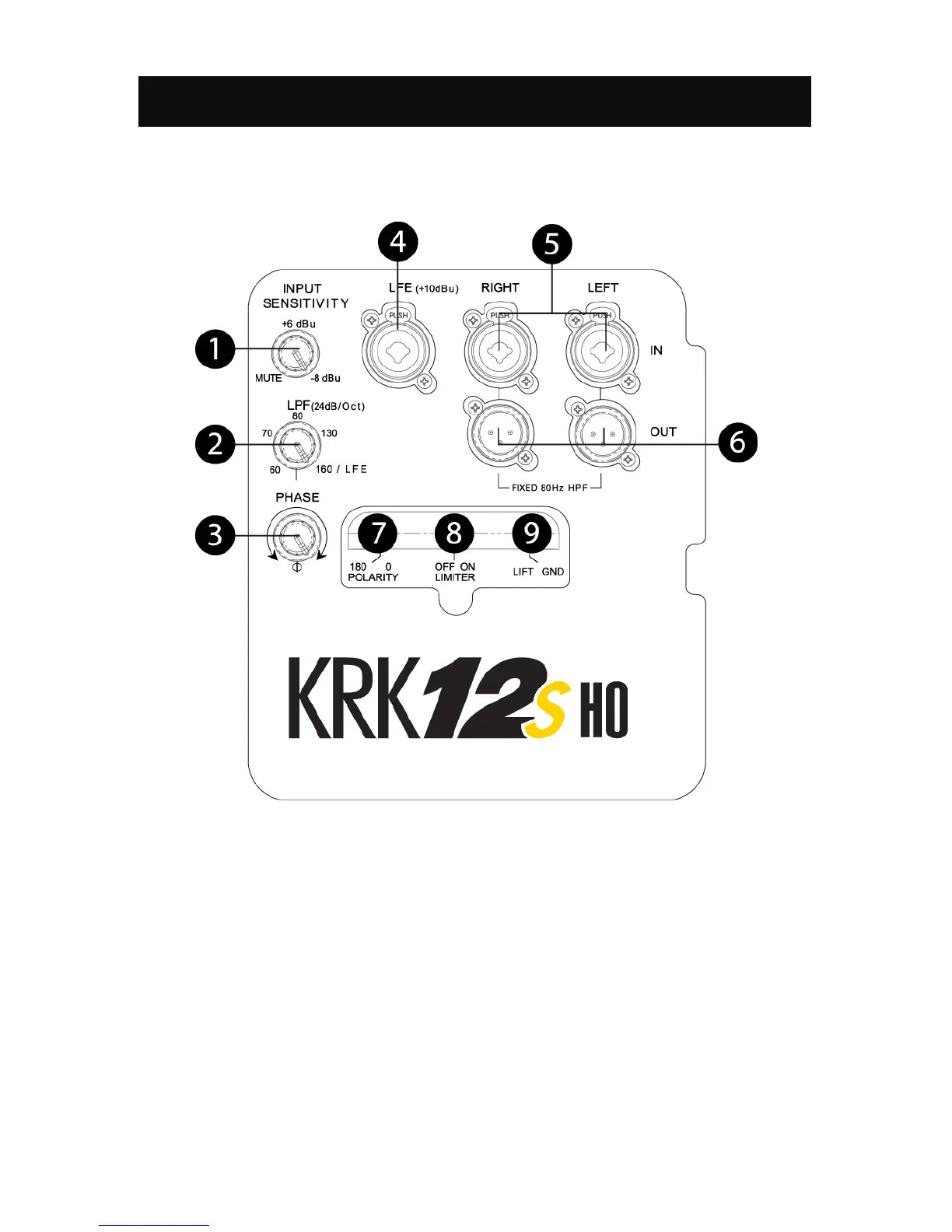
System Controls – Rear Panel
Before installing and connecting the KRK12sHO, please read the System Controls descriptions so you are
familiar with the main concepts.
Figure 2.1 – System Controls on the Rear Panel
(1) INPUT SENSITIVITY
The input sensitivity should be adjusted to match the maximum audio output of the device that is
connected to the KRK12sHO input. Consult the instruction manual of the audio equipment, such as the
mixing console, that is connected to the input of the KRK12sHO.
(2) LOW-PASS FREQUENCY ADJUSTMENT
Low-Pass Frequency adjustment is performed through a continuously variable adjustment. The range is
from 60Hz to 160Hz. If you are using the Subwoofer Line Outs for the monitors, you will want to place this
at the 80Hz position so that the subwoofer only produces frequencies below this point. The Subwoofer


 To Next Page