13
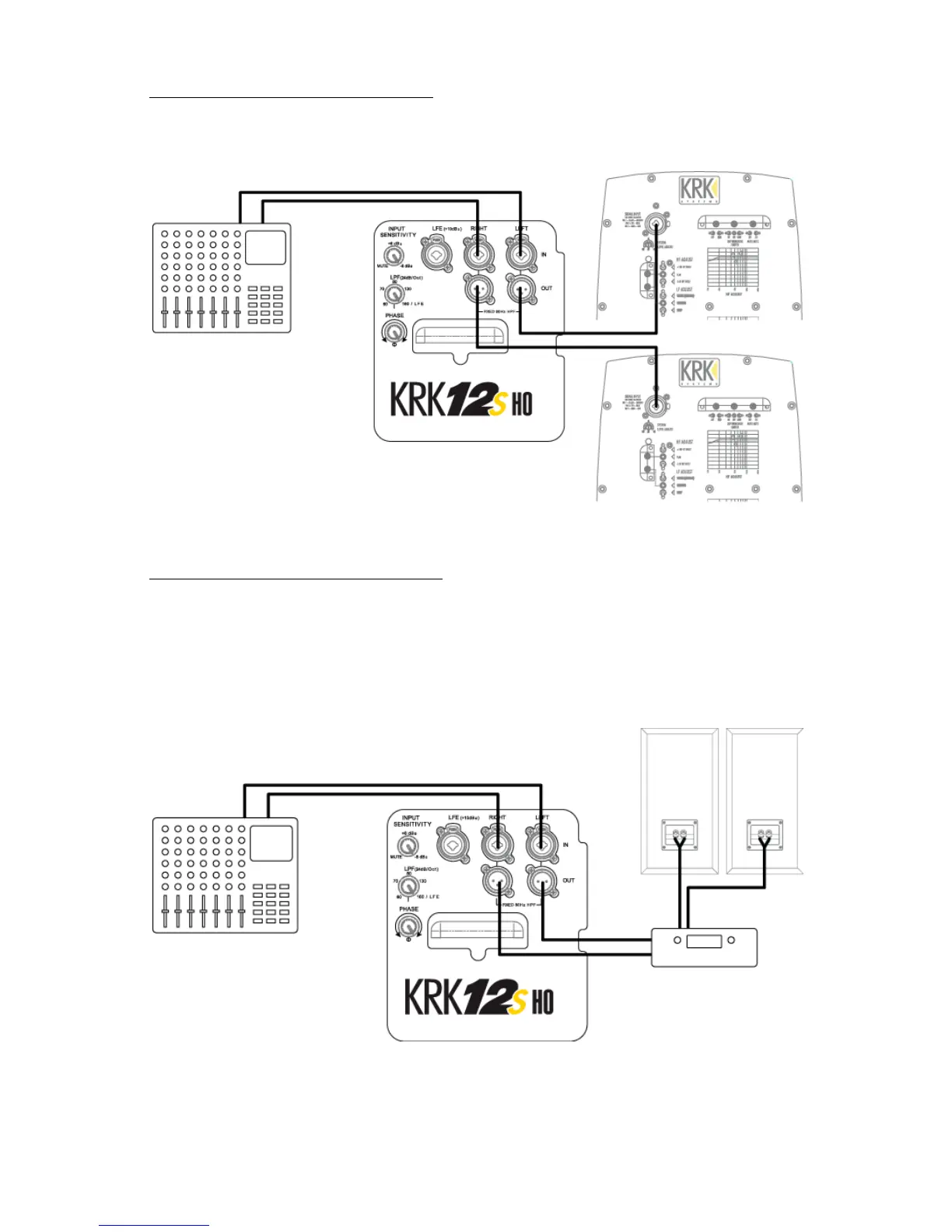
Subwoofer Hook Up with Active Monitors
If you are using active (powered) monitors, use an XLR or ¼” cable to connect the output of the subwoofer
directly to the input of the monitor. The output marked "Left" should go to your left monitor, and the
output marked "Right" should go to your right monitor.
Figure 3.1 – Subwoofer Hookup with Active Studio Monitors
Subwoofer Hook Up with Passive Monitors
If you are using passive (non-powered) monitors, use an XLR or ¼” cable to connect the output of the
subwoofer directly to the input of the monitor’s external power amplifier, and then connect the power
amplifier speaker output to the monitors.
Do not connect the speaker output of the monitor’s external amplifier to the input of the subwoofer. This
will cause permanent damage.
Figure 3.2 – Subwoofer Hookup with Passive Studio Monitors



 To Next Page