GB-5
• Check whether the device name/network name
in the network configuration is the same as the
device name saved in the control unit.
1
? The display on the control unit blinks and
indicates
1
.
! An invalid address has been set on theBCM.
! The address check has been activated on the
control unit by setting parameter A080=1.
• Check whether the BCM address is in the permit-
ted address range (001toFEF).
• Check the value of parameterA080 and adjust
it if necessary.
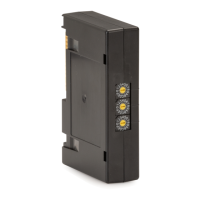
• Adjust the code switch settings on the BCM to
the device name assigned in the network con-
figuration.
2
? The display on the control unit blinks and
indicates
2
.
! The BCM has received an incorrect configuration
from the controller.
• Check whether the appropriate GSD/EDS file
has been read into the automation system’s
engineering tool.
• Check the device configuration.
3
? The display on the control unit blinks and
indicates
3
.
! The device name for the control unit (BCU) in
the engineering tool is invalid or has not been
entered.
! The address check has been activated on the
control unit by setting parameter A080=1.
▷ Device name on delivery:
e.g. for BCU 460 = not-assigned-bcu-460-xxx
(xxx = address in the range 00 to FEF).
▷
The device name must at least consist of the
expression:
e.g. for BCU 460 = bcu-460-xxx.
Depending on the control unit (BCU) in use,
the default value of the address will change,
see also page 4 (Parameter A080 = 2:
Fieldbus communication without address check).
• Delete the expression “not-assigned-” in the
engineering tool or replace it with an individual
name (e.g.Furnacezone-).
• Check whether the device name name in the
network configuration is the same as the device
name saved in the control unit.
• Check the value of parameterA080 and adjust
it if necessary.
4
? The display on the control unit blinks and
indicates
4
.
! The controller is set to Stop.
• Start the controller.
EE
? The display on the control unit blinks and
indicates
E E
.
! Internal communication with bus module has
suffered a fault.
• Connected control elements must be equipped
with protective circuits in accordance with the
manufacturer’s instructions.
▷
This prevents high voltage peaks which can
cause malfunctioning of the BCU.
• Use interference-suppressed terminal boots
(1kΩ).
• If the fault cannot be remedied by doing this,
remove the unit and return it to the manufacturer
for inspection.
! Bus module is defective.
• Replace the bus module.
For other control unit fault messages, see
BCU46x,480 operating instructions, section
entitled “Assistance in the event of malfunction”.
Technical data
Ambient conditions
Avoid direct sunlight or radiation from red-hot
surfaces on the unit.
Avoid corrosive influences, e.g. salty ambient air
or SO
2
.
The unit may only be stored/installed in enclosed
rooms/buildings.
This unit is not suitable for cleaning with a high-
pressure cleaner and/or cleaning products.
Ambient temperature:
-20 to +70°C (-4 to +158°F),
no condensation permitted.
Transport temperature = ambient temperature.
Storage temperature: -20 to +70°C (-4 to +158°F).
Enclosure: IP 20 pursuant to IEC 529.
Installation location: min. IP 65 (for installation in
BCU4xx).
Permitted operating altitude: < 2000 m AMSL.


 To Next Page
 Loading...