EasyManua.ls Logo

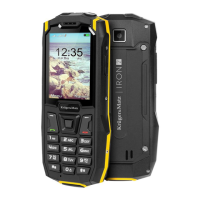
Krüger & Matz IRON 2 - User Manual

Krüger & Matz IRON 2
57 pages
Go to English
Print Icon
To Next Page IconTo Next Page
Loading...
Mobile phone
KM0459 / KM0460
USER’S MANUAL
EN DE
PL
RO
RO

Questions and Answers

  • L
    Lisa WardJul 28, 2025
    What to do if my Krüger & Matz IRON 2 cannot be powered on?
    • N
      nathaniel93Jul 28, 2025
      If your Krüger & Matz Cell Phone won't power on, the battery might be completely discharged. In this case, charge the battery. Alternatively, the battery might be installed improperly; ensure it's correctly installed.
  • K
    Kathryn LynchAug 5, 2025
    Why my Krüger & Matz Cell Phone battery cannot be charged?
    • S
      seancooperAug 5, 2025
      If your Krüger & Matz Cell Phone is not charging, first ensure that the charging voltage matches the voltage range indicated on the charger. Also, check that the charger plug is making good contact.
  • L
    Loretta HurleyAug 11, 2025
    What to do if my Krüger & Matz Cell Phone shows a SIM card error?
    • L
      lisahollowayAug 11, 2025
      If you're experiencing a SIM card error with your Krüger & Matz Cell Phone, it could be due to several reasons. The SIM card might be damaged, in which case you should contact your network service provider. Alternatively, the SIM card may not be inserted correctly; double-check its placement. Lastly, the metal part of the SIM card could be dirty; try cleaning it gently with a clean cloth.
  • B
    Brenda FoleyAug 20, 2025
    How to improve poor signal quality on Krüger & Matz Cell Phone?
    • L
      lisa21Aug 20, 2025
      If you are experiencing poor signal quality on your Krüger & Matz Cell Phone, try moving to a location where signals can be effectively transmitted.

Summary

Safety Information

Safety Warning and Attentions

Important warnings and precautions for safe operation of the mobile phone.

Product Description

Buttons Function

Getting Started

Battery, SIM Cards and Memory Card Installation

Instructions for installing the battery, SIM cards, and microSD card.

Ingress Protection Rating

Maintenance After Removing From Water

Procedures for drying and cleaning the phone after exposure to water.

Charging

Operation

Turn On;Off

How to turn the phone on and off using the end call button.

Phone Lock

Steps to lock and unlock the phone's keypad.

Language Selection

How to change the device's language settings.

Dialing Calls

Instructions for making phone calls using the keypad or contact list.

Answering;Ending;Rejecting Incoming Calls

How to answer, end, or reject incoming calls.

Messages

How to display and create text messages.

Contacts

Information on saving and managing contacts.

Adding New Contact

Procedure for adding a new contact to the phone.

Phonebook Settings

Settings for speed dial and other phonebook features.

Call Center

Accessing and managing call history (dialed, received, missed).

Power Bank Function

Using the phone as a portable charging device.

Internet Service

Connecting to the internet and using online features.

Cleaning

Instructions for cleaning the mobile phone safely.

Troubleshooting

Specification

Correct Disposal of This Product

Krüger & Matz IRON 2 Specifications

General IconGeneral
BrandKrüger & Matz
ModelIRON 2
CategoryCell Phone
LanguageEnglish

Related product manuals