EasyManua.ls Logo

Krups EA89 Series - User Manual

Krups EA89 Series
56 pages
Print Icon
To Next Page IconTo Next Page
Loading...
www.krups.com
EN US KRUPS ELITE SERVICE HOTLINE: 800-526-5377
FR LIGNE SANS FRAIS: 1 800 418 3325
ES HOTLINE: (01800) 112 8325
8020001251-02 - 02.2018- Réalisation : Espace graphique
www.krups.com
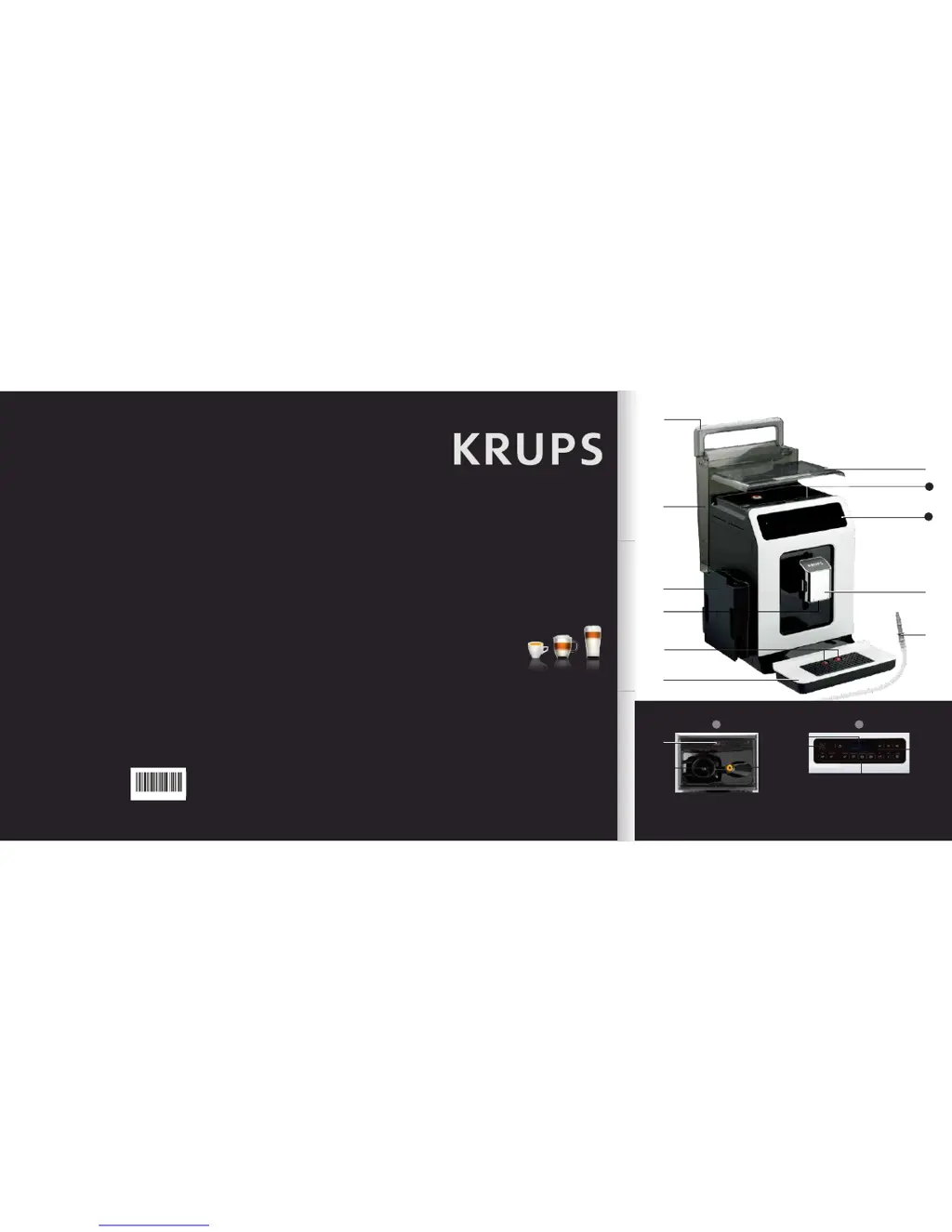
SUPER AUTOMATIC
SERIES EA89
ENFRES
A
I
B
C
E
D
H
G
F
1
2
1
L
K
2
J
M
O
O
8020001251-02
N

Questions and Answers

  • P
    paigecampbellAug 18, 2025
    How to fix a Krups Coffee Maker that won't turn on?
    • L
      Linda SmithAug 18, 2025
      If your Krups Coffee Maker doesn't switch on when you press the ON/OFF button (for at least 3 seconds), check your fuses and outlets. Also, ensure that the two power plugs are correctly inserted into the socket.
  • K
    kenneth30Aug 20, 2025
    How to clean a blocked steam nozzle on Krups EA89?
    • W
      William CollinsAug 20, 2025
      If the steam nozzle on your Krups Coffee Maker is blocked, dismantle the nozzle from its support using the dismantling key. Replace the support without the nozzle. Start the rinse cycle for the One Touch Cappuccino block to remove any remaining deposits. Clean the steam nozzle, ensuring that the opening isn't obstructed by milk or limescale. Use the cleaning needle if necessary.
  • J
    jessica59Aug 23, 2025
    What to do if my Krups Coffee Maker displays a failure?
    • S
      suzanne18Aug 23, 2025
      If your Krups Coffee Maker displays a failure, freezes, or malfunctions, switch it off and unplug it. Remove the filter cartridge, wait one minute, and then restart the appliance. Ensure you press and hold the on/off button for at least 3 seconds when restarting.
  • J
    Jennifer RobertsAug 26, 2025
    Why is my Krups Coffee Maker One Touch Cappuccino not frothing milk?
    • J
      james01Aug 26, 2025
      If the One Touch Cappuccino block on your Krups Coffee Maker isn't sucking milk or produces little froth, check the following: * Ensure the block is correctly assembled, especially the connector in the milk tube. * Make sure the steam nozzle isn't blocked. * Verify the connector isn't blocked or dirty; soak it in hot water with dish soap, then rinse and dry. * Check the flexible pipe for blockages or twists and ensure it's properly inserted to prevent air leaks. * Ensure the pipe is fully immersed in the milk. * Rinse and clean the block. For best results, use fresh, pasteurized or UHT milk that has been recently opened, and use a cold container.
  • B
    Bryan BradyAug 27, 2025
    Why is there no steam coming from my Krups EA89 Coffee Maker steam nozzle?
    • J
      Justin CohenAug 28, 2025
      If no steam comes out of the steam nozzle on your Krups Coffee Maker, first ensure that the steam nozzle is not blocked, following the instructions for cleaning a blocked nozzle. If that doesn't work, empty the water tank and temporarily remove the Claris cartridge. Fill the water tank with mineral water with high calcium content (>100 mg/l) and run 5 to 10 steam cycles consecutively into a container until you get a continuous jet of steam. Then, put the cartridge back in the tank.
  • M
    Mrs. Janet SalazarAug 30, 2025
    Why does coffee dispense so slowly from my Krups EA89 Coffee Maker?
    • S
      Sharon AndradeAug 30, 2025
      If the coffee dispenses too slowly from your Krups Coffee Maker, turn the ‘fineness of grind’ adjustment dial to the right to make the ground coffee coarser, adjusting for the type of coffee you're using. You can also run one or several rinsing cycles.
  • W
    Wendy Miller DVMSep 2, 2025
    How to make my Krups EA89 espresso hotter?
    • J
      Jordan PerezSep 2, 2025
      If your espresso or coffee from the Krups Coffee Maker isn't hot enough, run a coffee circuit rinsing cycle before preparing your coffee. You can also increase the coffee temperature in the Settings menu and warm the cup by rinsing it with hot water before making the drink.
  • W
    William JonesSep 4, 2025
    Why does my Krups EA89 Coffee Maker still say the water tank is empty?
    • D
      Dr. Ronald Williams MDSep 4, 2025
      If the water tank has been filled on your Krups Coffee Maker, but the warning message is still displayed, check that the tank is installed correctly on the device. Ensure the float at the bottom of the tank moves freely; check and unblock the float if necessary.
  • M
    myersscottSep 7, 2025
    Why is the coffee from my Krups Coffee Maker too weak?
    • L
      Lucas HernandezSep 7, 2025
      If the coffee from your Krups Coffee Maker is too lightly colored or weak, avoid using oily, caramelized, or flavored coffee beans. Check that the coffee bean container has coffee and is dispensing correctly. Decrease the preparation volume and increase the drink's strength using the Dark function. Turn the grinding fineness adjustment dial to the left for finer grounds. You can also make the drink in two cycles using the 2 cups function.
  • D
    Daniel RoweSep 9, 2025
    What to do if Krups EA89 Coffee Maker grinder makes strange noise?
    • R
      Raymond KempSep 9, 2025
      If your Krups Coffee Maker's coffee grinder makes a strange noise, it may be due to a foreign body in the grinder. Contact the KRUPS Customer Service team.

Summary

IMPORTANT SAFEGUARDS

CAUTION

Important safety advice regarding appliance usage and maintenance.

SHORT CORD INSTRUCTIONS

Guidelines for using power cords and extension cords safely.

IMPORTANT INFORMATION CONCERNING THE APPLIANCE AND INSTRUCTIONS

Guide to Symbols and Included Products

Explains manual symbols and lists all parts supplied with the machine.

TECHNICAL DATA

APPLIANCE DESCRIPTION

Overall View and Components

Identifies external parts and buttons of the coffee machine with their functions.

USING YOUR APPLIANCE

Installation and Initial Setup

Covers connecting the machine, initial settings, language, date, time, and filter installation.

Drink Preparation Button Functions

Explains how to use buttons for various drinks and other functions like More/Settings.

Button Illumination Guide

Explains the meaning of button lights indicating function availability and status.

BEFORE PREPARING DRINKS

Important Information and Preparation Steps

Key details before preparing drinks, grinder/outlet adjustment, and appliance prep.

Water Hardness and Filter Installation

Guide to checking water hardness and installing the filter cartridge.

OPERATING THE APPLIANCE

Stopping and Customizing Drinks

How to stop, prepare double cups, and use Dark/Extra Shot functions.

PREPARING COFFEE DRINKS VIA DIRECT ACCESS

Preparation and Settings

Steps for placing cups, selecting drinks, and adjusting strength/volume.

Stopping and Adjusting Coffee

How to stop preparation and adjust coffee strength and volume.

PREPARING MILK BASED DRINKS VIA DIRECT ACCESS

Milk Frothing, Preparation, and Rinsing

Steps for milk drinks, rinsing, and cleaning the milk system.

PREPARING TEAS

Tea Preparation and Settings

How to select tea types, adjust volume, and add extra shots.

PREPARING OTHER DRINKS: RISTRETTO, DOPPIO, AMERICANO OR FROTHY MILK

Making Specific Coffee Drinks

Instructions for preparing Ristretto, Doppio, Americano, and Frothy milk.

Customizing Frothy Milk and Rinsing

How to customize frothing time and rinse the cappuccino block.

OTHER FUNCTIONS

Appliance Settings

Overview of configurable settings like date, clock, language, brightness, and temperature.

Advanced Settings

Details on water hardness, auto-on/off, automatic rinsing, and drink settings.

GENERAL MAINTENANCE

Cleaning and Rinsing Circuits

How to clean milk/coffee circuits, grounds/drip tray, and manage auto-cleaning.

Descaling and Filter Maintenance

Information on descaling the machine and maintaining the water filter.

Info Menu and Upkeep

Accessing usage info, maintenance alerts, and drink counts.

Cleaning the One Touch Cappuccino block

Dismantling and Cleaning Block

Step-by-step guide to dismantle, clean, and reassemble the milk frothing block.

Automatic descaling program of the steam circuit

Descaling Procedure and Cycle

Instructions for running descaling, including materials and cycle details.

TROUBLESHOOTING

Machine Malfunctions and Power Issues

Addresses software freezes, power issues, grinder noise, and no coffee production.

Milk Frothing and Steam Nozzle Problems

Solutions for milk frothing issues and blocked steam nozzles.

Dispensing and Water Issues

Covers slow dispensing, water errors, temperature, strength, and coffee color.

KRUPS INTERNATIONAL LIMITED GUARANTEE

Guarantee Terms, Exclusions, and Consumer Rights

Details guarantee coverage, exclusions, and consumer statutory rights.

Krups EA89 Series Specifications

General IconGeneral
TypeAutomatic Espresso Machine
Bean Hopper Capacity260 g
Pump Pressure15 bar
Built-in GrinderYes
Milk FrotherYes
DisplayLCD
Adjustable Coffee StrengthYes
One-Touch FunctionsYes
Adjustable Coffee VolumeYes
Adjustable Milk FrothingYes
Automatic Cleaning ProgramYes
Descaling ProgramYes
Removable Brewing UnitYes
ColorBlack
Power1450 W
ProgrammableYes
Removable Drip TrayYes
Auto-OffYes

Related product manuals