ENFR
ES
PT
31
ENGLISH
CREATING A PROFILE
1
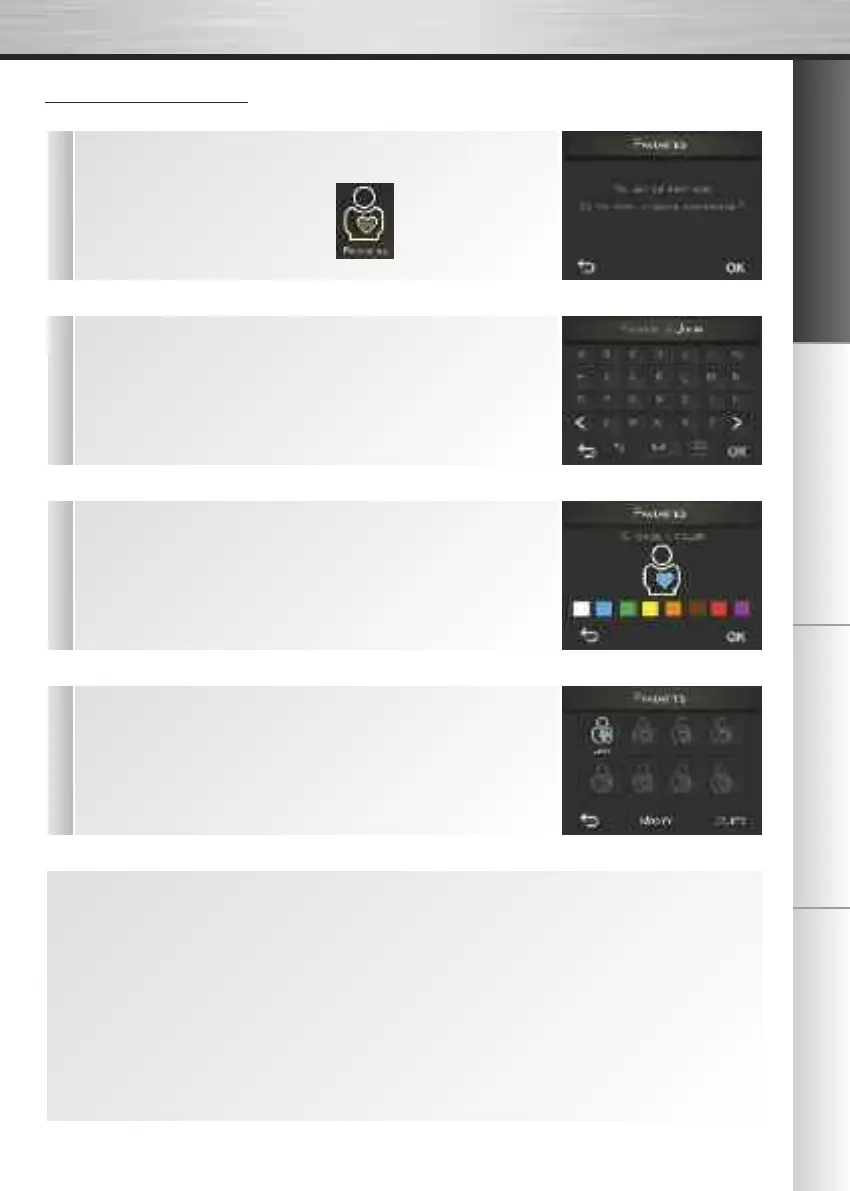
n The first time you go to the “Favorites” menu, your machine will
prompt you to create a new profile. Press the OK button.
n During subsequent uses, press the icon to create a new
profile.
2
n Then enter the name of your profile using the alphabetic keypad
displayed on the screen and confirm by pressing OK.
3
n You must then select a color for your profile. Choose it and confirm by
pressing OK.
4
n Your profile will then appear in the Favorites menu. You can associate
up to 8 recipes with it. When you press the profile button, you will access
the list of recipes associated.
At any time, you can:
n Create a new profile by pressing the + button
- You must then repeat the same operations, i.e. enter the name and choose the color.
n Modify the profile characteristics by pressing the (Change) button.
- Choose the profile you want to modify
- Modify the name entered
- Modify the color
- Confirm by pressing OK.
n Delete one or more profile(s) by pressing the (Delete) button.
- Choose the profile(s) you want to delete
- Confirm by pressing the OK button.


 To Next Page