smartphone via Da Fit app and enabled all accesses.
You can access this function from the main menu. To do so,
tap on the blue/purple Voice Assistant icon.
3.6 Music control
The smartwatch features a
music control tool. Access
the smartwatch main
menu and tap on the
musical note icon. This
function works with music
apps, such as Spotify or
Apple Music. Once inside,
tap on the play/pause icon
to start playing music or to
pause it. You will also be
able to play the
previous or the next song.
This function will also let
you turn the volume up or
down.
When your phone is paired
with your smartwatch, all
the audio files will play on
the smartwatch. This
includes YouTube videos,
WhatsApp voice notes,
WhatsApp videos, etc.
To stop this from
happening, access your
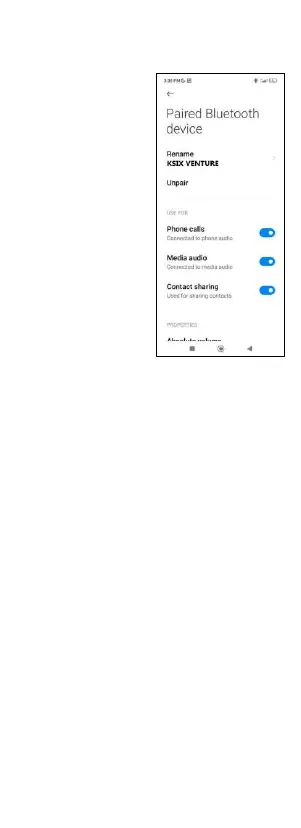
smartphone settings, and enter the Venture device option.
Unselect the media audio setting so that all the music, videos,
voice notes and other files that contain audio play on the
phone and not on the smartwatch.
You will also be able to access the music control feature from
the quick access menu.
3.7 Remote camera control
The Venture smartwatch allows you to take pictures from
your smartphone remotely. Access the smartwatch main
menu and tap on the camera icon. If your smartphone is
unlocked and correctly paired to the smartwatch, your
smartphone will automatically display a camera. To take
remote pictures, simply place your smartphone wherever
you want and tap on the camera icon inside the remote
camera function of your smartwatch.
3.8 Anti-lost function
The Venture smartwatch features an anti-lost function.
Access the smartwatch’s main menu and tap on the icon
sowing a green radar. Once inside, tap on the icon again to
make your paired phone emit a beep so that you can find it.
3.9 Games
The Venture includes 4 video games: Young Bird, Hamster,
Battleship and 2048.
3.10 Compass
The Venture has a built-in compass. To access it, press the
"Compass" icon. It will ask you to calibrate it by rotating the
watch in a figure of 8.
3.11 Altimeter
You can access the Venture altimeter from the main menu.
If your smartwatch is properly connected, you can find out
the altitude of your current location.


 To Next Page
 Loading...