61
62
The normal operation status of the stick logger, when router connected to the network
normally:
1. Successful connection status with serve: NET light keeps on after the logger powered on.
2. Logger running normally: READY light flashes.
3. Successful connection status with inverter : COM light keeps on.
6.4 Abnormal State Processing
If the data on platform is abnormal when the stick logger is running, please check the table
below and according to the status of indicator lights to complete a simple troubleshooting. If it
still can not be resol-ved or indicator lights status do not show in the table below, please
contact our Customer Service..(Note: Please using the following table query after power-on for
2mins at least.)
NET COM READY
Fault Cause Fault Description
Solution
OFF
Slow
flash
Slow
flash
ON
ON
1.Stick logger does
not have a network.
2.Antenna abnormal
3.Router WiFi signal
strength weak.
Connection between
logger and router
abnormal
Communicate with
inverter abnormally
NET
COM
READY
OFF
Any
state
Slow
flash
Slow
flash
Power supply
abnormal
Fast
flash
Restore
factory settings
Normal
OFF OFF OFF
Any
state
Any
state
Fast
flash
SMARTLINK
networking status
Normal
Any
state
Any
state
1. Connection betw-
een stick logger and
inverter loosen.
Inverter does not
match with stick log-
ger's communication
rate.
1.Check the connection between stick
logger and inverter. Remove the stick
logger and install again.
2.Check inverter's communication rate
to see if it matches with stick logger's.
3.Long press Reset button for 5s,
reboot stick logger.
1. Check if the wireless network
configured.
2. Check the antenna, if there is any
damage or loose.
3. Enhance router WiFi signal strength.
Long press Resetbutton for 10s,
reboot stick logger and networking
again.
1. Check if the router has access to
the network.
2. Check the router's setting, if the
connection is limited.
1. Router networking
abnormal.
2. The server point
of logger is modified.
3.Network limitation,
server cannot be
connected.
Connection betwe-
en logger and router
normal, connection
between logger and
remote server
abnormal.
1.Connection betwe- en logger and
router normal, connection between
logger and remote server abnormal.
1. Connection betw-
een stick logger and
inverter loosen or
abnormal.
2. Inverter power in-
sufficient.
3. Stick Logger abn-
ormal.
1.Exit automatically after 5mins.
2.Long press Reset button for 5s,
reboot stick logger.
3.Long press Reset button for 10s,
restore factory settings.
1.Exit automatically after 1mins.
2.Long press Reset button for 5s,
reboot stick logger.
3.Long press Reset button for 10s,
restore factory settings.
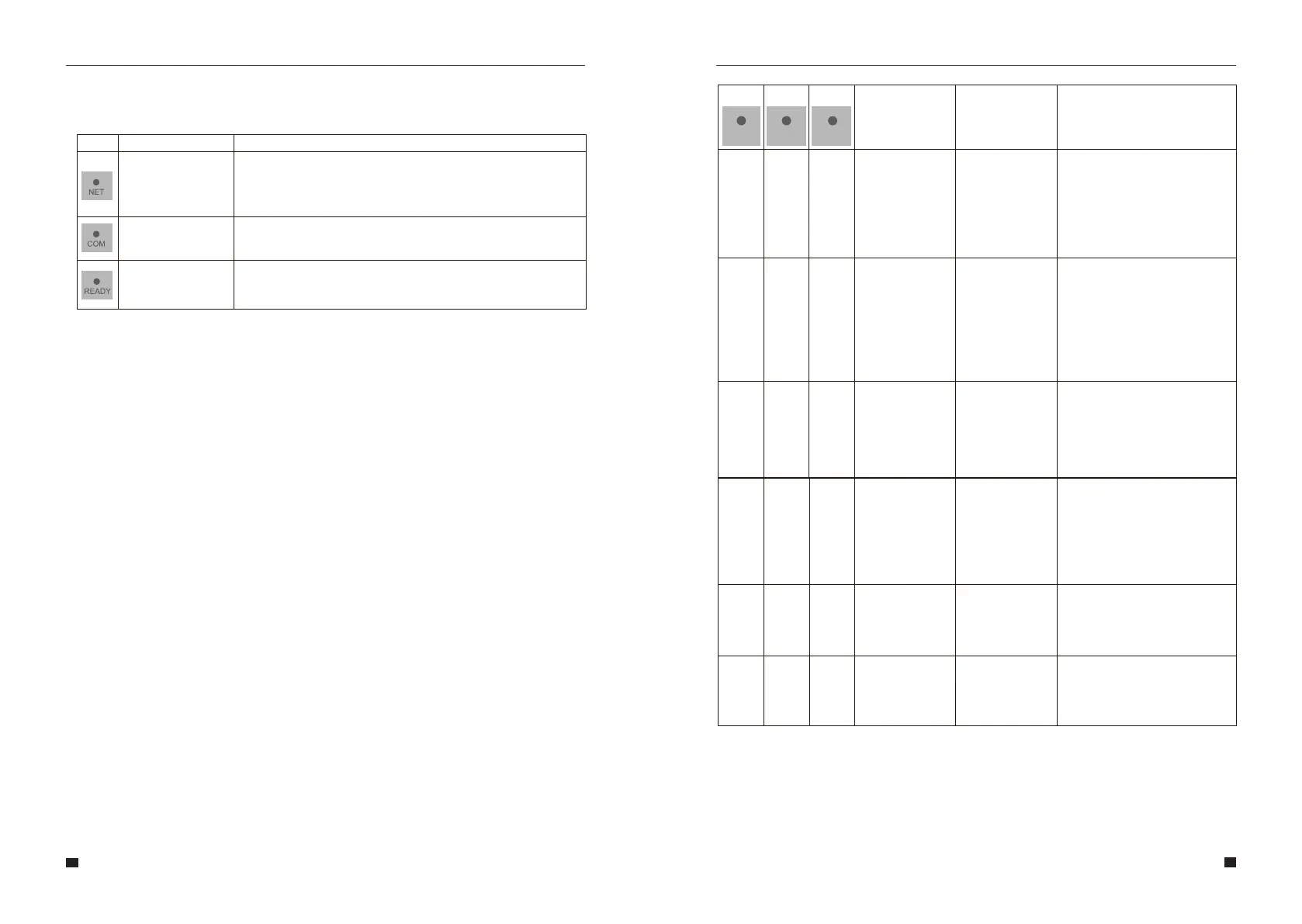
6.3 Logger Status
6.3.1 Check Indicator light
Lights
Implication
Status Description(All lights are single green lights.)
Communicate
with router
1. Light off: Fail to connect to the router.
2. On 1s/Off 1s(Slow flash): Successful connection to the router.
3. Light keeps on: Successful connection to the server.
4. On 100ms/Off 100ms(Fast flash): Distributing network fast.
Communicate
with inverter
1. Light keeps on: Logger connected to the inverter.
2. Light off: Fail to connect to the inverter.
3. On 1s/Off 1s(Slow flash): Communicating with inverter.
Logger running
status
1. Light off: Running abnormally.
2. On 1s/Off 1s (Slow flash): Running normally.
3. On 100ms/Off 100ms(Fast flash): Restore factory settings.
User Manual User Manual



 To Next Page