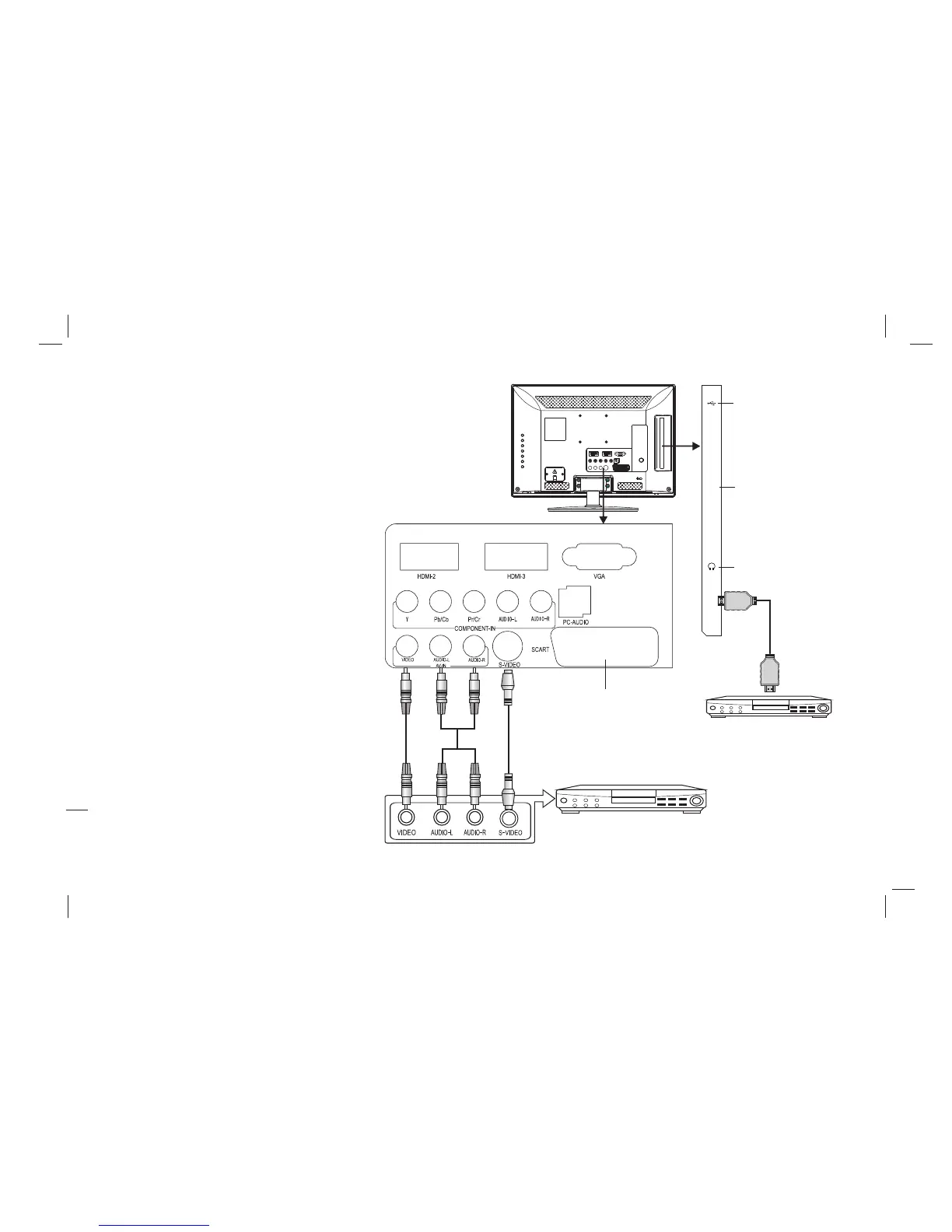
Through composite cable, connect AV equipment VIDEO output
termination to this machine VIDEO input, and AV equipment
AUDIO output termination to this machine AUDIO input,
respectively; Press "SOURCE" key to select "AV" signal source.
gna
Connect your equipment with SCART
interface to the SCART interface of the
machine.
AV Video Signal Connection
S-VIDEO Input Connection
Through S-VIDEO/AUDIO cables to connect
external AUDIO/VIDEO equipment to the
machine's AUDIO/VIDEO input port, and
press "SOURCE" key to select "SVIDEO"
si l source
SCART Connection
Earphone Socket: The TV speakers will be
shut off when earphone is inserted into this
socket.
12
CVBS, DVD Player or other
machine with CVBS/S-Video.
SCART
USB interface
HDMI-1
CI CARD
Earphone Socket
Audio/Video machine
with HDMI interfaces
CI CARD
19L11A / 22L11A / 23L11 共用 中性 英 文说 明书(欧 洲模 数)(MSD 306方案 )


 To Next Page