a.Under shutdown state, you can only turn on the display by short pressing rather than other keys;
b.Under standby state without signal:Use key to switch to an input signal source, long press
for 3 seconds rather than other keys to turn off the display; open the navigation menu underno-signal
state, the menu will fix at the key position on the right side (the position will not move randomly);
c.Under power-on state:Short press any key at the first time to open the
navigation menu; press the same key again to open the sub-menu corresponding to this key;
long press for 3 seconds to turn off the display;
d.The navigation menu can only be opened by pressing the key on the display rather than using the
remote control.
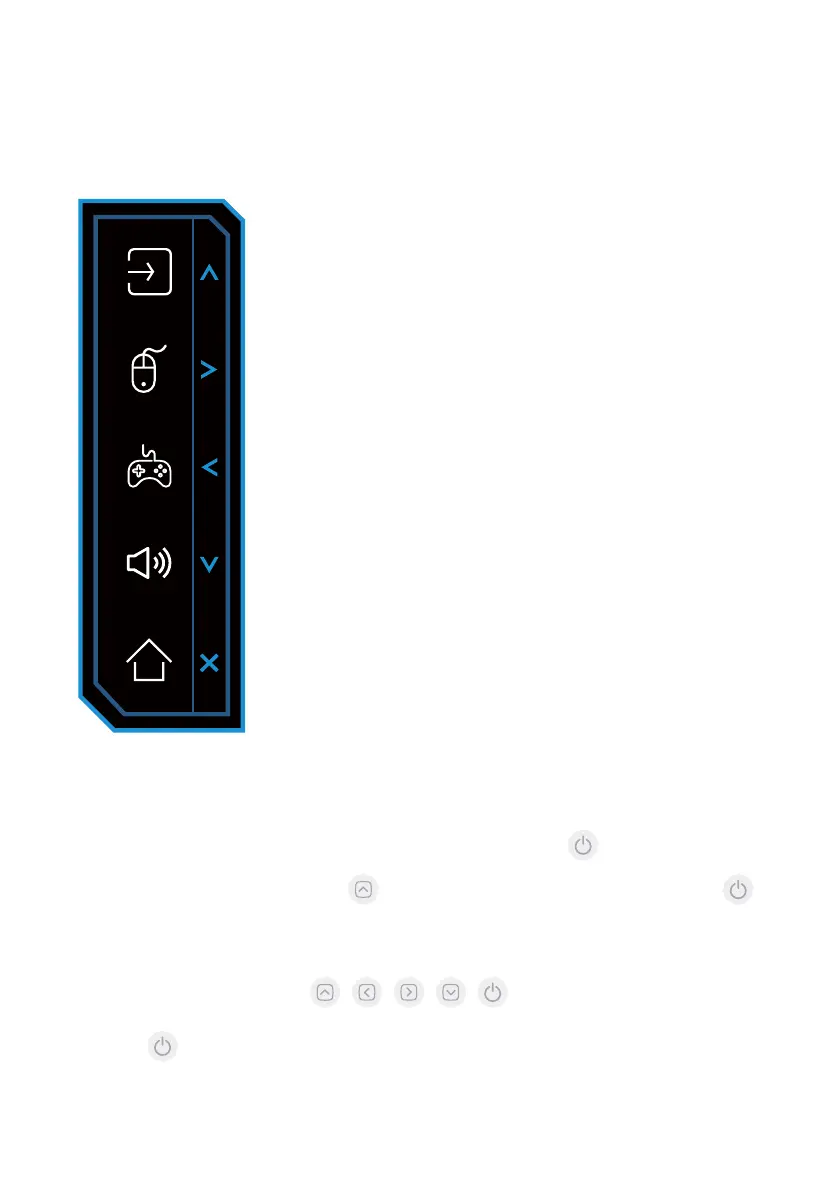
Functional logic of navigation menu:
Remote menu/Functional keys
Signal Source Selection
KVM
Game
Sound
Home
button
The button will become the function key of “Up Arrow”
upon you open the main menu.
The button will become the function key of “Right Arrow”
upon you open the main menu.
The button will become the function key of “Left Arrow”
upon you open the main menu.
The button will become function key of “Down Arrow”
upon you open the main menu.
Use shortcut key to open the main menu, then exit the
menu with a short press.



 To Next Page