— 14 —
SPECIFICATIONS
TROUBLESHOOTING
If you have any trouble with your system, try these simple steps which should handle most
common issues.
SYMPTOM: Cannot set time.
SOLUTION(s): Make sure press and hold BOTH the ALARM SET/OFF and SNOOZE DIMMER
buttons for 6 seconds. See Setting the Time section.
SYMPTOM: The Alarm worked fine this morning but did not activate the next day.
SOLUTION(s): The alarm of Clock is a one-day alarm. This means a user will always have to
turn on the alarm again after it has been activated
SYMPTOM: The Clock display does not show the time but instead displays “ERR”.
SOLUTION(s): The AC Outlet on the top of the unit has been over-loaded. Press the AC
Outlet Reset button on the rear of the unit to reset the outlet.
AC Input ........................................................................................................... 100 - 240 VAC
AC Output ............................................................................................100 - 240VAC; max 5A
USB-A Output 1 ....................................................................................................... 5V ~ 2.1A
USB-A Output 2 .......................................................................................................... 5V ~ 1A
microUSB Cable Output ........................................................................................... 5V ~ 1.5A
Lightning Cable Output ............................................................................................. 5V ~ 2.1A
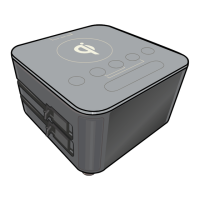
Wireless Charge Pad Output .............................................................................................. 5W
Specications


 To Next Page